A planet full of gadgets from China · a database of the best coupons
Product comparisons

TOP 6 cheap gadgets from China #240

9. August 2025 4 min read 0 comments

With the next weekend, we have another installment of TOP 6 cheap gadgets from China, which you loved so much, and it’s also the already two hundred forty sixth continuation! We picked another set of six interesting items from international sellers at great prices.

To make sure you never miss the latest episode of TOP 6 cheap gadgets from China, give us a like on Facebook, join our FB groups or follow Telegram. Here we always keep you updated about our articles.

We also add cheap gadgets to our FB

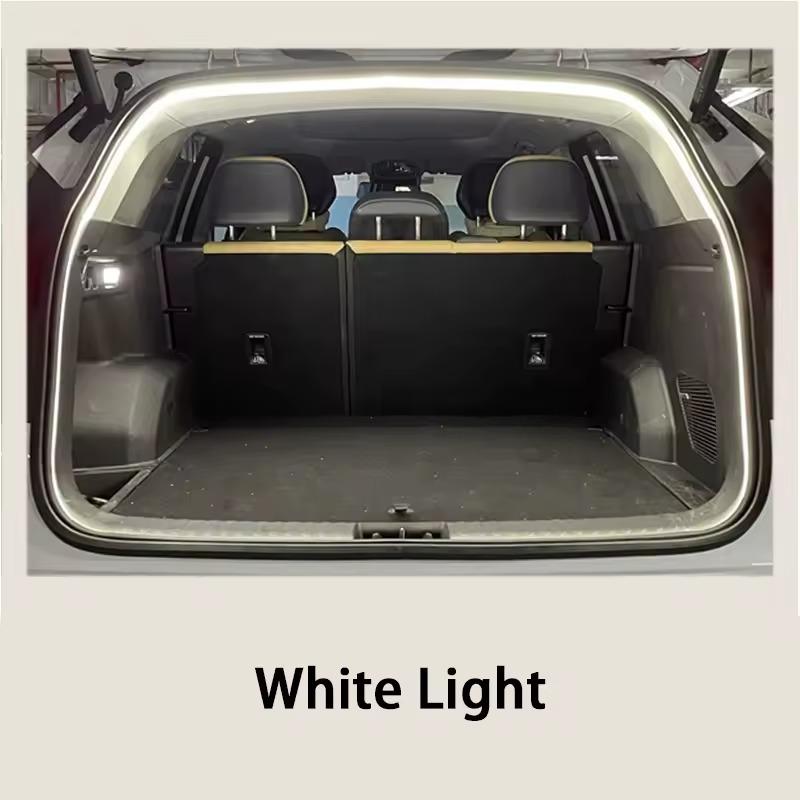
LED light for the trunk

A practical LED strip for the luggage area offers high brightness for perfect interior lighting, with automatic activation when you open the trunk thanks to a wireless sensor system.

This elegant ambient light will enhance the look of your car and fits various vehicle models. While it isn’t an original Xiaomi product, it impresses with an excellent price and easy installation.

ChinaPlanet deal

LED light for the trunk

Free duty delivery
LED svetlo do kufra
15-day delivery
13,10 €You save 2,55 €
10,55 €
Are you shopping on AliExpress for the first time? See the guide!
Updated 8. 8. 2025 at 10:44
TIP15-day delivery via Aliexpress Standard Shipping

For this product, Aliexpress Standard Shipping is available with guaranteed delivery within 15 days. It’s the most reliable delivery method and, in most cases, it’s handled by a courier company. The 15-day delivery is something we actually tested.

When you order from a Chinese warehouse, AliExpress adds a customs duty charge of approximately 3,70 € per order to your cart. When you receive the shipment, you won’t have to pay anything extra.

Track this product’s price

As soon as we post a new coupon, we’ll send you an email. You can unsubscribe from tracking anytime.

Are you shopping on AliExpress for the first time?

The process is via the AliExpress mobile app, where most people shop. There are two key things: don’t use Buy now and enter the coupon only in the order summary, in the field Promo code. After you click Pay now, you won’t be able to add it.

  1. Copy the code and click Use discountIn our article, copy the coupon and click the button GET DISCOUNT. The link will take you directly to the product in the AliExpress app.
  2. Use Add to cart instead of Buy nowOn the product card, scroll down and tap Add to cart. Don’t use the Buy now button—you’ll skip the cart, and later you won’t have anywhere to enter the coupon. Before that, double-check the variant: the color, the version, and whether it ships from an EU warehouse.
  3. Through the cart, go to CheckoutA pop-up will appear: Added to cart! — tap Check it out in it. If it disappeared, open the cart with the icon at the bottom right. In the cart, check the product and quantity, then click the red Checkout. Only the items marked with the red ring will be applied.
  4. Enter your address and card, then look for Promo codeIn the order summary, first fill in the delivery address and payment card at the top. Below them there’s a line Promo code — expand it with the arrow on the right.
    Riadok Promo code v zhrnutí objednávky v aplikácii AliExpress
    Look for this line under the address and payment method.
  5. Paste the code and confirm ApplyIn the field Promo code paste the copied code and click the black Apply. The code is case-sensitive and must not contain spaces.
    Políčko Promo code s kódom a tlačidlom Apply v aplikácii AliExpress
    Paste the code into the field and confirm with the Apply button.
  6. Check the savings and payIn the Summary expand the line Saved — you’ll see the applied coupon there as AliExpress coupons/codes. Only when Total is really lower, click Pay now.
    Riadok Saved s uplatneným kupónom a znížený Total v aplikácii AliExpress
    The applied coupon will appear in the Saved line and will reduce the Total.
Apply the discount already at the order summary. After you click Pay now, you can no longer add a coupon. If Apply shows an error, the code has either expired, doesn’t apply to your items, or the order doesn’t meet the minimum amount.
The Store Coupon also goes in the same field. — a coupon from the seller itself, which isn’t always available and changes from day to day. AliExpress coupons can’t be combined, so try both and go with the one that gives you more. Coins are added automatically.

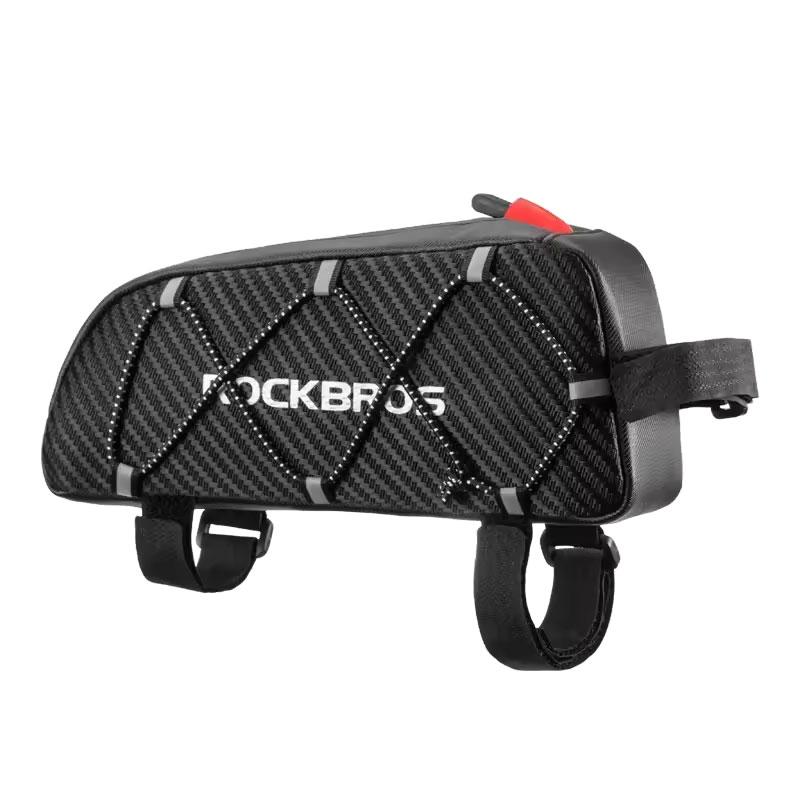
Rockbros bicycle bag

The ROCKBROS cycling pouch, lightweight and compact, with an approximate volume of 1 liters, offers enough space for your phone, keys, tools, or energy bars.

It’s made from durable and water-resistant polyester, and with three adjustable hook-and-loop fasteners it attaches to your bike frame quickly and easily. Reflective elements improve safety when riding in reduced visibility.

ChinaPlanet deal

Rockbros bicycle bag

Free duty delivery
Rockbros taška na bicykel
15-day delivery
11,24 €You save 0,89 €
10,35 €
Are you shopping on AliExpress for the first time? See the guide!
Updated 8. 8. 2025 at 11:03
TIP15-day delivery via Aliexpress Standard Shipping

For this product, Aliexpress Standard Shipping is available with guaranteed delivery within 15 days. It’s the most reliable delivery method and, in most cases, it’s handled by a courier company. The 15-day delivery is something we actually tested.

When you order from a Chinese warehouse, AliExpress adds a customs duty charge of approximately 3,70 € per order to your cart. When you receive the shipment, you won’t have to pay anything extra.

Track this product’s price

As soon as we post a new coupon, we’ll send you an email. You can unsubscribe from tracking anytime.

Are you shopping on AliExpress for the first time?

The process is via the AliExpress mobile app, where most people shop. There are two key things: don’t use Buy now and enter the coupon only in the order summary, in the field Promo code. After you click Pay now, you won’t be able to add it.

  1. Copy the code and click Use discountIn our article, copy the coupon and click the button GET DISCOUNT. The link will take you directly to the product in the AliExpress app.
  2. Use Add to cart instead of Buy nowOn the product card, scroll down and tap Add to cart. Don’t use the Buy now button—you’ll skip the cart, and later you won’t have anywhere to enter the coupon. Before that, double-check the variant: the color, the version, and whether it ships from an EU warehouse.
  3. Through the cart, go to CheckoutA pop-up will appear: Added to cart! — tap Check it out in it. If it disappeared, open the cart with the icon at the bottom right. In the cart, check the product and quantity, then click the red Checkout. Only the items marked with the red ring will be applied.
  4. Enter your address and card, then look for Promo codeIn the order summary, first fill in the delivery address and payment card at the top. Below them there’s a line Promo code — expand it with the arrow on the right.
    Riadok Promo code v zhrnutí objednávky v aplikácii AliExpress
    Look for this line under the address and payment method.
  5. Paste the code and confirm ApplyIn the field Promo code paste the copied code and click the black Apply. The code is case-sensitive and must not contain spaces.
    Políčko Promo code s kódom a tlačidlom Apply v aplikácii AliExpress
    Paste the code into the field and confirm with the Apply button.
  6. Check the savings and payIn the Summary expand the line Saved — you’ll see the applied coupon there as AliExpress coupons/codes. Only when Total is really lower, click Pay now.
    Riadok Saved s uplatneným kupónom a znížený Total v aplikácii AliExpress
    The applied coupon will appear in the Saved line and will reduce the Total.
Apply the discount already at the order summary. After you click Pay now, you can no longer add a coupon. If Apply shows an error, the code has either expired, doesn’t apply to your items, or the order doesn’t meet the minimum amount.
The Store Coupon also goes in the same field. — a coupon from the seller itself, which isn’t always available and changes from day to day. AliExpress coupons can’t be combined, so try both and go with the one that gives you more. Coins are added automatically.

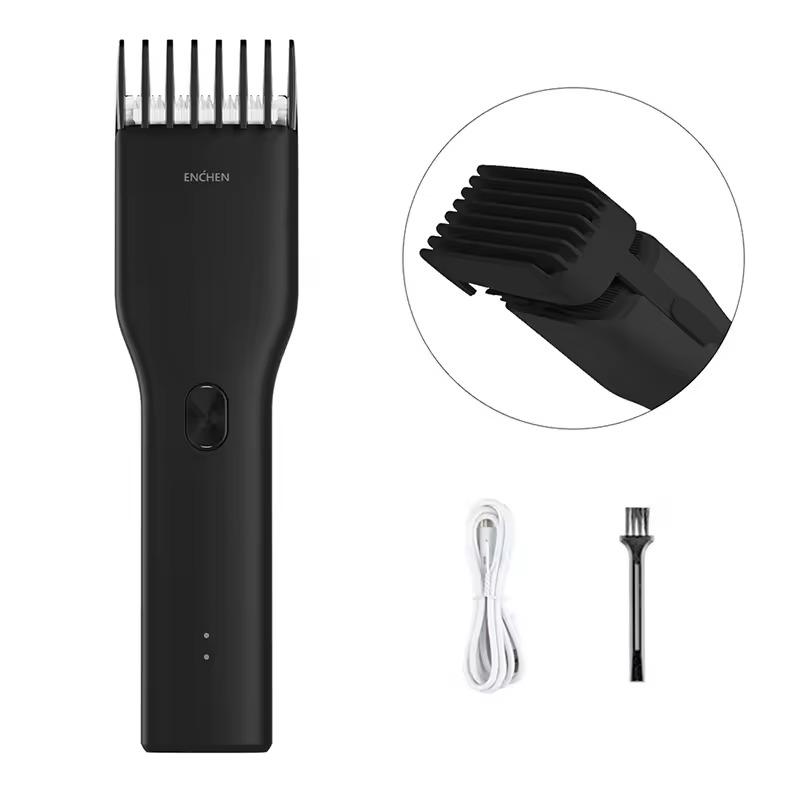
Enchen trimmer

The ENCHEN Boost cordless trimmer offers an adjustable cutting length of 0,7 – 21 mm with a single button, and a quiet nano-ceramic head with a long service life.

It features a dual-speed motor, an intelligent system that helps prevent hair from getting stuck, and fast USB-C charging in 90 minutes. The lightweight design and rounded edges ensure comfortable and safe use.

ChinaPlanet deal

Enchen trimmer

Free duty delivery
Enchen zastrihávač
15-day delivery
12,55 €You save 0,89 €
11,66 €
Are you shopping on AliExpress for the first time? See the guide!
Updated 8. 8. 2025 at 10:46
TIP15-day delivery via Aliexpress Standard Shipping

For this product, Aliexpress Standard Shipping is available with guaranteed delivery within 15 days. It’s the most reliable delivery method and, in most cases, it’s handled by a courier company. The 15-day delivery is something we actually tested.

When you order from a Chinese warehouse, AliExpress adds a customs duty charge of approximately 3,70 € per order to your cart. When you receive the shipment, you won’t have to pay anything extra.

Track this product’s price

As soon as we post a new coupon, we’ll send you an email. You can unsubscribe from tracking anytime.

Are you shopping on AliExpress for the first time?

The process is via the AliExpress mobile app, where most people shop. There are two key things: don’t use Buy now and enter the coupon only in the order summary, in the field Promo code. After you click Pay now, you won’t be able to add it.

  1. Copy the code and click Use discountIn our article, copy the coupon and click the button GET DISCOUNT. The link will take you directly to the product in the AliExpress app.
  2. Use Add to cart instead of Buy nowOn the product card, scroll down and tap Add to cart. Don’t use the Buy now button—you’ll skip the cart, and later you won’t have anywhere to enter the coupon. Before that, double-check the variant: the color, the version, and whether it ships from an EU warehouse.
  3. Through the cart, go to CheckoutA pop-up will appear: Added to cart! — tap Check it out in it. If it disappeared, open the cart with the icon at the bottom right. In the cart, check the product and quantity, then click the red Checkout. Only the items marked with the red ring will be applied.
  4. Enter your address and card, then look for Promo codeIn the order summary, first fill in the delivery address and payment card at the top. Below them there’s a line Promo code — expand it with the arrow on the right.
    Riadok Promo code v zhrnutí objednávky v aplikácii AliExpress
    Look for this line under the address and payment method.
  5. Paste the code and confirm ApplyIn the field Promo code paste the copied code and click the black Apply. The code is case-sensitive and must not contain spaces.
    Políčko Promo code s kódom a tlačidlom Apply v aplikácii AliExpress
    Paste the code into the field and confirm with the Apply button.
  6. Check the savings and payIn the Summary expand the line Saved — you’ll see the applied coupon there as AliExpress coupons/codes. Only when Total is really lower, click Pay now.
    Riadok Saved s uplatneným kupónom a znížený Total v aplikácii AliExpress
    The applied coupon will appear in the Saved line and will reduce the Total.
Apply the discount already at the order summary. After you click Pay now, you can no longer add a coupon. If Apply shows an error, the code has either expired, doesn’t apply to your items, or the order doesn’t meet the minimum amount.
The Store Coupon also goes in the same field. — a coupon from the seller itself, which isn’t always available and changes from day to day. AliExpress coupons can’t be combined, so try both and go with the one that gives you more. Coins are added automatically.

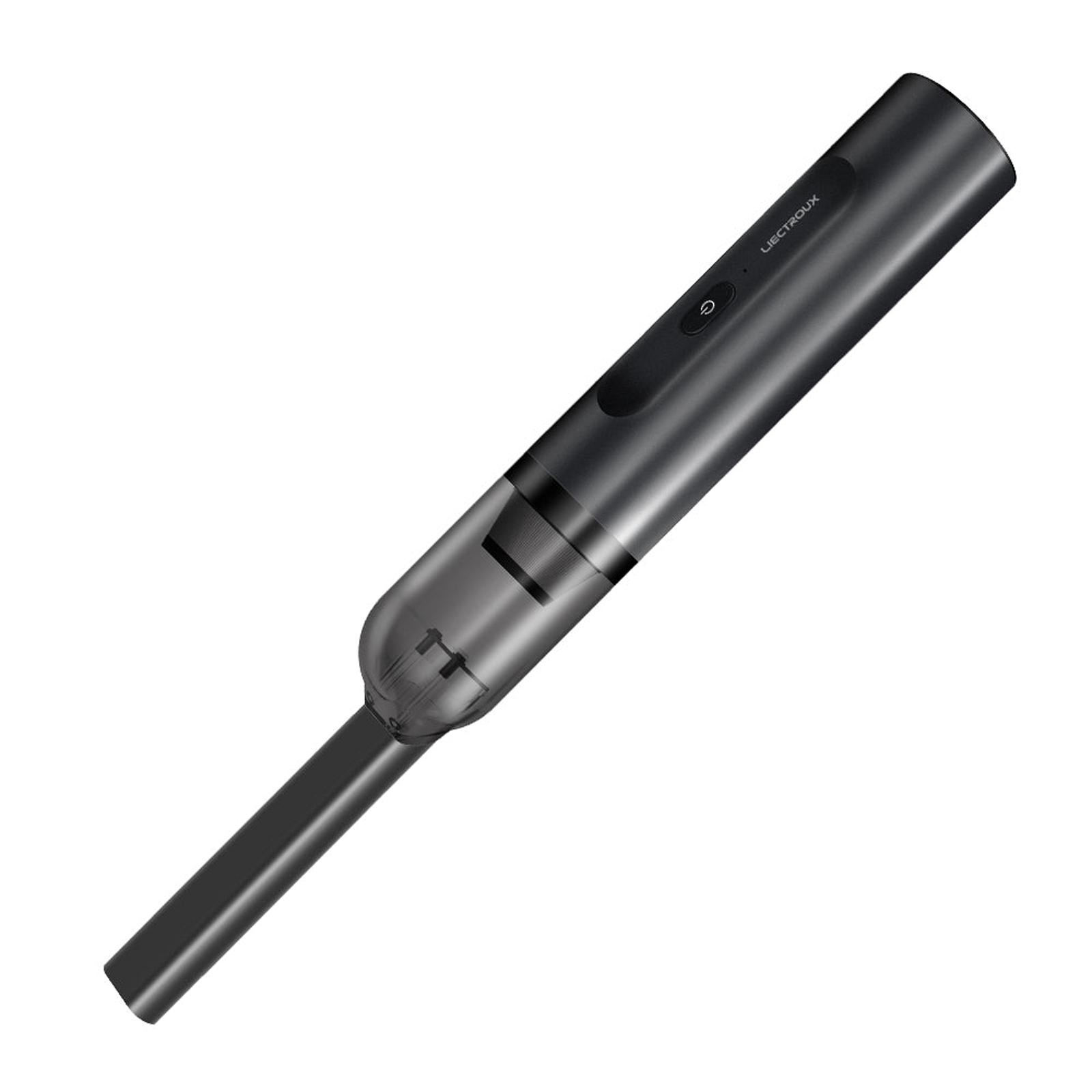
Liectroux i5

Liectroux i5 is a compact handheld vacuum with suction up to 12 000 Pa, that can handle both vacuuming and blowing—so it takes care of dust, crumbs, and even cleaning your keyboard or electronics.

It has a multi-stage HEPA filter, a 2500 mAh battery with up to 35 minutes of runtime, and a low weight of just 800 g for comfortable use. In the box, you’ll also find a crevice nozzle, a brush, and a nozzle attachment—so it’s ready for different types of cleaning at home and in your car.

Learn more in our article.

Important: Orders from Geekbuying come with our VIP support, which you get after downloading our extension for the Chrome browser on desktop only (for this store, never shop through the app). Right after payment, send us your order number so we can check that VIP support is valid!
ChinaPlanet deal

Liectroux i5

EU warehouse
Liectroux i5
EU warehouse
29,99 €
No coupon

Price history

2,00 €cheaper than the average price
Cheapest 29,99 €Most expensive 36,00 €
Is it your first time shopping on Geekbuying? See the guide!
Updated 22. 10. 2026 at 12:04
TIPExpress delivery from a European warehouse without customs duty and VAT.

This product will be delivered to you express from a local warehouse in Europe. Delivery from EU warehouses usually takes 2–10 days and is handled by a courier. When delivered, you don’t pay any extra fees—no customs duty or VAT.

Track this product’s price

As soon as we post a new coupon, we’ll send you an email. You can unsubscribe from tracking anytime.

Is it your first time shopping on Geekbuying?

Ad

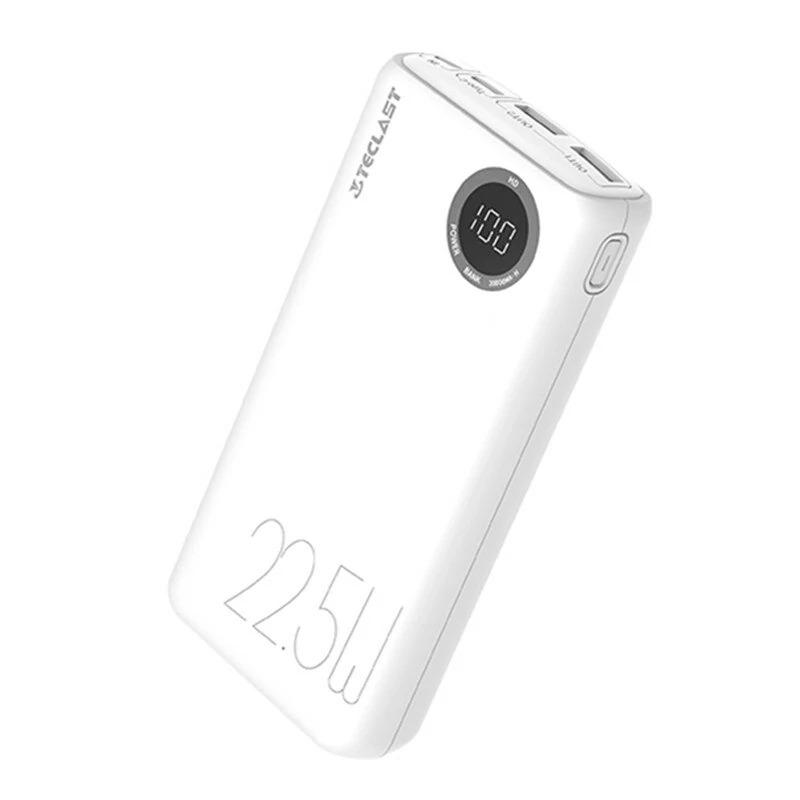
TECLAST T200H Pro

TECLAST T200H Pro is an elegant 20 000 mAh power bank with a round digital display. It offers fast charging up to 22,5 W and supports PD and QC3.0 protocols.

It has USB-C and 2× USB-A ports, so it can charge multiple devices at once, including smartphones or smaller laptops. Compact dimensions, weight 405 g, and availability from a European warehouse make this model a practical daily companion.

Learn more in our article.

Important: Orders from Banggood come with our VIP support, which you get after downloading our extension for the Chrome browser on desktop only.
ChinaPlanet deal

TECLAST T200H Pro

EU warehouse
TECLAST T200H Pro
CZ warehouse
22,09 €You save 4,11 €
17,98 €
CouponBGTSL2WEU

Price history

0,85 €cheaper than the average price
Cheapest 17,97 €Most expensive 20,28 €
Buying on Banggood for the first time? See the guide!
Updated 5. 9. 2025 at 08:22
TIPExpress delivery from the Czech warehouse with no customs duties and VAT.

This product will be delivered to you express from the local Czech warehouse. Delivery from Czechia usually takes 7-10 days and is handled by courier. On delivery, you don’t pay any additional fees—no customs duty and no VAT.

Track this product’s price

As soon as we post a new coupon, we’ll send you an email. You can unsubscribe from tracking anytime.

Buying on Banggood for the first time?

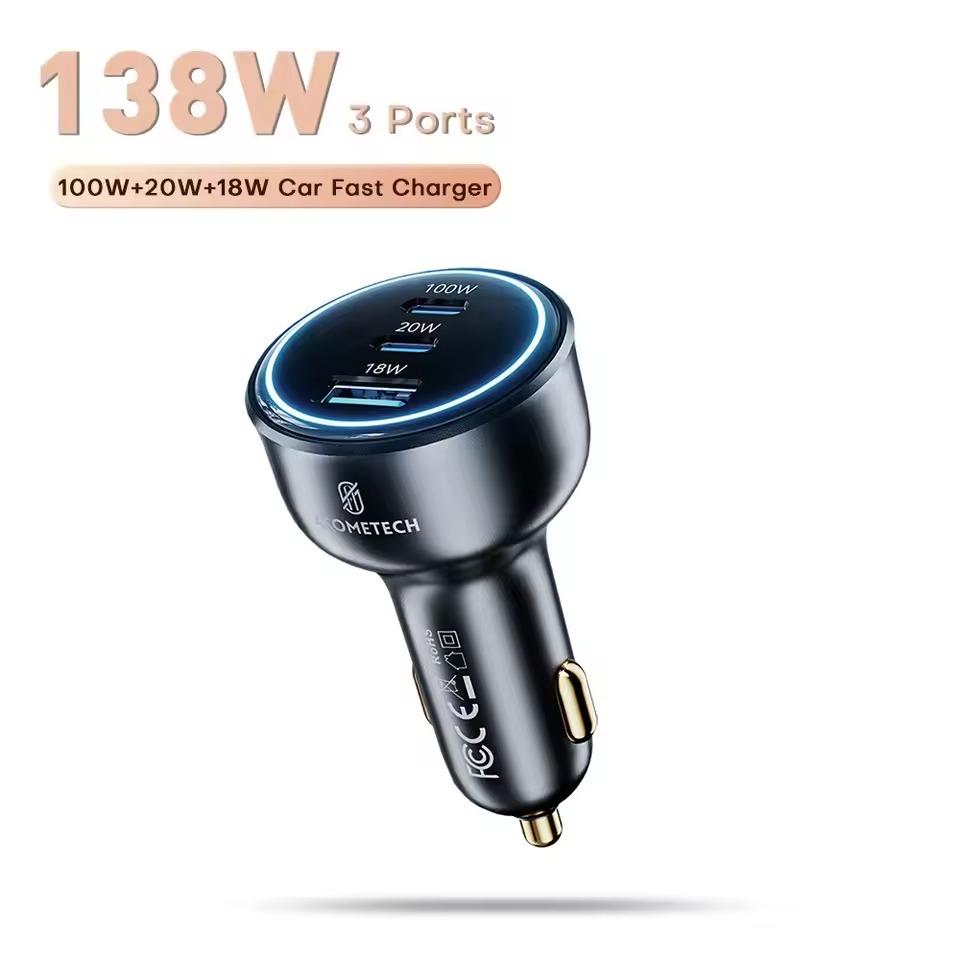
ASOMETECH 138 W car charger

ASOMETECH is a powerful GaN car charger with total power up to 138 W, offering three fast-charging ports—USB-C1 (100 W) for laptops, tablets, and smartphones, USB-C2 (20 W) and USB-A (18 W).

It supports a wide range of protocols, including PD3.0, PPS, QC4+/QC3.0, as well as fast charging for Samsung and Apple devices. You can charge multiple devices at once at the maximum speed, making it an ideal travel companion.

ChinaPlanet deal

ASOMETECH 138 W car charger

Free duty delivery
ASOMETECH 138 W nabíjačka do auta
15-day delivery
13,40 €You save 1,77 €
11,63 €
Are you shopping on AliExpress for the first time? See the guide!
Updated 8. 8. 2025 at 10:50
TIP15-day delivery via Aliexpress Standard Shipping

For this product, Aliexpress Standard Shipping is available with guaranteed delivery within 15 days. It’s the most reliable delivery method and, in most cases, it’s handled by a courier company. The 15-day delivery is something we actually tested.

When you order from a Chinese warehouse, AliExpress adds a customs duty charge of approximately 3,70 € per order to your cart. When you receive the shipment, you won’t have to pay anything extra.

Track this product’s price

As soon as we post a new coupon, we’ll send you an email. You can unsubscribe from tracking anytime.

Are you shopping on AliExpress for the first time?

The process is via the AliExpress mobile app, where most people shop. There are two key things: don’t use Buy now and enter the coupon only in the order summary, in the field Promo code. After you click Pay now, you won’t be able to add it.

  1. Copy the code and click Use discountIn our article, copy the coupon and click the button GET DISCOUNT. The link will take you directly to the product in the AliExpress app.
  2. Use Add to cart instead of Buy nowOn the product card, scroll down and tap Add to cart. Don’t use the Buy now button—you’ll skip the cart, and later you won’t have anywhere to enter the coupon. Before that, double-check the variant: the color, the version, and whether it ships from an EU warehouse.
  3. Through the cart, go to CheckoutA pop-up will appear: Added to cart! — tap Check it out in it. If it disappeared, open the cart with the icon at the bottom right. In the cart, check the product and quantity, then click the red Checkout. Only the items marked with the red ring will be applied.
  4. Enter your address and card, then look for Promo codeIn the order summary, first fill in the delivery address and payment card at the top. Below them there’s a line Promo code — expand it with the arrow on the right.
    Riadok Promo code v zhrnutí objednávky v aplikácii AliExpress
    Look for this line under the address and payment method.
  5. Paste the code and confirm ApplyIn the field Promo code paste the copied code and click the black Apply. The code is case-sensitive and must not contain spaces.
    Políčko Promo code s kódom a tlačidlom Apply v aplikácii AliExpress
    Paste the code into the field and confirm with the Apply button.
  6. Check the savings and payIn the Summary expand the line Saved — you’ll see the applied coupon there as AliExpress coupons/codes. Only when Total is really lower, click Pay now.
    Riadok Saved s uplatneným kupónom a znížený Total v aplikácii AliExpress
    The applied coupon will appear in the Saved line and will reduce the Total.
Apply the discount already at the order summary. After you click Pay now, you can no longer add a coupon. If Apply shows an error, the code has either expired, doesn’t apply to your items, or the order doesn’t meet the minimum amount.
The Store Coupon also goes in the same field. — a coupon from the seller itself, which isn’t always available and changes from day to day. AliExpress coupons can’t be combined, so try both and go with the one that gives you more. Coins are added automatically.

Follow the China Planet website, sign up for our monthly newsletter, and make sure you also follow our Facebook page, the group All from EU warehouses, and join our Telegram—where we add the best deals and coupons from China day after day.

Add us as your preferred source on Google

Don’t miss the best coupons 📩

Subscribe and we’ll email you new coupons before they expire. We only send it once a month — no spam.

Ad Engerio