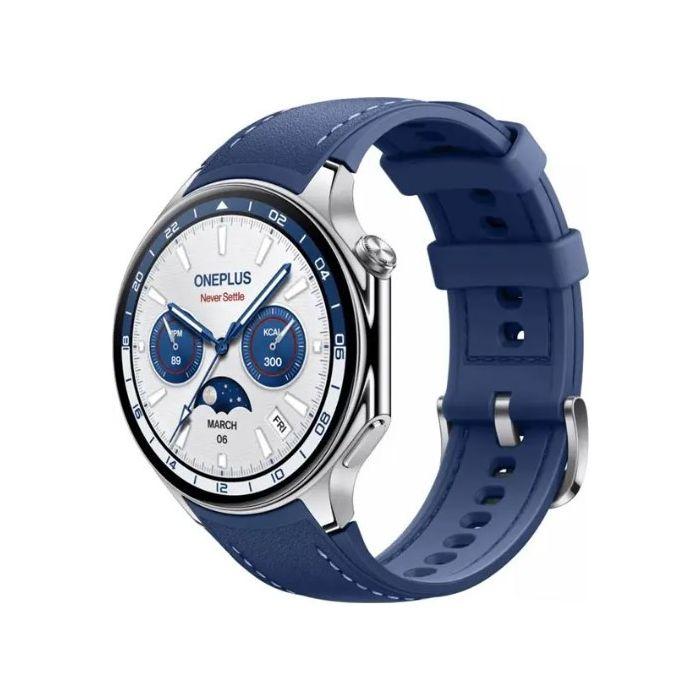
The popular Chinese brand OnePlus still has its second-generation smartwatches on sale as well: OnePlus Watch 2 , plus also OnePlus Watch 2R, which are almost identical to the Watch 2, but cheaper. And you can get them for significantly less than buying from the manufacturer’s official website.
Only Watch 2 left, but with a super price
You can buy the OnePlus Watch 2 smart watch on the AliExpress marketplace directly from the EUwarehouse, with delivery taking only 5-10 business days.
Are you shopping on AliExpress for the first time?See the guide!
Updated 24. 10. 2026 at 12:17
TIPExpress delivery from a German warehouse without customs duty and VAT.
This product will be delivered express from the local German warehouse. Shipping from Germany usually takes 7-10 days, and the delivery is handled by a courier. When it arrives, you won’t pay any additional fees—no customs duty or VAT.
Are you shopping on AliExpress for the first time?See the guide!
Updated 24. 10. 2026 at 12:17
TIPExpress delivery from the Polish warehouse with no customs duty and VAT.
This product will be delivered to you express from a local Polish warehouse. Shipping from Poland usually takes 7-10 days and is handled by a courier. When it arrives, you don’t pay any extra fees—no customs duty or VAT.
Comparison: OnePlus Watch 2R vs OnePlus Watch 2
-
OnePlus Watch 2R
OnePlus Watch 2
Case size
46mm
47mm
Case material
Aluminum
Stainless steel
Display
1.43" 60Hz AMOLED
1.43" 60Hz AMOLED
Display resolution
466 x 466
466 x 466
Processor
Snapdragon W5 / BES2700
Snapdragon W5 / BES2700
RAM
2GB
2GB
Storage
32GB
32GB
Battery
500mAh
500mAh
Mobile connectivity
No
No
Wi-Fi connectivity
Yes
Yes
Software
Wear OS 4
Wear OS 4
Health sensors
Heart rate / SpO2
Heart rate / SpO2
Dimensions
47 x 46.6 x 12.1mm
47 x 46.6 x 12.1mm
Weight
59g (with strap)
80g (with strap)
IP rating
IP68
IP68
Strap size
22 mm
22 mm
Colors
Forest Green / Gunmetal Gray
Black Steel / Radiant Steel
OnePlus Watch 2: WearOS 4, Snapdragon processor, and GPS connectivity
The elegant design of the OnePlus Watch 2 is available for sale in black and silver colorways, including a combination with a black and dark-green silicone strap. You’ll also like the low weight of these smartwatches—just 80 grams. The stainless-steel construction is also paired with enhanced water and dust resistance with 5 ATM certification.
On the front, there’s a 1.43″ AMOLED display that delivers a crisp resolution of 466 x 466 pixels, as well as a built-in Always-On Display feature to show the time or date. It also has sapphire-protective glass.
Ad
NFC chip for mobile payments and up to 100 hours on a single charge
The display isn’t the only control element. On the right side, you’ll find a pair of buttons, including a crown for controlling functions or starting the selected feature. Power comes from the integrated Qualcomm Snapdragon W5 processor, supported by 2 GB of RAM and up to 32 GB of internal storage.
The operating system is Google WearOS 4, with the Play Store, and the package also includes an NFC chip for mobile payments via the Google Pay app. There’s also monitoring for dozens of sports activities, sleep tracking, heart-rate monitoring, SpO2 monitoring (blood oxygen level), and evaluating your data in the OHealth mobile app.
Other features include an oximeter, barometer, accelerometer, as well as dual GPS connectivity for tracking your activities. The built-in battery provides up to 100 hours of maximum battery life with intelligent modes, or 48 hours with standard use. Charging is handled by the magnetic pins at the bottom.
Follow the China Planet website, sign up for push notifications, and definitely check our Facebook page, the Everything from EU warehouses group, and subscribe to our Telegram, where we add the best deals and coupons from China day after day.