


[REVIEW] Ninkear A15 Pro
Our editorial rating is based on product testing.
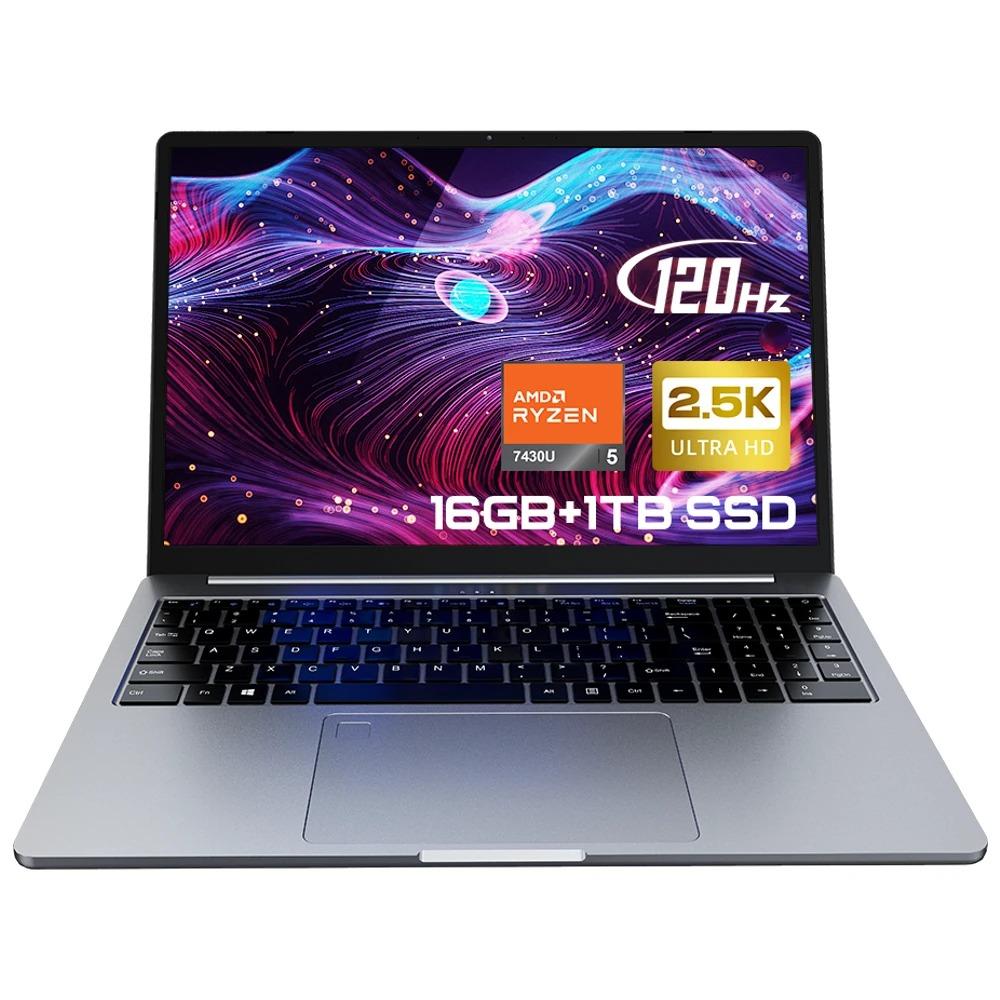
- 16-inch 2.5K IPS display with 120 Hz
- Sturdy, slim design with metal elements
- Large touchpad with a fingerprint scanner
- Ryzen 5 processor, 16 GB RAM and a 1 TB SSD
- Compact 65 W charger, plus a mouse and mouse pad included in the box
- At best, an average battery life
- Long charging time
- You need to install Slovak language pack
- Weak Wi‑Fi module
- Quiet and flat speakers
Chinese online stores often surprise you with notebooks that look impressively good and, compared to well-known brands on our market, deliver noticeably better specs. The laptop segment is highly competitive, especially when it comes to more budget-friendly models. In that situation, it makes sense to also consider an alternative from China.
While some of you might not know the Ninkear brand, from what we’ve known, it’s one of those well-known companies whose products haven’t disappointed us in the past. They use components from reputable companies, which will be good news for many. But how do these gaming-work specs perform in real life? We tested a model that a wider group of users will be able to afford. The Ninkear A15 Pro review will tell you whether it’s worth investing in.
Where to buy the Ninkear A15 Pro?
You can find the Ninkear A15 Pro notebook directly in our partner e-shop Banggood. It’s even in an EU warehouse, meaning very fast delivery within 5 business days and with no extra fees! Don’t forget to use the coupon from the price box.
A clearance sale is currently running with our partner, and until 12.9. 10:00 you’ll get a discount when paying—so be sure to take advantage of it!
Ninkear A15 Pro
 CZ warehouse
TIPExpress delivery from the Czech warehouse with no customs duties and VAT.
This product will be delivered to you express from the local Czech warehouse. Delivery from Czechia usually takes 7-10 days and is handled by courier. On delivery, you don’t pay any additional fees—no customs duty and no VAT.
Specs table
| Ninkear A15 Pro | |
|---|---|
Brand | Ninkear |
Type | A15 Pro |
Color | Cosmic Grey |
Material | A/D Metal / B/C Plastic |
OS | Windows 11 |
Language | Global language |
Webcam | 2.0 MP |
Keyboard | QWERTY (US layout) |
Battery | 11.4V / 4800 mAh / 54.72 Wh |
Chip | AMD Ryzen 5 7430U |
CPU frequency | 6 cores / 12 threads / up to 4.3 GHz |
Technology | 7 nm |
GPU | AMD Radeon™ (7 cores) |
RAM | 16 GB DDR4 |
Storage | 1 TB SSD |
Size screens | 16 inches |
Ratio pages | 16:10 |
Resolution and refresh rate | 2560 × 1600 / 120 Hz |
Screen type | IPS |
Wi-Fi | Wi‑Fi 6 |
Bluetooth | 5.2 |
USB 3.0 | 3× |
Micro SD | Yes |
USB-C | 2× |
HDMI slot | Yes |
3.5 mm port | Yes |
Product weight | 1.85 kg |
Package weight | 2.548 kg |
Product dimensions | 362 × 251.4 × 18.5 mm |
Package dimensions | 480 × 280 × 70 mm |
Package contents | Notebook A15 Pro ×1 / User guide ×1 / Warranty card ×1 / Charger ×1 / Mouse ×1 / Mouse pad ×1 |
Package contents
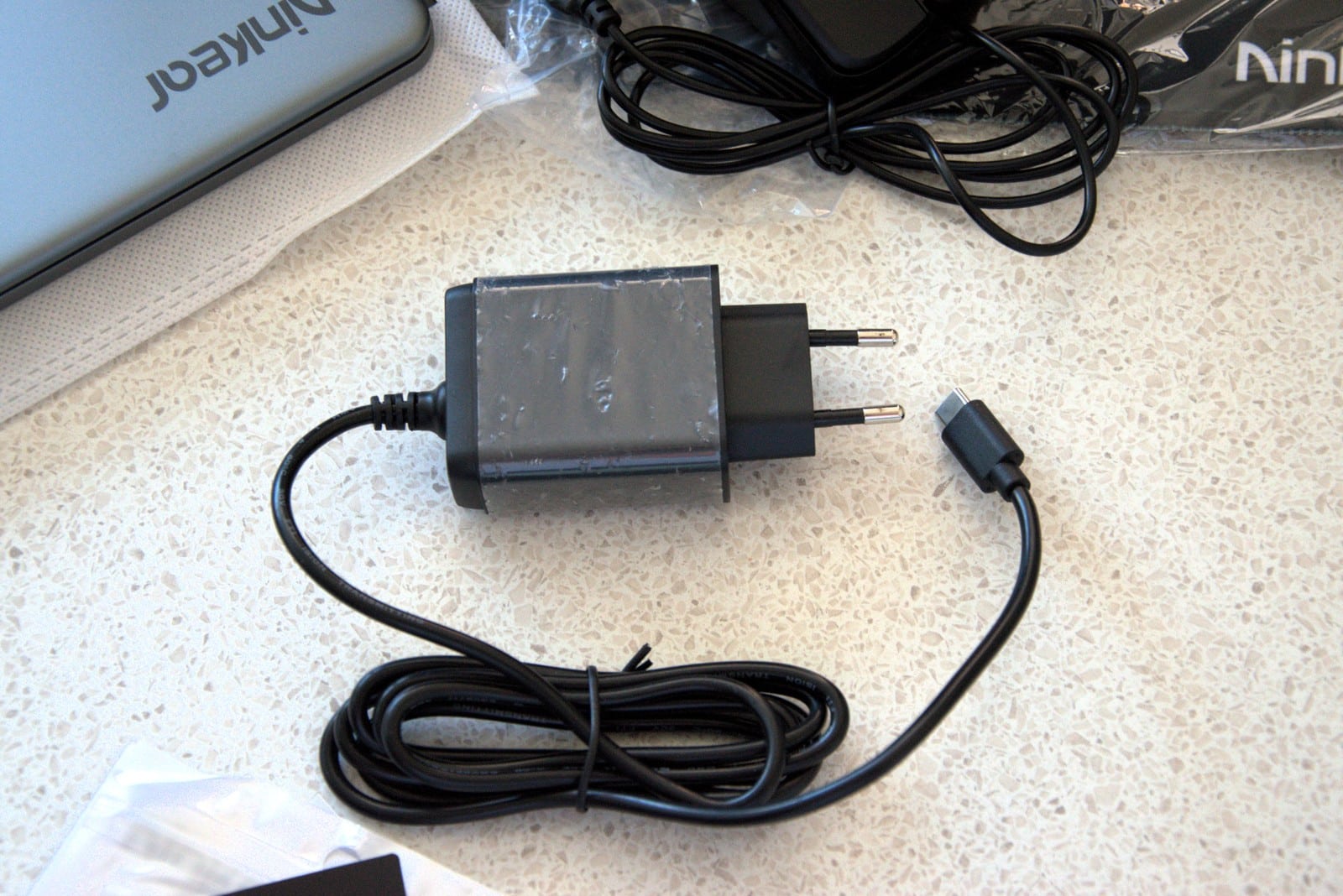
The laptop is safely packed in two boxes. To protect it from rough handling, the laptop is cushioned with foam elements inside the package so it doesn’t come into direct contact with the walls of the box. Besides the laptop, the package of course includes a GaN charger, which is very compact and looks like an adapter meant for a phone. It offers a maximum output power of 65 W (20 V / 3.25 A) and features a USB-C output.

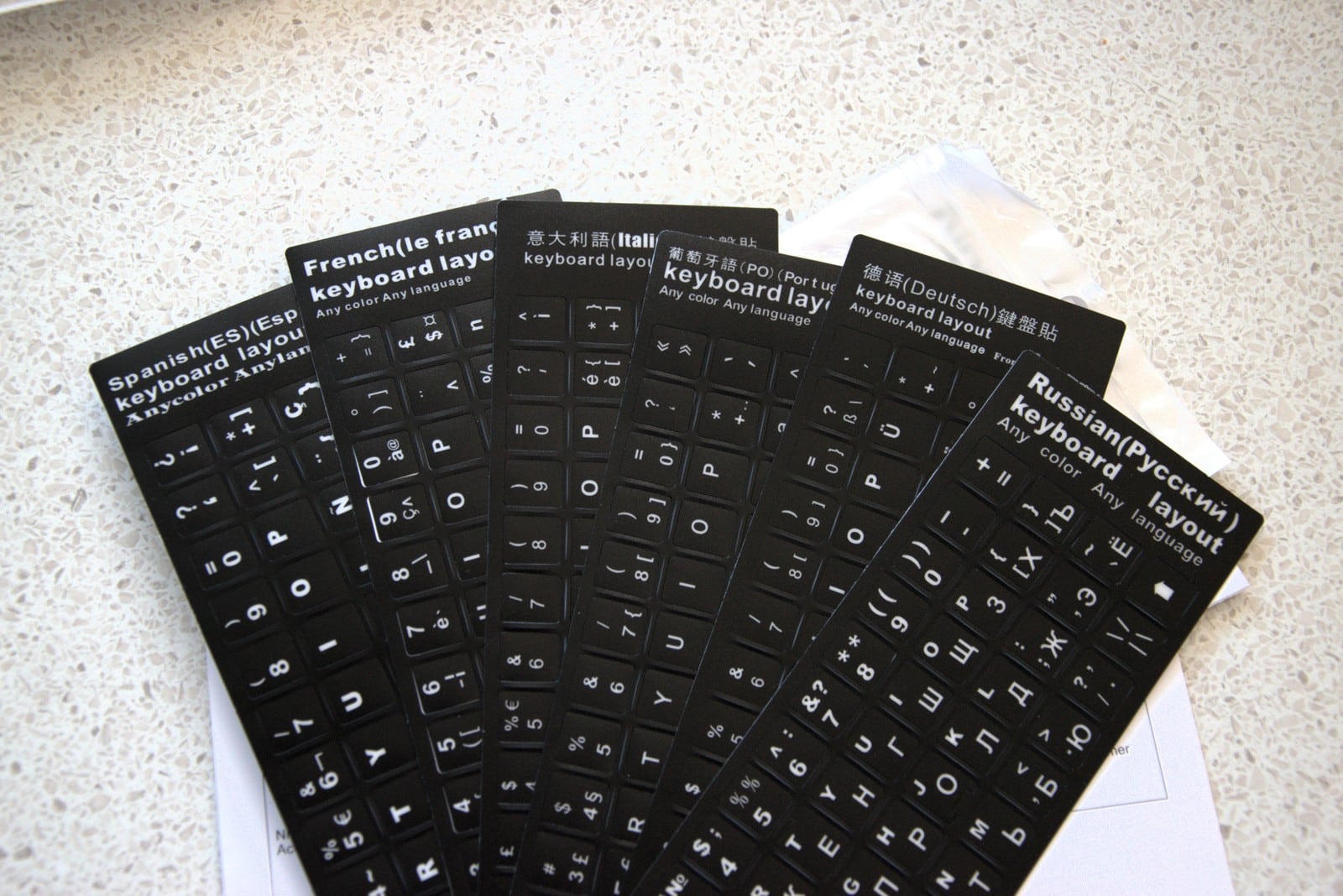
We’re a bit disappointed that the cable isn’t detachable and the adapter is permanently attached. The manufacturer also included its own computer mouse. It’s definitely not premium, but it’s also not the worst we’ve come across – honestly, it’s quite usable for everyday laptop control, and there are also keyboard stickers with international characters.

You won’t find Slovak or Czech characters here, though — you’ll probably need to get used to the English keyboard layout that the laptop includes by default. Finally, a small black mouse pad with the manufacturer’s logo was also added.
Build quality, design and connectivity
We were pleasantly surprised by the craftsmanship, and this is often a big advantage of these Chinese laptops, especially when it comes to the brand Ninkear. In the lower price tier, many well-known brands tend to cut costs on the materials used. Ironically, Ninkear takes its own route, and the laptop doesn’t look cheap at all – on the contrary. Its construction combines plastic and metal, meaning it also includes plated parts – so watch out for scratches that will probably show up over time. The metal used seems a bit softer. You can scratch it with practically anything for a while, but it can be wiped off.

But just any object made of a harder material is enough and you’ll end up with a permanent scratch. We really like the laptop’s design, and we appreciate that you can open the screen with one hand. In the front, there’s a cut-out to make this step easier in a MacBook-style. The thickness is only 18 mm and it weighs 1.8 kg, which is pleasantly surprising given its size. The touchpad is also very well made: it’s mainly large and you can work on it to some extent. It’s better than on most much more expensive gaming laptops that have a tiny touchpad.

Those have priorities elsewhere, and with the Ninkear A15 Pro you also get a built-in fingerprint scanner in the top-left corner of the touchpad. This feature isn’t a given even for many pricier laptops, although it’s not some expensive component. The keyboard feel was very positive right from the start.

The metal base that the keyboard sits in is very sturdy, and when you apply pressure it flexes or creaks only minimally. That helps with more precise and comfortable typing. The individual keys are slightly harder, and you need a bit more force than we’d like.

For someone, however, this means good news and it leads to fewer typing mistakes thanks to the reduced number of accidental presses of neighboring keys. Even though it’s just a habit, we noticed that there’s a bit more space between the individual keys — or rather, a larger area for the keys themselves. Just a few days is enough and you’ll definitely get used to it, the same way we adapted to it too.

If you’re the kind of user who, for example, often works with spreadsheets or numbers in general, you’ll appreciate the presence of a full-size numeric keypad that makes better use of the space on a large, 16-inch laptop. The keyboard is backlit.

Wireless connectivity is based on Wi‑Fi 6 and Bluetooth 5.2. However, we have reservations about wireless internet – most of the time, downloads and uploads are extremely slow. Speeds are about one fifth of the actual bandwidth available. While other devices here download at 75 MB/s, Ninkear A15 Pro achieved transfer speeds of only 12 MB/s.
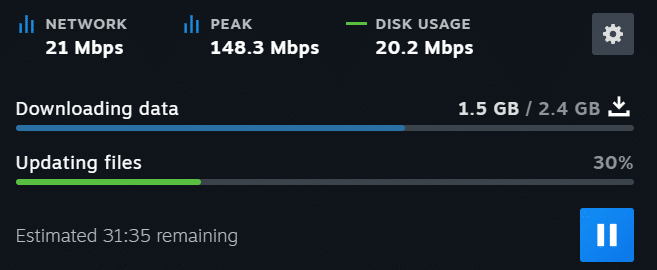
It’s like that 80% of the time, and sometimes, when the PC feels like it, the speeds get almost 100%. Meanwhile, we were no more than half a meter from the router – it was basically behind the notebook. For undemanding users, it won’t be a big deal, but we’d probably opt for a network card upgrade. There’s no hardware Ethernet port here, but you can add it via a separate adapter using USB.

More specifically, there are three USB 3.0 ports, two USB-C connectors, a microSD card reader, an HDMI cable connection, and a 3.5 mm audio jack. We’ll also mention the webcam at the end — it has 2 MPx and sits in the top bar above the screen. It doesn’t stand out for quality, but it will do for occasional video calls. Still, we’d generally rank the microphone together with the webcam below average.

Display and speakers
Another well-thought-out part of this notebook is its display. This is also an area where people often try to save money, especially with pricier gaming laptops. We dare to say that the Ninkear A15 Pro has a better screen than gaming laptops that cost more than twice as much. At first glance, the colors are accurate (it covers the entire sRGB color gamut), and we really liked its higher 2.5K resolution (specifically 2560 x 1600 px), which will be enough even on this large, 16-inch panel. And a 120 Hz refresh rate is a bonus not only for gamers, but also for everyday users and creators.

That makes everything feel much smoother. The aspect ratio is 16:10, so you get more vertically oriented content on the display, which is useful not only for work, but also for everyday web browsing. The image was the cleanest and sharpest during work, writing articles, video editing, creating in a graphics program, and even while gaming. We can also praise the great viewing angles – it’s an IPS panel. The bezels are surprisingly thin, and the matte screen makes it easy to read even in more aggressive ambient lighting. Its peak brightness is around 400 nits.

We can’t be positive about the speakers, though — they’re very bad. They’re quiet, and there’s essentially no bass. In fact, they probably don’t even produce much in the highs. They’re very flat, and the sound comes from the sides of the device. Sure, it’s stereo, but that reputation can’t save it. We wouldn’t even listen to spoken language through them – the sound turns metallic and doesn’t come through well. If possible, we still preferred headphones, and that’s where you can plug in the 3.5 mm jack.

Performance and memory
Inside the Nikear A15 Pro laptop, you’ll find an AMD Ryzen 5 7430U chip paired with integrated AMD Radeon graphics with 7 cores. It’s made using a 7 nm process and comes with a 6-core, or rather 12-thread processor with a maximum boost clock up to 4.3 GHz. At this price, don’t look for a dedicated graphics chip. If you’re planning to do undemanding tasks in graphics programs, this integrated version will work too. It was also enough to play League of Legends at native resolution at roughly 100 fps, which is completely playable for a MOBA game.

For example, you can no longer play Counter-Strike 2. In recent years, this game has also become more graphics-demanding, and right in the main menu we were getting at best 20 fps; on average, however, it was 8 – 12 fps. We didn’t even make it into the game. This laptop isn’t built primarily for gaming, but it will definitely run less demanding titles. All programs are stored on a 1 TB SSD drive of the M.2 / PCIe 3.0 type, which is fast enough. 16 GB (DDR4) of RAM is now an essential minimum. For everyday use and with the performance limit caused by the installed, power-saving chip, it’s still sufficient.

As for heating, it can be quite noticeable at times. The fans with vents under the display are sometimes so quiet you can barely hear them, other times they turn on unpredictably and create a significant amount of noise—even when the laptop is idle. Even when just playing a video, the bottom part of the laptop is warm, and you’ll notice the active cooling. When powered from the battery, there’s no significant heating. With more demanding tasks, the computer is already hot, but for example when exporting video—that’s to be expected. The important thing is that the area where you rest your hands while typing wasn’t noticeably warm at all.

It’s different when you use it with your legs, but if you’re a user of most similar notebooks, you probably know that feeling—and it’s a common situation. Exporting a 1080p 60 fps video took longer than we’re used to, and the editing process wasn’t very smooth either. As the project grew, the sound was often out of sync with the video, and it wasn’t comfortable. A more patient person could probably finish a shorter project, though.
Results in various benchmarks:


Operating system and touchpad
The preinstalled operating system is Windows 11, but it’s in English. Unfortunately, you won’t find Slovak or Czech in the default settings. You can still use it, but you’ll need to install a Slovak keyboard layout and a text processor that will underline the text you type in red. If you don’t add it or if you don’t disable it completely, when writing documents you’ll only see a red sea, because the software expects English text. In general, though, we recommend installing the full package with Slovak localization in the settings, so it translates the entire operating system environment. Otherwise, it’s basically a traditional Windows 11 without any extra bloatware.
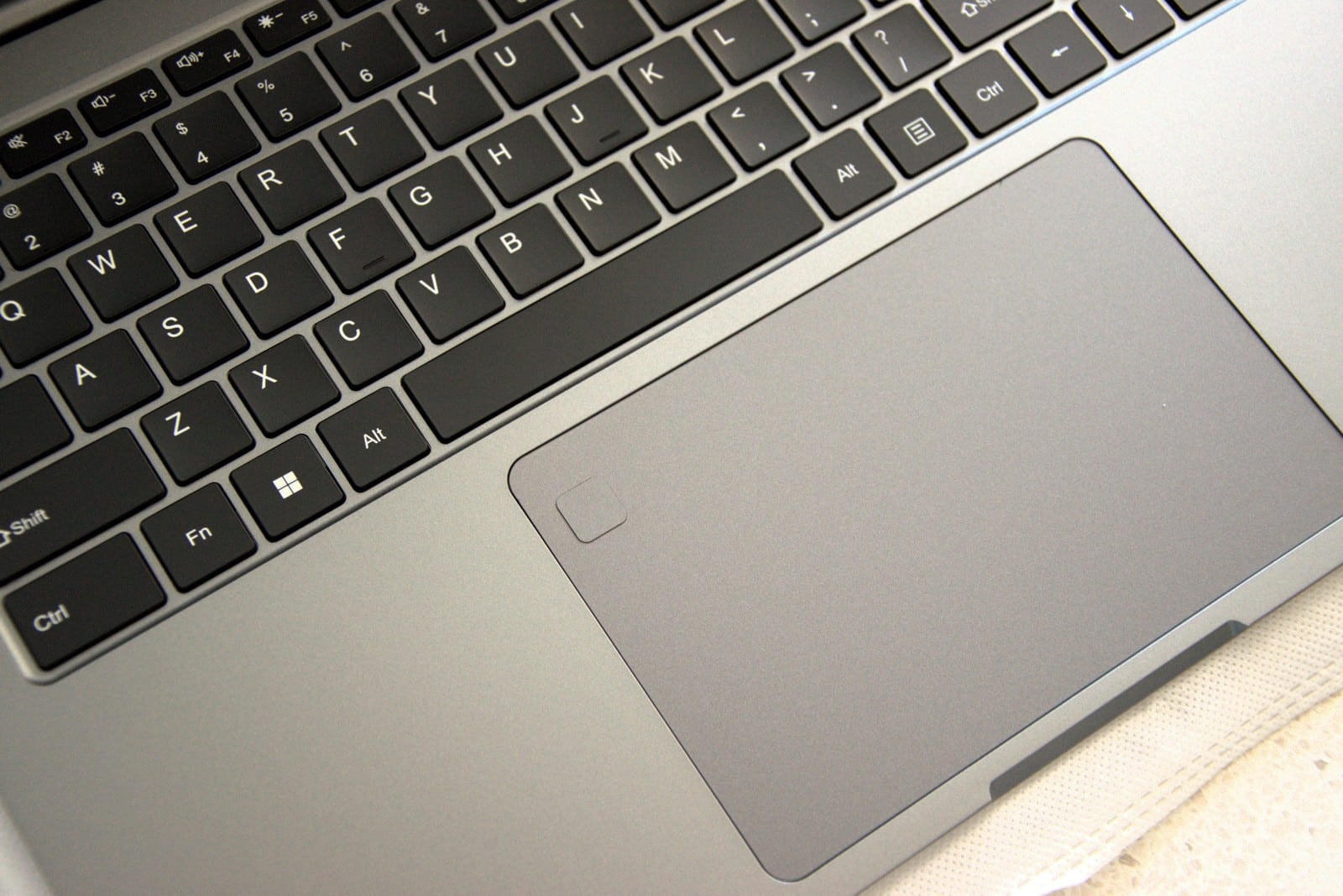
On the laptop, this operating system runs very smoothly. Even though on Windows laptops we’re not big fans of touchpads and typically go for a mouse, this one could be used for simple tasks. Its bottom parts can be pressed. It doesn’t feel cheap; it’s more than just average. But precise work will require a mouse – for example, with DaVinci Resolve we work on a MacBook using only the touchpad, and with Ninkear A15 Pro that was unthinkable. On the other hand, we can’t compare things that can’t be compared: macOS has all of this better sorted out, and the touchpads on MacBooks are generally much better. On the touchpad, there’s a fingerprint scanner for faster and more secure unlocking.
Battery and charging
With a capacity of 54.72 Wh, based on our experience the battery lasts 2.5 – 3 hours of demanding use, including work in more demanding programs—such as editing photos or videos—or using the browser to play videos in high resolution. If you’re only working in office apps or watching series/movies, 4 hours isn’t unrealistic.

During our testing, we had one unpleasant surprise – with around 25 % battery left, the laptop suddenly shut down and reported 0 %. If we had something important in progress, that would definitely have annoyed us. That really shouldn’t happen. On the other hand, the manufacturer deserves credit for implementing USB-C fast charging. As we already mentioned, there’s a 65 W GaN adapter included, which tops up the battery in just over two hours, which is quite a long time. From 0 % to 100 %, our measurements showed it would take up to 2.5 hours.
When playing YouTube video in high resolution, we observed the following battery drain:
- At the start – 86 %
- After two hours – 31 %
- After three hours – 8 %
Charging speed (from 8 %) looked like this:
- 15 minutes – 22 %
- 60 minutes – 66 %
- 80 minutes – 81 %
- 133 minutes – 97 %
- 140 minutes – 100 %
Final verdict
Ninkear A15 Pro is a laptop that tries to appeal to as wide an audience as possible, and we have to admit that it succeeds in many ways. In the affordable laptop category, it offers a top-tier display with 2.5K resolution, 120 Hz refresh rate and great color reproduction, very decent build quality with metal elements, and also a surprisingly comfortable keyboard with a numpad. You’ll also appreciate the fast SSD drive, 16 GB of RAM and a reliable Ryzen 5 processor, which handles everyday work, multimedia and less demanding games.
On the other hand, there are compromises here. The biggest disappointment is the weak Wi-Fi module, which can’t reliably use the full bandwidth, and the very average battery life, which in heavier workloads ends after just 2.5 – 3 hours and may get even worse over time as the battery ages. Charging is also very slow. The audio output is weak and the fans can get noisy even in light-use situations.
If we leave those shortcomings aside, this is a very interesting laptop in terms of price/performance. You’ll appreciate the display most, the typing experience, the fast SSD storage and modern connectivity (USB-C, Wi-Fi 6, Bluetooth 5.2). Although it’s not a machine for professional gaming or demanding video editing, for everyday use, office work or multimedia it offers more than you’d expect at this price. If you’re looking for an affordable laptop with a more premium look and a top-notch display, and you can overlook its weaker points in sound, networking and battery life, Ninkear A15 Pro is a sensible choice.
If we convinced you to buy this laptop, make sure you do it through our panther Banggood.
Ninkear A15 Pro
CZ warehouseTIPExpress delivery from the Czech warehouse with no customs duties and VAT.
This product will be delivered to you express from the local Czech warehouse. Delivery from Czechia usually takes 7-10 days and is handled by courier. On delivery, you don’t pay any additional fees—no customs duty and no VAT.
Follow the China Planet website, sign up for our monthly newsletter, and make sure you also follow our Facebook page, the group All from EU warehouses, and join our Telegram—where we add the best deals and coupons from China day after day.
Don’t miss the best coupons 📩
Subscribe and we’ll email you new coupons before they expire. We only send it once a month — no spam.

