–in many cases you have to stick the magnet to your smartphone
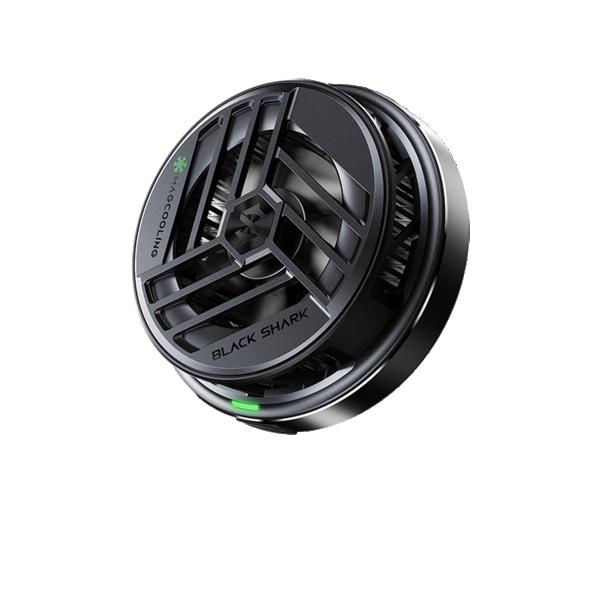
Even while testing the Black Shark 4 smartphone, we tried this brand’s active cooler, the FanCooler 2.0. It included a pair of holders that let you attach it to the phone. This time, we have a new item in the editorial office in the form of the Black Shark Magnetic Cooler — a magnetic external cooler.
Where to buy the Black Shark Magnetic Cooler?
You can get the magnetic external cooler from Black Shark through the official Black Shark store on the well-known international marketplace AliExpress. However, it’s currently only available in the Chinese warehouse, so delivery will be a bit longer.
With AliExpress Standard Shipping, you don’t need to worry about extra charges, because it will be delivered by courier and not by the Slovak post office. Sellers on AliExpress have started to bypass customs fees.
Are you shopping on AliExpress for the first time?See the guide!
Updated 28. 10. 2021 at 14:17
TIPShipping via Aliexpress Standard Shipping
For this product, Aliexpress Standard Shipping or AliExpress Saver Shipping is available. This is the most reliable way to deliver from Chinese warehouses. Delivery can take 15 days to 1 months.
When you order from a Chinese warehouse, AliExpress adds a customs duty charge of approximately 3,70 € per order to your cart. When you receive the shipment, you won’t have to pay anything extra.
Are you shopping on AliExpress for the first time?See the guide!
Updated 28. 10. 2021 at 14:17
TIPShipping via Aliexpress Standard Shipping
For this product, Aliexpress Standard Shipping or AliExpress Saver Shipping is available. This is the most reliable way to deliver from Chinese warehouses. Delivery can take 15 days to 1 months.
When you order from a Chinese warehouse, AliExpress adds a customs duty charge of approximately 3,70 € per order to your cart. When you receive the shipment, you won’t have to pay anything extra.
Package contents
We’ll start this short review in the traditional way — with what’s in the box. The box that the Black Shark Magnetic Cooler comes in has compact dimensions of just 9.5 x 13.3 x 3.4 cm. It’s a white, extremely sturdy box made from thicker cardboard, with a soft protective insert. The cooler itself is perfectly protected inside the package.
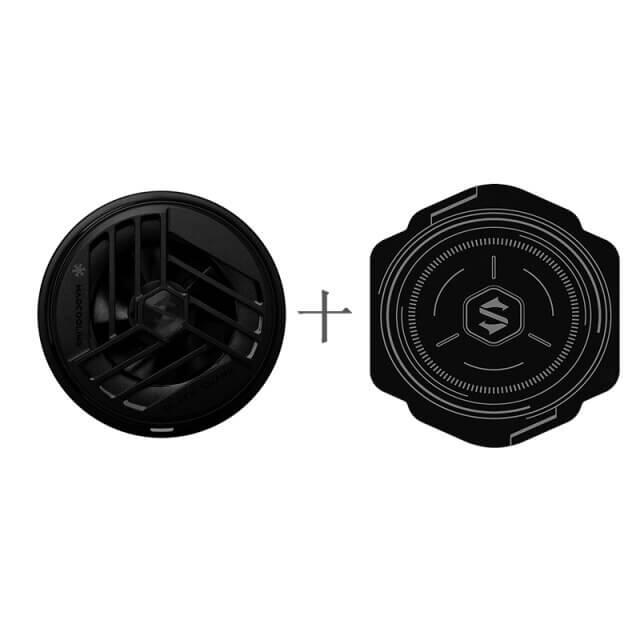
Inside, the cooler is placed in a foam insert and underneath it there’s a self-adhesive metal magnet. There are 2 variants available in the shop – without the magnet and with the magnet. If you have a smartphone that has a metal frame including the back cover, you don’t need the self-adhesive magnet, and you can simply place the cooler on the back cover, where it attaches using magnets.
Ad
The package is also completed with a foil that’s included only in the bundle with the self-adhesive magnet. It serves as a layer between the smartphone and the self-adhesive magnet.
The Black Shark Magnetic Cooler weighs just 73 g and has a diameter of 6 cm. Its cover is made of plastic, but overall it feels very high-quality. The openings and grille on the top side and along its edge make for a truly attractive look. Design-wise, it really did turn out well.
Magnetic attachment
Unlike the previously mentioned FanCooler 2.0 cooler, the Black Shark Magnetic Cooler includes 15 NdFeB magnets located around the perimeter of the external cooler itself. They’re strong enough to keep the cooler firmly attached to the phone’s back cover.
The cooler consists of 112 high-quality fins, a fan running at 7200 rpm, and a heat-conductive layer on the underside. According to the manufacturer, this setup should be able to reduce your smartphone’s temperature by up to 23 °C. Of course, these are only theoretical values calculated based on lab tests by Black Shark.
Black Shark Magnetic Cooler: First use
We tested the Black Shark Magnetic Cooler on an older Samsung Galaxy S9+ smartphone, which gets noticeably hot while gaming. Once attached to its back cover, the cooler does stick, but not well enough for further handling or gaming.
That’s why we went with the self-adhesive magnet we mentioned at the start. Before sticking it, we cleaned the surface of the back cover and then applied a thin film to it. This is a standard transparent film also used to protect the display. After that, we attached the self-adhesive magnet directly onto the film.
Then you just need to place the cooler onto the glued magnet. It’s a shame the manufacturer includes only one film in the box without a replacement self-adhesive strip. The self-adhesive magnet is basically one-time only, and after peeling it off you can’t stick it back onto another smartphone. You’d have to replace the adhesive layer on the magnet and also buy a second film. The cooler is therefore more suitable for smartphones where you don’t need to stick on this magnet.
Power supply and our cooling test
The cooler doesn’t have its own battery, so an external power source is required. In the box, you’ll find a 1.5 m long USB-C cable that you can use for this purpose. We powered the cooler from a Xiaomi power bank with a capacity of 20 000 mAh, but it doesn’t have a USB-C output port, so we used our own cable.
The bottom heat-conducting layer of the cooler is truly ice-cold after just a short time of use. The cold transfers immediately to the self-adhesive magnet and the smartphone—feeling-wise, the area around the magnet is definitely cooler, so the cooler seems effective. We also tested it while playing Rebel Racing. After a few minutes of gameplay, we measured the temperature on the back cover of the smartphone with a non-contact thermometer: 39 °C.
After that, we connected the Black Shark Magnetic Cooler, and after ten minutes of gaming the temperature dropped to an excellent 27 °C. The smartphone was noticeably cooler and felt much more pleasant to hold in your hands. So the cooler passed our test and managed to effectively reduce the smartphone’s temperature.
Ad
Downsides of the stuck-on magnet for the Black Shark Magnetic Cooler
As we already mentioned earlier, for this cooler an ideal smartphone is one with a magnetic back. The magnet on the back of the smartphone creates several issues right away. The first is harder installation of the phone case, since the magnet slightly gets in the way. The bigger problem, however, is that you can’t use NFC for payments in stores if you stick the magnet directly over the NFC chip.
You also can’t use wireless charging, which the magnet interferes with. As you can see, the cooler is indeed effective, but it also causes certain limitations in everyday use.
Black Shark Magnetic Cooler: Final assessment
The Black Shark Magnetic Cooler is an interesting gadget that mobile gamers, in particular, will appreciate. It can effectively cool your smartphone, enhancing the gaming experience and preventing excessive overheating.
However, it’s more ideal for smartphones with a magnetic back, when you don’t need to stick the magnet onto the phone. The attached magnet limits the use of NFC as well as wireless charging. It’s an interesting product that will definitely find its target audience.
Are you shopping on AliExpress for the first time?See the guide!
Updated 28. 10. 2021 at 14:17
TIPShipping via Aliexpress Standard Shipping
For this product, Aliexpress Standard Shipping or AliExpress Saver Shipping is available. This is the most reliable way to deliver from Chinese warehouses. Delivery can take 15 days to 1 months.
When you order from a Chinese warehouse, AliExpress adds a customs duty charge of approximately 3,70 € per order to your cart. When you receive the shipment, you won’t have to pay anything extra.
Are you shopping on AliExpress for the first time?See the guide!
Updated 28. 10. 2021 at 14:17
TIPShipping via Aliexpress Standard Shipping
For this product, Aliexpress Standard Shipping or AliExpress Saver Shipping is available. This is the most reliable way to deliver from Chinese warehouses. Delivery can take 15 days to 1 months.
When you order from a Chinese warehouse, AliExpress adds a customs duty charge of approximately 3,70 € per order to your cart. When you receive the shipment, you won’t have to pay anything extra.