


Rating: KTC H27T22
Our editorial rating is based on product testing.
- 2560×1440 px 2K resolution
- low 1 ms response time
- 165 Hz refresh rate
- rich customization options: tilt, swivel, or portrait mode
- no speakers and no way to connect a keyboard or mouse via the USB port
- uneven panel backlighting
- annoying message every time you manually change brightness through the monitor menu
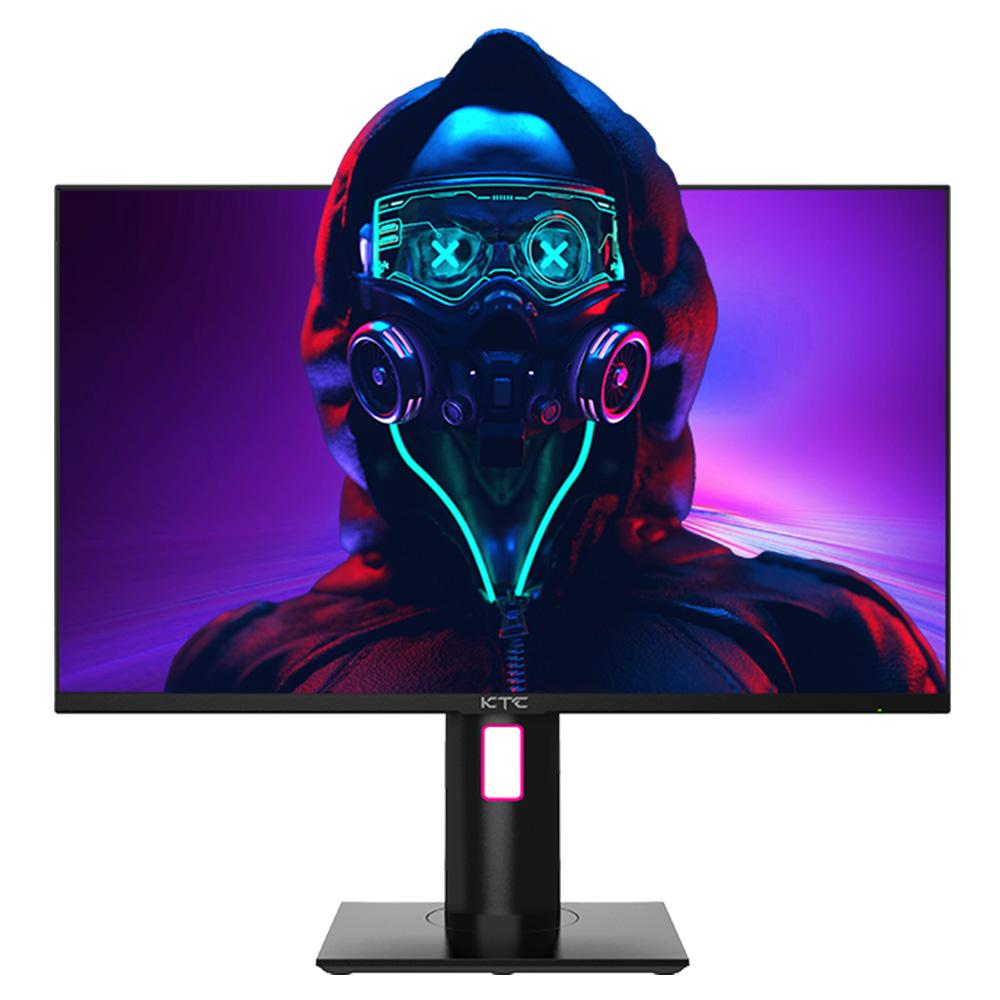
The KTC brand is still fairly unknown around here, so we decided to test one of their monitors, KTC H27T22. It is a gaming monitor with a high refresh rate, attractive design, and ambient backlighting.
In the review, we’ll of course take a look at image quality and build quality, connectivity options, as well as customization. We’ll also go through the settings the monitor offers and share our personal experience.
Where to buy KTC H27T22?
The KTC H27T22 monitor is available in a new Hungarian warehouse of our international partner Geekbuying. Delivery takes approximately 3 to 7 business days after dispatch, and thanks to the European warehouse, you don’t have to worry about any customs fees. The package will be delivered by the courier right to your home.
KTC H27T22 27" gaming monitor
 EU warehouse
TIPExpress delivery from a European warehouse without customs duty and VAT.
This product will be delivered to you express from a local warehouse in Europe. Delivery from EU warehouses usually takes 2–10 days and is handled by a courier. When delivered, you don’t pay any extra fees—no customs duty or VAT.
Technical specifications
| Model | KTC H27T22 |
|---|---|
| Panel | IPS |
| Aspect ratio | 16:9 |
| Resolution | 2560×1440 px |
| Viewing angles | 178° |
| Brightness | 300 cd/m² (Min) / 350 cd/m² (Typ) |
| Contrast ratio | 1000:1 |
| Response time | 1 ms |
| Compatibility with FreeSync and G-Sync | yes |
| Connectivity | 2 x HDMI 2.0 (2560×1440@144Hz) / 1 x DisplayPort 1.2 (2560×1440@165Hz) / 1 x USB 2.0 / Audio output |
| HDR | yes |
| Customization | tilt / swivel / height adjustment / pivot |
| VESA | yes 100 x 100 mm |
In short about KTC
As we already hinted in the introduction, the KTC H27T22 monitor is the first product from this brand that we’ve had the chance to test. For us—and probably also for you, our readers—this brand is still largely a mystery.


Is this a newcomer to the market? Not exactly. The KTC brand (Key To Combat) was founded back in 1995 as Shenzhen KTC Technology Co., Ltd in China. The company focuses on manufacturing displays for various devices, from monitors and TVs to different medical equipment.

KTC also produces displays for some more well-known brands like Samsung, NEC, or Viewsonic. In 2021, it decided to go its own way and make displays under its own brand as well.
Packaging contents & quality
The KTC H27T22 monitor was delivered by courier DPD in a fairly large turquoise box. It wasn’t packed in any additional protective box, so the shipping label was stuck directly onto the product box.

Inside, we found the monitor placed in two polystyrene inserts shaped exactly to the monitor’s design so they could protect it properly. Personally, we always worry a bit when shipping monitors or TVs, whether they’ll be packed well enough so they don’t get damaged during transport. In this case, the monitor arrived with absolutely no signs of damage to either the monitor or the box.


Inside the box, you’ll also find the stand, a power cable with adapter, a DisplayPort cable, and a manual with assembly instructions.
Assembling the monitor is very easy
The package also includes a manual for assembling the monitor, but you can easily manage without it. The first step is to put together the monitor stand itself, which consists of two parts. You screw them together by hand, without using a screwdriver.


Next, just snap this bracket into place on the back of the monitor. We recommend placing the monitor on your desk with the screen facing down while doing it. The whole process is therefore very simple and quick.

Design, build quality, and placement of the elements
The KTC H27T22 is a gaming monitor, which is reflected in its design too. Mainly the back side, where you’ll find a stylishly cut-out section housing a colorful LED light. This creates a kind of ambient backlight, but it’s rather weak and its intensity can’t be adjusted. If you place the monitor close to a wall, the light only reflects when it’s completely dark.

We especially appreciate the stand, which is sturdy and reinforced with metal. It doesn’t flex at all and firmly holds the set position.

When it comes to the monitor’s build quality, it’s very good. It’s true that the monitor is made of plastic, but thanks to the solid stand, it gives an overall very good impression. The design is also improved by very thin bezels around the display. The only wider one is the bottom bezel, which is completely normal.


On the back you’ll also find a power on/off button that also serves for navigating the settings menu, because it’s a joystick-like button. You can press it, but you can also move it left and right to navigate the menu up, down, right, or left.
IPS panel with 2K resolution
The KTC H27T22 gaming monitor comes with an IPS panel with a 27″ diagonal and a 16:9 aspect ratio. The maximum resolution is 2560 x 1440 px, and you’ll also appreciate the high refresh rate of up to 165 Hz. The manufacturer labels this panel as Fast IPS AUO8.2.

The display can show 16.7 million colors, with brightness rated at 350 cd/m² and a contrast ratio of 1000:1. In terms of color coverage, it spans 84 % of the Adobe RGB CIE1976, 92 % of DCI-P3, and 99 % of sRGB. Subjectively, the monitor’s colors are fairly well balanced, and the preset values feel believable. If the color settings don’t suit you, you can fine-tune them in the settings.

Compared to a gaming monitor from Xiaomi, which we also tested a while ago, the KTC H27T22 lacks any confirmation of color calibration. On the KTC monitor, the colors lean slightly toward cooler tones. This is definitely not a monitor for professional graphic work.

The response time is just 1 ms, and the monitor also supports HDR10, eliminates flickering, and offers a low blue light mode. Overall, the picture is extremely smooth with no unpleasant, visible ghosting—which is great for this price.
With the room light turned off and a black background on the monitor, you may notice uneven backlighting on the panel (so-called backlight bleed), especially in the corners—which, however, is nothing unusual at this price range. With normal use, we didn’t notice it at all.

Compatibility with FreeSync and G-Sync
Gamers will definitely be interested in support for FreeSync and G-Sync technologies as well. If by chance you don’t know what they are, these are two types of adaptive synchronization technologies between your graphics card and the monitor. FreeSync is a technology from AMD and G-Sync is from nVIDIA.

These technologies handle synchronization between the monitor’s refresh rate and the frame rate of your graphics card. Thanks to them, the image is smoother, prevent so-called artifacts, don’t render some frames multiple times, and therefore contribute to a smoother image without tearing. A mismatched frequency between the graphics card and the display is the problem.
Our tested model, the KTC H27T22, is not officially certified by nVIDIA or AMD for use of this technology. nVIDIA, unlike AMD, even requires a special hardware module in the monitor—only officially certified monitors include it. FreeSync doesn’t have such requirements, since it’s simply an extension of the DisplayPort standard.

In both cases, however, some monitors are compatible with these technologies. The same goes for the KTC H27T22, so you can use both of the mentioned technologies even if the monitor isn’t certified. In both cases, you just need a supported graphics card, the latest driver, and to enable the technologies in both the graphics card settings and the monitor settings.

We tested this feature with an older Radeon RX470 graphics card, but its FreeSync support is still there. Don’t forget that you first need to enable this feature in your monitor settings. Otherwise, the AMD app will warn you about an incompatible monitor and FreeSync won’t let you turn it on.
Connectivity and stand customization options
As for connectivity, you can connect the monitor to your computer in two ways – using HDMI or DisplayPort technology. On the back of the monitor, you’ll find one HDMI 2.0 port supporting a resolution of 2560 x 1440 px at a maximum refresh rate of 144 Hz, or also two DisplayPort 1.2 ports supporting a resolution of 2560 x 1440 px at a maximum refresh rate of 165 Hz.

For the best monitor experience, we definitely recommend choosing a DisplayPort connection option, as it supports full 165 Hz refresh rate.
Besides the ports mentioned above, there’s also a USB 2.0 port here, but it’s only for firmware updates on the monitor and an audio output in the form of a 3.5 mm jack. Speakers or the option to connect a mouse or keyboard to the monitor are missing.
What definitely isn’t missing is the ability to adjust the height, tilt, or even rotate without needing to turn the entire stand together with the monitor. You can set the tilt in the range of – 5 to 20°, rotate 45° to both sides, and height adjustment lets you lift the monitor by 130 mm. We especially appreciate the height-adjustment option.

Another interesting feature is the so-called pivot function, thanks to which you can rotate the monitor even into a vertical position. VESA standard support is also included, so if needed, you can mount the monitor on a wall using a VESA mount of 100 x 100 mm.
Settings options
The settings menu you access via the button on the back is fairly wide. The menu includes a lot of items, divided into several categories.

Specifically, it includes the following categories: Display, Color, Gaming Setup, Input, System Set, and User Data. On the edge of the settings window, you can also see the current display refresh rate.
In the display settings, you’ll find the usual options like brightness, contrast, black level, aspect ratio, and sharpness. You can also save these settings as a preset. You can further customize the color, meaning its temperature, saturation, tint, gamma, and the blue light level.

The gaming settings include enabling FreeSync / G-Sync, plus other options such as override (off / low / middle / high), HDR, DCR, MPRT, enabling ambient lighting, and the Game Plus item.

It hides the option to display FPS in the corner of the monitor, in-game crosshair reticles in various styles, or also a time countdown display (15 / 35 / 45 / 60 / 90 minutes).
KTC H27T22: Final verdict
The KTC H27T22 gaming monitor is an excellent choice for those looking for a budget gaming monitor with great specs. Its 27″ diagonal is ideal for many users. You’ll like the 2K resolution of 2560×1440 px, a high refresh rate of 165 Hz, and a low response time of just 1 ms.

Gamers will also surely appreciate compatibility with adaptive technologies FreeSync and G-Sync, though it’s important to note that it’s not an officially certified monitor for these technologies. Still, its smoothness is excellent, the colors are very well balanced, and it will serve not only gamers really well.
We also appreciate the height adjustment, tilt and swivel options, as well as the pivot function. The monitor doesn’t lack a gaming design with ambient backlighting on the back.
The downside is slightly uneven backlighting, but it’s only noticeable on a black screen in the dark. Since this is a fairly lesser-known brand in our region, long-term reliability is questionable. Overall, though, we’re very happy with the monitor, and it can definitely compete directly with big, well-known brands.
Don’t miss the best coupons 📩
Subscribe and we’ll email you new coupons before they expire. We only send it once a month — no spam.


