


Zhodnotenie: Xiaomi Mi 165 Hz Fast IPS Monitor
Our editorial rating is based on product testing.
- 100% coverage of the sRGB color gamut with factory calibration
- height adjustment and pivot function
- high refresh rate 165 Hz and NVIDIA G-Sync support
- elegant design and a metal stand
- absencia USB portov
- higher price
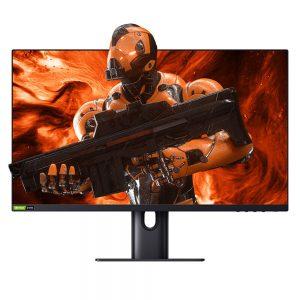
Xiaomi Mi 165 Hz Fast IPS Monitor is a gaming monitor with a high refresh rate of up to 165 Hz. It’s an IPS monitor with a 24.5″ display size and FullHD resolution. You’ll also appreciate support for NVIDIA G-Sync technology. In our editorial office, we’ve been using this monitor for a few days already, and during that time we prepared this review for you.
Where to buy Xiaomi Mi 165 Hz Fast IPS Monitor 24.5″?
The mentioned gaming monitor from Xiaomi is currently available from the international retailer Banggood. It’s shipped from a warehouse in the Czech Republic, so delivery is very fast and you’ll avoid any customs fees and VAT.
Xiaomi Mi 165 Hz Fast IPS Monitor 24.5"
 CZ warehouse
TIPExpress delivery from the Czech warehouse with no customs duties and VAT.
This product will be delivered to you express from the local Czech warehouse. Delivery from Czechia usually takes 7-10 days and is handled by courier. On delivery, you don’t pay any additional fees—no customs duty and no VAT.
Technical specifications
Aspect ratio Power Odozva displeja Rated power Resolution Screen size Refresh rate Product dimensions Display brightness Weight Contrast ratio Rozsah pracovnej teploty Dynamic contrast Display color InterfaceModel number XMMNT245HF1 16:9 12V / 5A 2ms (GTG) 36W Max. 1920 x 1080 px 24.5 Inch 165 Hz 556.38 (L) * 185 (W) * 475.91 (H) mm 400 cd / m2 5.22 kg 1000:1 0 ℃ ~ 40 ℃ 1000000:1 16.7 M 2 x HDMI2.0 / 1 x DP1.2 / 1 x Audio interface
Packaging contents & quality
Xiaomi Mi 165 Hz Fast IPS Monitor ships in a cardboard box measuring 66 x 20 x 43.5 cm with a handy plastic carrying handle. Of course, the monitor is disassembled, as is the case with all monitors. All parts are neatly packed in thick polystyrene that protects the individual components.


The image section is also protected with a thin cover that can additionally be used to cover the monitor, protecting it from dust. The package includes the main monitor unit with an IPS panel, the stand, the stand column, the power cable, and an HDMI cable. You’ll also find a practical cable cover for the back of the monitor and an instructions manual for assembly.


All components are well protected, and the polystyrene support is thick enough to protect the monitor from damage.
Skladanie monitora
Assembling the Xiaomi Mi 165 Hz Fast IPS Monitor is very easy and quick. The basic principle is to attach the stand with the column to the main part of the monitor. First, you need to connect the column to the stand. A single screw with a rotating head on the underside of the stand is used for this. Once you connect those two parts, you just need to tighten the screw head by hand. No screwdriver is required.

It’s even easier to then connect the stand with the column to the main part. Here, you only need to insert this piece into the prepared grooves and press until the latch clicks into place. Thanks to this latch, you can easily disassemble the monitor anytime. After pressing the latch, the column simply comes out of the monitor, and you can then easily unscrew it from the stand.

After that, you only need to connect the monitor to the power outlet, plug in the cable from your PC or laptop, and the monitor is ready for first use. You can also mount it on the wall, but the mount isn’t included in the package. The manufacturer only includes screws for attaching the monitor to a wall mount.

Design and build quality
The Xiaomi Mi 165 Hz Fast IPS Monitor is sold in black. The frame around the display is really very thin (1.6 mm), which gives it a modern and attractive look. The only thicker part is the bottom bezel—it’s 1.5 cm—and it has 5 buttons at the bottom for adjusting image settings and turning the monitor on or off.

The last-mentioned button, which turns the monitor on and off, sticks out a bit more than the others and is also backlit. You can feel all the buttons easily even without looking directly at them. There’s also a practical metal stand that includes a cable opening—so you can neatly hide the cables behind the monitor.

In terms of build quality, it’s at a high level. After all, this isn’t some cheap monitor. The top part around the display is plastic, but the stand and the column are made of metal. We particularly appreciate the metal stand, which keeps the monitor very stable. Plastic stands and columns often don’t hold firmly and can feel quite wobbly.
When it comes to design and build quality, we rate this monitor very positively.
Ability to rotate to a vertical position and connectivity
The Xiaomi Mi 165 Hz Fast IPS Monitor 24.5″ offers height adjustment. If we measure the distance from the desk you place it on to the bottom edge of the display, the height adjustment range is 4.8 – 16.8 cm. Since, for proper sitting posture from a health perspective, the top edge of the monitor should be at eye level, the height adjustment option is more than welcome.

There’s also a function called pivot, so you can rotate the monitor into a vertical position. The monitor turns easily, but it holds the set position well. After rotating to portrait mode, you also need to rotate the image— it doesn’t rotate automatically. If you use Windows 10, you’ll find the orientation setting in the screen resolution settings.

As for connectivity, on the back you’ll find, besides the power cable port, 2 x HDMI, 1 x DisplayPort, and a 1 x 3.5 mm headphone jack. The power cable is not the standard one you see on many monitors. Xiaomi chose its own power connector. It’s a shame there are no USB ports.

The monitor also doesn’t have speakers, but personally we didn’t miss them at all. The vast majority of monitors include low-quality speakers that are more of an emergency fallback.
Resolution and image quality
The gaming monitor from Xiaomi features FullHD resolution of 1920 x 1080 px. For a 24.5″ diagonal, this resolution is more than enough. It’s an IPS panel with a high refresh rate of 165 Hz and a low response time of just 2 ms. Thanks to these specs, it’s rightly labeled as a gaming monitor. You can check whether the monitor is running at 165 Hz in the monitor’s advanced settings in Windows.

The aspect ratio is 16:9, the display brightness is represented by 400 cd / m2, and the contrast ratio is 1000:1. The dynamic contrast is 1000000:1, and the viewing angle is 178°. The monitor’s display covers 95% of the DCI-P3 color gamut and up to 100% sRGB. It also has DisplayHDR 400 certification, so overall it’s a monitor with very interesting specifications.

The image quality of the Xiaomi Mi 165 Hz Fast IPS Monitor is at a very good level. In the box, the manufacturer also includes the factory image calibration output. It tells you that every monitor is calibrated before being put on sale. The report includes the serial number of our monitor, image settings for the sRGB color gamut, and also information about the device used for this measurement. For this reason, it’s recommended to use the sRGB mode, which is set in the monitor menu.
In sRGB mode, brightness is noticeably reduced, but the colors are natural and close to real life. Overall, they lean slightly toward warmer tones. For your eyes, though, this setting is very comfortable, and even after long hours working at the computer, we didn’t feel eye strain.
Image customization options
If sRGB or the monitor’s original mode doesn’t suit you, there are plenty of settings available. You can access them with the first button on the left. In short, we’ll go through these settings. The main menu offers options: Bri/Con, Display, PQ, Pro. Functions, Smart Modes, Input Source, and Settings.

In the Bri/Con section, you’ll find brightness and contrast settings. You can also adjust the black level and enable the DCR (dynamic contrast ratio) function. With DCR enabled, brightness and contrast automatically adjust according to the image’s needs. In the Display menu, you’ll find settings for color temperature, shadows, saturation, gamma, and the aspect ratio.
In the PQ tab, you can set response time and sharpness. Pro. Functions, as the name suggests, hides advanced features. In this case, it’s the Adaptive-Sync function (turn it on or off), HDR, as well as the Refresh rate and Aiming sight functions.

For Smart Modes, you have a choice of: 6: Standard, ECO, Game, Movie, Low Blue Light, and sRGB. These are predefined color profiles for different scenes. Input Source is used to select the input, and the last menu item is general settings. Here you can set the language, menu orientation, volume, and the functions of two physical buttons for quick access to settings. Originally, the second button is for choosing the input, and the third button is for the smart modes menu.
NVIDIA G-Sync
Gamers will especially appreciate support for NVIDIA G-Sync technology. If you don’t know what it is, we’ll briefly explain how it works. The problem it solves is the difference between the monitor’s refresh rate and the graphics card’s refresh rate. Most traditional monitors have a fixed refresh rate (typically 60 Hz), while the graphics card’s refresh rate is variable.

NVIDIA came up with a solution in the form of an integrated G-Sync module, which is installed in selected monitors. This technology can synchronize the monitor’s refresh rate with the graphics card. Of course, it works only with NVIDIA graphics cards. Thanks to this technology, objects in games render faster, look sharper, and overall gameplay is smoother. G-Sync technology is supported by NVIDIA GeForce GTX 650 Ti BOOST GPU graphics cards and higher.
Final verdict: Xiaomi Mi 165 Hz Fast IPS Monitor
The Xiaomi Mi 165 Hz Fast IPS Monitor is a 24.5″ IPS monitor designed especially for gamers. It impresses with up to 100% coverage of the sRGB color gamut, a high refresh rate, and solid build quality with a metal stand and base. You also get a color calibration certificate with the monitor.

Gamers will definitely appreciate the support for NVIDIA G-Sync technology, which delivers a better gaming experience by synchronizing the monitor’s refresh rate with the graphics card’s refresh rate. One slight letdown is the lack of USB ports for those who are used to plugging devices into the monitor.
As we mentioned at the start of the review, for your purchase we definitely recommend Banggood, since it has it in the Czech warehouse with cheap duty-free shipping. You don’t need to deal with VAT or customs duty.
Xiaomi Mi 165 Hz Fast IPS Monitor 24.5"
CZ warehouseTIPExpress delivery from the Czech warehouse with no customs duties and VAT.
This product will be delivered to you express from the local Czech warehouse. Delivery from Czechia usually takes 7-10 days and is handled by courier. On delivery, you don’t pay any additional fees—no customs duty and no VAT.
Don’t miss the best coupons 📩
Subscribe and we’ll email you new coupons before they expire. We only send it once a month — no spam.


