


Review: Xiaomi Mi Smart Air Fryer 3.5 L
Our editorial rating is based on product testing.
- fast preheating
- easy and convenient controls
- healthier way to prepare food
- capacity only for 1 to 2 servings
- image loading issues in recipes from the Xiaomi Home app
For the past few weeks, we’ve been testing the intelligent air fryer Xiaomi Mi Smart Air Fryer 3.5L. It’s a great home helper that lets you prepare quick and healthy food in just a few minutes.
In this review, you’ll learn what smart features this fryer has, and also what our experience is with cooking different types of food.
Where to buy Xiaomi Mi Smart Air Fryer?
You can buy the Xiaomi Mi Smart Air Fryer 3.5 L from our international partner, Gshopper. You’ll be pleased to find it available in a Czech warehouse, from where it will be delivered to you by courier within a few business days. So you don’t have to worry about any unexpected fees.
Xiaomi Mi Smart Air Fryer 3.5 L
 CZ warehouse
TIPExpress delivery from the Czech warehouse with no customs duties and VAT.
This product will be delivered to you express from the local Czech warehouse. Delivery from Czechia usually takes 7-10 days and is handled by courier. On delivery, you don’t pay any additional fees—no customs duty and no VAT.
Our extra service with VIP support — we’ll handle the order on Gshopper for you and ship it straight to your address.
If you’re not experienced with shopping on Gshopper, your payment won’t go through, or the coupon just isn’t working, we offer our readers and customers a service where we place the order directly to your address. You send us the money by bank transfer, and we’ll order the product straight to you. That way, you don’t have to worry about failed payments or coupon issues, and you can be sure the whole order will go 100 % smoothly. Plus, you automatically get our VIP support — we handle any shipment issues for you and help with claims too. The fee for this service is €15 on top of the product price. You can contact us by email at info(@)chinaplanet.sk or on Messenger, where we’re active all the time.
Technical specifications at a glance
Model MAF02 Weight 3.9 kg Dimensions 30.4 x 25.2 x 33.5 cm Power 1500 W Capacity fryers 3.5 L Range temperature 40 – 200 °C Display yes – OLED
Package contents
The Xiaomi Mi Smart Air Fryer arrived in a white product box, with several manufacturer specifications and photos printed on it. It’s a shame the seller didn’t pack this fryer in an additional protective box—or at least some kind of protective cover.


After opening the box, we found the user manual on the top, tucked into polystyrene. Under it was the fryer itself, wrapped in protective film. The packaging is fairly simple, but the fryer is well protected thanks to the polystyrene mentioned above.

Design and build quality
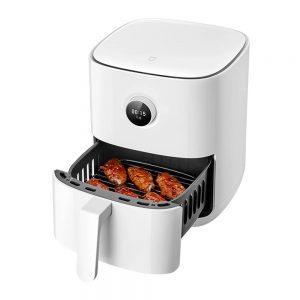
The Xiaomi Mi Smart Air Fryer is a very elegant appliance that also fits in a modern home. It’s sold in white, and its surface is glossy. On the front, you’ll find a round dial with an OLED display for manual control of the fryer. Above it there’s a discreet touch button to turn it on and off, and in the lower half there’s a standard frying basket.

Inside the frying basket, you’ll find a stainless-steel rack, as well as one black base on which the food is placed. The basket volume is 3.5 L. In the back, there are only air outlet openings and the cable for connecting to the power supply. The air fryer also has rubber, anti-slip feet.

First power-on and pairing with the app
As we mentioned above, the air fryer is turned on with a button located above the rotary dial with the display. Once you turn it on, the display lights up immediately with a prompt to connect to a WiFi network. To pair the fryer with your smartphone, you need the Xiaomi Home app.

Our app on the smartphone found the air fryer nearby right away, so pairing was very easy and fast. If that doesn’t happen, you can also manually search for the fryer in the list of devices in the Xiaomi Home app. We use a modified, region-free Xiaomi Home app.

After successful pairing, the app offered a firmware update for the fryer, which also completed quickly and without any issues. Instructions for using the fryer are shown right at the start.
App interface and recipes for various meals
The main screen of the air fryer app includes individual pre-set modes for cooking different types of food. Specifically, you’ll find the following programs:
- manual
- fries
- chicken wings
- fish
- steak
- shrimp
- vegetables
- cake
- dried fruit

Under the preset programs, you’ll also find the option to create your own recipe, as well as a button for more recipes. The recipes include a database of up to 100 different recipes for dishes you can prepare using the air fryer. So you can take this section as inspiration, with tips for interesting meals. However, they are in English, which may not suit everyone.


Here you’ll find recipes for onion rings, meatballs, pizza, salmon, muffins, brownies, cheesecake, roasted chestnuts, yogurt, and more recipes with meat in various ways, eggs, or cakes. With the air fryer, you can cook meat, but also defrost, make homemade yogurt, or dry fruit. There really are many ways to use it.
The operating principle, or how to prepare food in a healthier way
As the name suggests, the air fryer cooks food using hot air that circulates inside. In the upper part, above the pull-out basket, there is a spiral, and above it sits a fan. Its job is to blow the hot air around after the spiral has heated it up. Since the air inside the air fryer is circulating, it provides 360° air circulation.

Despite the information provided by the manufacturer, because the spiral is located only in the top part, the food is cooked the most on the top side. That’s why you need to turn the food occasionally—or at least shake the basket, for example when making fries—so it cooks evenly. The air fryer also thinks about this: the turning reminder is built into the programs.

You can set the temperature in manual mode from 40 to 200 °C. At lower temperatures (40 – 80 °C), the fan speed is adjusted as mentioned above to 1800 rpm. That’s why the air fryer is also suitable for defrosting and drying fruit.

At higher temperatures in the range 80 – 200 °C, the fan speed automatically increases to 2600 rpm. As for the timer, you can set it to a maximum of 1 hour. Heating up to the selected temperature is very fast. According to the manufacturer, the air fryer heats to 160 °C in 145 seconds and to 200 °C in about 185 seconds.

Since the air fryer works by using hot air, you can prepare food in a healthier way. That means you don’t cook meat in oil, which also benefits your health.
Controls even without an app
An app or pairing with a smartphone is not required for this product. You can fully use the Xiaomi Mi Smart Air Fryer using the manual selector with a display on the front instead.

In the menu, you navigate by turning the dial left and right, and confirm the selected item by pressing it. Here you’ll find 8 basic programs, which you can also find in the app, as well as delayed start and settings.

The settings offer only the option to reset the WiFi connection and change the language. Unfortunately, Slovak and Czech aren’t available here.
Our experience after a few weeks of use
For this product, we have to admit that the app and the connection to a smartphone add almost no value, and in most cases we didn’t use the app at all.
Since you have to load the food into the air fryer, it doesn’t make sense to turn it on via the app when you can do it very quickly using the dial with the display. It’s actually faster too—when you compare that we need to unlock the smartphone, open the app, choose the air fryer among smart devices, and then select the program.

The app is still a nice add-on, and it offers at least a good number of recipes for inspiration. However, for us the recipes in the app often appeared without pictures for no apparent reason.
During our testing, we cooked fries in the Xiaomi Mi Smart Air Fryer most often. It’s a quick and healthier way to prepare them. But we also tried other dishes such as baked salmon, meat in various ways, fish fingers, fried cheese, and dried fruit.

As for cleaning, you can put the frying basket and the rack in the dishwasher or wash them under running water.
How does the food taste from the air fryer, and does it have enough capacity?
The biggest draw of an air fryer is cooking food in a healthier way without oil. However, this can also mean that when you cook chicken, for example, the warm air dries the meat out too much and it loses its juiciness.

Since you place the meat on a rack or a stainless-steel grid, a large amount of juices will drip down with the fat into the bottom part of the container. But we have a useful tip to solve this: if you put a regular baking paper under the meat, it will keep the juices and won’t dry out as much.
At the same time, because the fat and meat drippings don’t run down into the bottom of the container, you don’t have to clean it as often.


As for capacity, it’s 3.5 L. The dimensions of the inner frying basket are 19 x 19 x 10.5 cm. The manufacturer states that it’s enough for cooking for 1 – 3 people. We have to admit that you definitely won’t cook food for 3 people in this fryer. It’s more suitable for one to two household members, since it doesn’t offer much space.

You can of course insert the stainless-steel rack mentioned above, which lets you bake more portions at the same time, but once it’s packed, the food underneath the rack cooks significantly less than the food on the rack, because warm air flows from the top.
Overall, we were satisfied with the air fryer, but you should plan for a maximum of one or two portions of food per bake. Of course, the food tastes slightly different compared to food cooked with oil, but it’s healthier. As you can see in the photos, we also tried the fruit-drying program. It works for 5 hours, and the fruit dries well, but there isn’t much space to fit it into the frying basket.


If your air fryer is connected to your smartphone via the Xiaomi Home app, the cooking progress is also shown with the time when the program will end. After the program finishes, you’ll get a notification. You can customize the individual preset programs in the app – change the amount (half or full batch), the temperature, and the cooking time.
It can also bake cakes
In the app, you’ll also find several sweet dishes, including different cakes and other treats. We decided to try the blueberry muffin recipe. The process is very simple, and anyone can handle it.


Once we had the batter with blueberries ready, we tapped the Start button in the recipe. The first step was to preheat the air fryer to 180 °C. When it was preheated, we quickly pulled out the frying basket and added 5 muffins to it. Preheating is optional, and it’s hard to say whether it makes a big difference. If you remove the frying basket, a large part of the heat escapes naturally, but at least the spiral stays warm.

The muffins baked for about 17 minutes and were truly excellent—tender and tasty. The preset time from the recipe is 21 minutes at 180 °C, but in the recipe you’ll also find a note that the time and temperature need to be adjusted depending on how the muffins are baking, and you can check them along the way.

We’ve been using the air fryer for several years
Personally, we’ve been using an air fryer for a long time. Of course, not the mentioned Xiaomi Mi Smart Air Fryer, since it hasn’t been on the market for that long. In our household, we own an air fryer from Tefal with the same frying-basket capacity, which we’ve been using to prepare meals for several years. Specifically, it’s the FRY DELIGH FX100015 model.

Tefal’s air fryer isn’t smart. It doesn’t have a display or the ability to connect to a smartphone. It’s controlled using two manual controls: the first is the timer and the second is the temperature dial. Compared to Xiaomi’s air fryer, it’s a bit bigger because the black color on the front makes dirt more noticeable, but it works almost the same.

Xiaomi’s air fryer is a bit more compact, more elegant, and offers more options. It also has a longer timer, reminds you when you need to flip the food, and it has two airflow-speed settings.
After a few weeks of use, our choice would be clear, and we would definitely prefer the Xiaomi fryer.
Xiaomi Mi Smart Air Fryer: Final assessment
The Xiaomi Mi Smart Air Fryer air fryer has a capacity of 3.5 L, an elegant white design, and lets you cook without using oil. You can control it via a smartphone with the Xiaomi Home app, but you can also use it manually with a rotary dial and an OLED display. It offers several preset programs, as well as lots of recipes with tips for preparing different dishes.

The fryer heats up quickly and cooks food really well. We mainly used it to make fries, meat, or fish fingers. However, it’s also great for baking cakes, drying fruit, preparing yogurts, or defrosting.
Xiaomi Mi Smart Air Fryer 3.5 L
CZ warehouseTIPExpress delivery from the Czech warehouse with no customs duties and VAT.
This product will be delivered to you express from the local Czech warehouse. Delivery from Czechia usually takes 7-10 days and is handled by courier. On delivery, you don’t pay any additional fees—no customs duty and no VAT.
Don’t miss the best coupons 📩
Subscribe and we’ll email you new coupons before they expire. We only send it once a month — no spam.


