


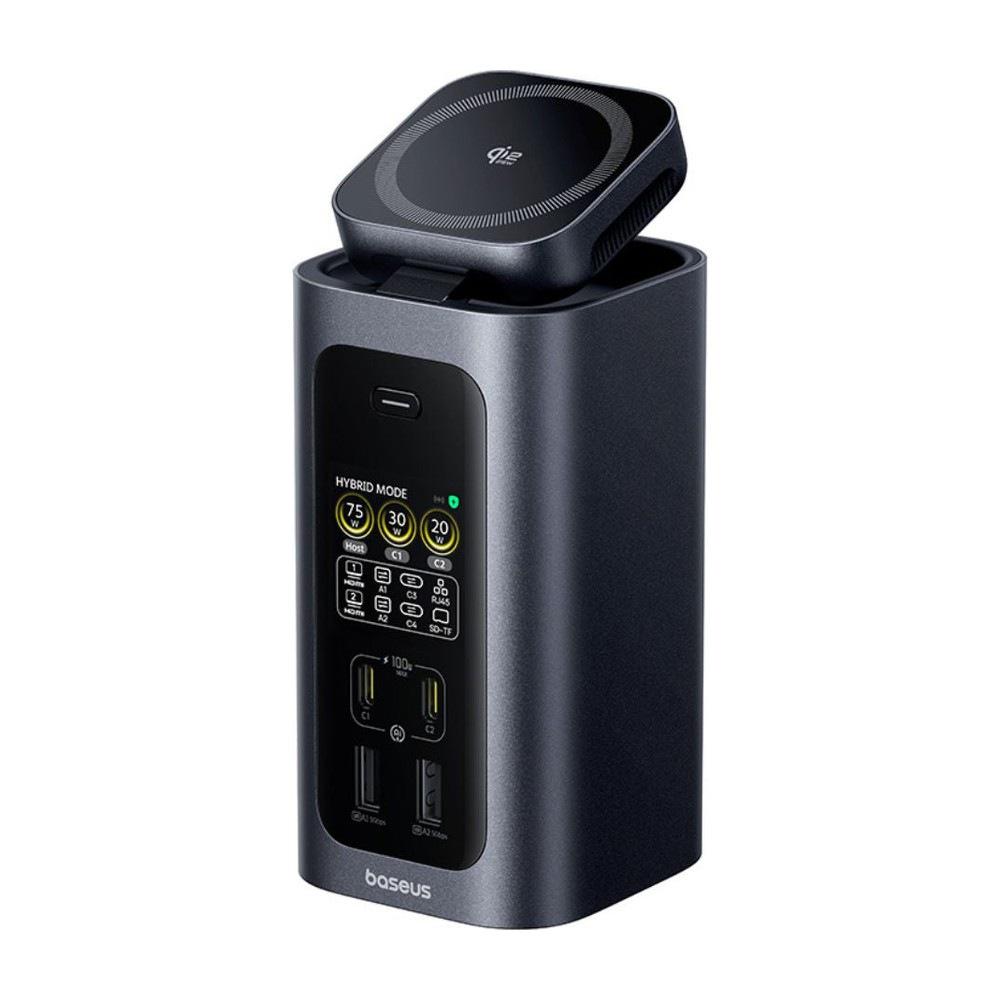
Anyone who works at a desk with a notebook and monitors knows this well: the notebook charger, another one for the mobile, a hub for the monitors, and the power cable. Baseus Spacemate RD1 Pro hides it all in one aluminum tower with 15 ports, which connects two 4K monitors via a single USB-C cable and at the same time provides up to 160 W for charging. On top, it also comes with a fold-out magnetic Qi2.2 25 W pad for the phone, plus a small display at the front where you can see how many watts are currently going to which device.
An office hub for one cable, shipped from a European warehouse
Baseus Spacemate RD1 Pro docking station is sold directly by the official Baseus European shop, which ships from European warehouses via Amazon logistics. The price includes VAT and shipping, so you don’t pay anything extra and the product has a two-year warranty and 14 days for returns. The store states delivery in 5 to 10 business days, but for Slovakia, based on its own terms, it also counts 14 to 20 business days. For comparison, on German Amazon the same station costs over 250 €.
Baseus Spacemate RD1 Pro 15-in-1 docking station
 EU warehouse
TIPExpress delivery from a European warehouse without customs duty and VAT.
This product will be delivered to you express from a local warehouse in Europe. Delivery from EU warehouses usually takes 2–10 days and is handled by a courier. When delivered, you don’t pay any extra fees—no customs duty or VAT.
What reviewers and buyers say about it
On Amazon, RD1 Pro currently has a rating of 4.4 out of 5 from 40 reviews, and buyers most often praise that in the morning you just plug in one cable and the whole desk comes to life. One USA user managed to run two 4K monitors, ethernet, a webcam, notebook charging and also wireless charging for the phone on a Windows laptop. According to them, everything worked without a single hang-up. Another buyer liked the display, because right away you can see how many watts go to which port.
Independent tests sound similar. The Notebookcheck editorial team measured, with an external SSD, read speeds of around 980 MB/s via the dock—just a few percent less than with direct connection—and during several-hours of testing they didn’t notice overheating or coil whine. The German Techtest recommends it for those who want both a charger and a dock in one device, but criticizes its higher standby power consumption, around 3.7 W with no devices connected. A buyer who gave only three stars would have welcomed a DisplayPort port and a 3.5 mm audio output for speakers, which the station doesn’t have.
Fifteen ports and two 4K monitors
On the front you’ve got two USB-C ports with 100 W for charging and two USB-A ports with 5 Gb/s, which are great for a key or a mouse. On the back there’s a host USB-C port for a notebook, which charges it up to 100 W and also carries data and video through it. Next to that you’ll find two USB-C ports with 10 Gb/s speed, two slower USB-A ports for a keyboard or a mouse receiver, two HDMI ports, gigabit Ethernet, and an SD and microSD card reader. Just know that the front USB-C ports are for charging only, so the external drive belongs at the back.


With a Windows laptop and a full-featured USB-C, USB4 or Thunderbolt, the RD1 Pro supports two 4K monitors at 60 Hz, each with its own content. If you use only one monitor, the second HDMI will run it in 4K at 120 Hz. The catch is with MacBooks, because macOS doesn’t support MST over a single USB-C cable, so the two monitors will show the same image, and you’ll only get an extended desktop on one. The same is reported by iPad owners. So it isn’t a Thunderbolt dock—data transfers at 10 Gb/s, which is more than enough for everyday work and even for a fast SSD.
160 W that it splits automatically
In the box there is a 180 W GaN adapter. The station keeps 20 W for itself, and the remaining 160 W are split between the notebook, the two front USB-C ports, and the wireless pad. The notebook always gets priority, so when it asks for the full 100 W, only 60 W remains for the other devices. When you charge the notebook with its own charger, the front ports can use the full power, which is enough for a tablet and a second notebook at the same time.


Power distribution from Baseus shortens charging of three devices at once by about 46 minutes compared to regular chargers with fixed power splitting. Heat is dissipated by an aluminum body with a graphene layer and a small fan that, according to tests, isn’t audible during operation.
Display with watts and a flip-out Qi2 charger
The front display shows which ports are occupied and how many watts go to the laptop and the front USB-C. You switch between hybrid mode, when the dock is fully utilized, and charging mode, and with one button you turn it off if it bothers you on your desk at night. It also alerts you to a charging issue, for example overvoltage or a short circuit.


The magnetic top pad is certified for Qi2.2 with 25 W, can be pulled out and tilted up to 80°, and the phone can stand upright or sideways on it, so it works as a video-call stand. However, full power is used only by phones with Qi2; older Android phones without magnets charge only at 5 W. Notebookcheck also noticed that the joint loosens over time with frequent angle adjustments.
For whom it’s worth it
RD1 Pro makes the most sense on a work desk with a Windows laptop and two monitors, where it replaces the hub, the laptop charger, and the phone’s wireless charger. If you have a MacBook and want two extended displays, you need the more expensive Thunderbolt dock. If you need less charging and want more monitors, check out the older Baseus Spacemate 11-in-1, which we introduced last year.


Dimensions are 13,6 × 7,1 × 6,9 cm, so the tower takes up less space on your desk than a typical flat docking station with an external power supply. Thicker HDMI cables can still topple it with an easy pull, so it’s worth routing them behind the desk.
| - | Baseus Spacemate RD1 Pro 15-in-1 |
|---|---|
| Connection to the laptop | USB-C (100 W PD / data / video) |
| Front ports | 2× USB-C 100 W (charging only) / 2× USB-A 5 Gb/s |
| Rear ports | 2× USB-C 10 Gb/s / 2× USB-A 480 Mb/s |
| Gaming monitors | 2× HDMI / 2× 4K 60 Hz or 1× 4K 120 Hz |
| Network | Gigabit Ethernet |
| Card reader | SD and microSD (UHS-I) |
| Wireless charging | Qi2.2 magnetic to 25 W |
| Total power | 160 W |
| Adapter included in the box | 180 W GaN |
| Compatibility | Windows 10 / 11 / macOS 10.15 and newer |
| Dimensions | 13.6 × 7.1 × 6.9 cm |
Follow the China Planet website, subscribe to our monthly newsletter, and be sure to check out our Facebook page, the China Planet group, and join our Telegram, where we add the best offers and coupons from China every single day.
Don’t miss the best coupons 📩
Subscribe and we’ll email you new coupons before they expire. We only send it once a month — no spam.


