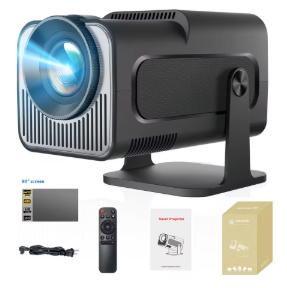
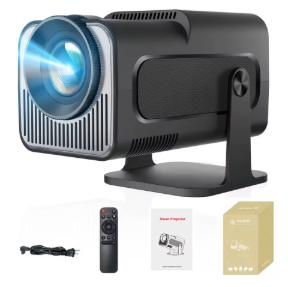
If you’re looking for a portable projector that can play 4K videos, has a built-in Android system, and also doesn’t take up much space, Magcubic HY320 Mini is the answer. This mini projector combines modern technologies, including WiFi 6 and Bluetooth 5.0, in a small but powerful body. Thanks to its flexible projection and support for Android apps, it’s an ideal solution for movies, presentations, and home cinema. With a resolution of 1280 x 720 px and support for decoding 4K video, it’s a great choice for anyone looking for an affordable and portable projector.
With a coupon and extra discount in your cart
You can find the mini projector Magcubic HY320 Mini on AliExpress from a verified seller. It’s located directly in a European warehouse, which means very fast delivery—already within a week—and with no additional fees! There’s also a version available with an 80″ projection screen.
ChinaPlanet deal
Magcubic HY320 Mini 720p projector
57,50 €You save 9,82 €
47,68 €
CouponIFPSXBKCopied!
% Cart discount3,85 €?This discount is applied automatically in the cart before checkout — no coupon code needed.
Are you shopping on AliExpress for the first time?See the guide!
Updated 18. 8. 2025 at 07:41
TIPExpress delivery from the Polish warehouse with no customs duty and VAT.
This product will be delivered to you express from a local Polish warehouse. Shipping from Poland usually takes 7-10 days and is handled by a courier. When it arrives, you don’t pay any extra fees—no customs duty or VAT.
TIPExpress delivery from the French warehouse with no customs duties or VAT.
This product will be delivered express from the local Spanish warehouse. Shipping from Spain usually takes 7-10 days and is handled by a courier. On delivery, you don’t pay any extra fees—no customs duty or VAT.
Compact, lightweight, and flexible
The projector body measures just 10 x 18.8 cm and weighs only 0.5 kg. Despite that, it can display an image size from 40 to 130 inches, ensuring a cinematic experience anywhere—on a wall, ceiling, or screen. With its flexible 180° projection angle, you can set up the HY320 on a table, shelf, or even project from the floor upward. Automatic image keystone correction and manual focus ensure a sharp, properly aligned image every time.
Another big advantage is the quiet operation under 40 dB, made possible by an efficient cooling system with an internal turbine and axial airflow. So you can enjoy projection without disruptive noise.
Android 11, WiFi 6, and Bluetooth 5.0
The Magcubic HY320 Mini comes with an Android 11 system supporting over 4,000 apps, including Netflix, YouTube, and Amazon Prime. The device has 1 GB of RAM and 8 GB of storage, which is enough for most streaming apps. Internet connectivity is provided by dual WiFi 6, which is significantly faster and more stable than previous standards.
The built-in Bluetooth 5.0 module lets you connect wirelessly to external speakers, soundbars, or headphones. The signal is stable, the range is wider, and the response is instant—perfect for evening movie watching or listening to music.
Ad
Support for 4K videos and multimedia
Even though the projector’s native resolution is 720p, it can easily decode 4K videos in various formats—HEVC, VP9, AVS2, AVC 4K @ 30fps, and more. It also supports displaying images (JPG, BMP, PNG) and playing music in MP3, WMA, and AAC formats. It also includes a TXT text-reading function.
Thanks to the built-in HDMI port, you can also connect external devices such as laptops, gaming consoles, or media players. Screen mirroring from smartphones via WiFi is supported, including devices with Android and iOS.
Technical specifications of the Magcubic HY320 Mini
-
Magcubic HY320 Mini
Resolution
1280 x 720 px (native)
Video support
up to 4K (decoding)
WiFi
WiFi 6 (2.4 GHz / 5 GHz)
Bluetooth
5.0
OS
Android 11
RAM
1 GB
Storage
8 GB
Screen size
40 – 130 inches
Projection angle
180° flexible
Sound noise level
< 40 dB
Dimensions
10 x 18.8 cm
Weight
0.5 kg
Connectivity
HDMI / WiFi / Bluetooth / USB
What’s in the box?
In the box, you’ll find the projector itself, a power cable, a remote control (without batteries), and a user manual. After connecting to WiFi and completing a short initialization, it’s ready to play content. With the Android system, you can install your favorite apps directly on the device and watch movies or videos without any additional video source.
Ad
Follow the China Planet website, sign up for our monthly newsletter, and make sure you also follow our Facebook page, the group All from EU warehouses, and join our Telegram—where we add the best deals and coupons from China day after day.