A planet full of gadgets from China · a database of the best coupons
Product comparisons

TOP 6 cheap gadgets from China #274

23. May 2026 4 min read 0 comments

With the next weekend, we’ve got another episode of the TOP 6 cheap gadgets from China, that you liked so much—and today it’s already the two hundred seventy-fourth installment! We picked another set of six interesting items from international sellers at great prices.

Join our Messenger channel

To catch the latest episode of the TOP 6 cheap gadgets from China every time, give us a like on Facebook, join the FB group, or follow Telegram. Here we always share our articles.

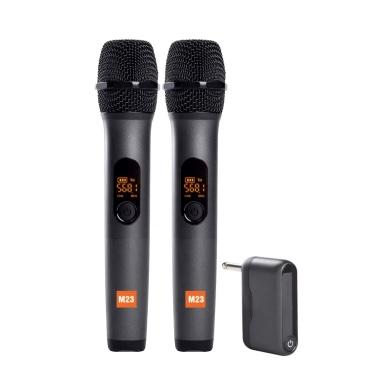
1. M23 UHF 2 wireless microphones

M23 UHF is a practical 2-channel wireless microphone system with a pair of handheld microphones and a rechargeable receiver that’s great for karaoke, parties, smaller DJ sets, presentations, or sound reinforcement in church. Thanks to the wireless design, you get more freedom of movement, and the UHF technology should provide a more stable audio transmission with less interference than typical cheap microphones. The rechargeable receiver makes things simple to use without constantly swapping batteries, so it’s an affordable option for anyone who wants to quickly and easily amplify singing, spoken word, or a smaller event.

ChinaPlanet deal

M23 UHF 2 wireless microphones

15-day delivery
M23 UHF 2 bezdrôtové mikrofóny
15-day delivery
35,37 €
No coupon
Are you shopping on AliExpress for the first time? See the guide!
Updated 23. 5. 2026 at 11:23
TIP15-day delivery via Aliexpress Standard Shipping

For this product, Aliexpress Standard Shipping is available with guaranteed delivery in 15 days. This is the most reliable way to ship and, in most cases, it’s delivered by a courier company. 15-day delivery we’ve tested it for real.

When you order from a Chinese warehouse, AliExpress adds a customs duty charge of approximately 3,70 € per order to your cart. When you receive the shipment, you won’t have to pay anything extra.

Track this product’s price

As soon as we post a new coupon, we’ll send you an email. You can unsubscribe from tracking anytime.

Are you shopping on AliExpress for the first time?

The process is via the AliExpress mobile app, where most people shop. There are two key things: don’t use Buy now and enter the coupon only in the order summary, in the field Promo code. After you click Pay now, you won’t be able to add it.

  1. Copy the code and click Use discountIn our article, copy the coupon and click the button GET DISCOUNT. The link will take you directly to the product in the AliExpress app.
  2. Use Add to cart instead of Buy nowOn the product card, scroll down and tap Add to cart. Don’t use the Buy now button—you’ll skip the cart, and later you won’t have anywhere to enter the coupon. Before that, double-check the variant: the color, the version, and whether it ships from an EU warehouse.
  3. Through the cart, go to CheckoutA pop-up will appear: Added to cart! — tap Check it out in it. If it disappeared, open the cart with the icon at the bottom right. In the cart, check the product and quantity, then click the red Checkout. Only the items marked with the red ring will be applied.
  4. Enter your address and card, then look for Promo codeIn the order summary, first fill in the delivery address and payment card at the top. Below them there’s a line Promo code — expand it with the arrow on the right.
    Riadok Promo code v zhrnutí objednávky v aplikácii AliExpress
    Look for this line under the address and payment method.
  5. Paste the code and confirm ApplyIn the field Promo code paste the copied code and click the black Apply. The code is case-sensitive and must not contain spaces.
    Políčko Promo code s kódom a tlačidlom Apply v aplikácii AliExpress
    Paste the code into the field and confirm with the Apply button.
  6. Check the savings and payIn the Summary expand the line Saved — you’ll see the applied coupon there as AliExpress coupons/codes. Only when Total is really lower, click Pay now.
    Riadok Saved s uplatneným kupónom a znížený Total v aplikácii AliExpress
    The applied coupon will appear in the Saved line and will reduce the Total.
Apply the discount already at the order summary. After you click Pay now, you can no longer add a coupon. If Apply shows an error, the code has either expired, doesn’t apply to your items, or the order doesn’t meet the minimum amount.
The Store Coupon also goes in the same field. — a coupon from the seller itself, which isn’t always available and changes from day to day. AliExpress coupons can’t be combined, so try both and go with the one that gives you more. Coins are added automatically.

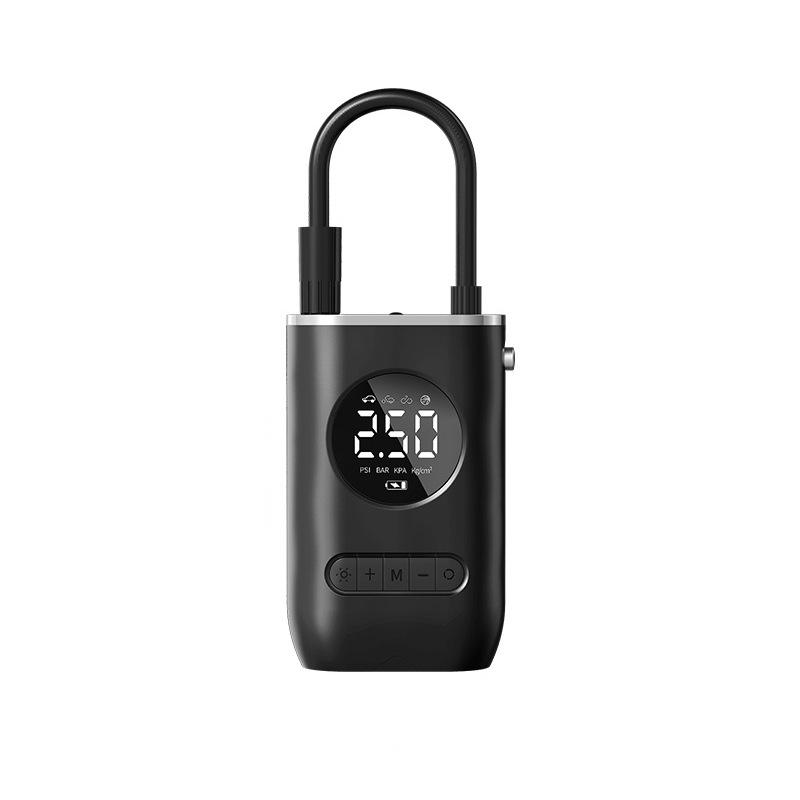
2. Mini electric air compressor

Small, compact, yet incredibly useful for the car. That’s exactly what this cordless electric air compressor is—it's able to inflate car, motorcycle, and bicycle tires, but also balls or inflatable toys for summer. Thanks to its compact size, you can toss it into the trunk or a storage compartment and keep it on hand for unexpected situations on the road.

ChinaPlanet deal

Mini electric air compressor

EU warehouse
Mini elektrický kompresor
ES warehouse
27,07 €You save 3,91 €
23,16 €

Price history

0,80 €cheaper than the average price
Cheapest 19,19 €Most expensive 31,02 €
Are you shopping on AliExpress for the first time? See the guide!
Updated 17. 6. 2026 at 13:05
TIPExpress delivery from a Spanish warehouse without customs duties or VAT.

This product will be delivered express from the local Spanish warehouse. Shipping from Spain usually takes 7-10 days and is handled by a courier. On delivery, you don’t pay any extra fees—no customs duty or VAT.

Track this product’s price

As soon as we post a new coupon, we’ll send you an email. You can unsubscribe from tracking anytime.

Are you shopping on AliExpress for the first time?

The process is via the AliExpress mobile app, where most people shop. There are two key things: don’t use Buy now and enter the coupon only in the order summary, in the field Promo code. After you click Pay now, you won’t be able to add it.

  1. Copy the code and click Use discountIn our article, copy the coupon and click the button GET DISCOUNT. The link will take you directly to the product in the AliExpress app.
  2. Use Add to cart instead of Buy nowOn the product card, scroll down and tap Add to cart. Don’t use the Buy now button—you’ll skip the cart, and later you won’t have anywhere to enter the coupon. Before that, double-check the variant: the color, the version, and whether it ships from an EU warehouse.
  3. Through the cart, go to CheckoutA pop-up will appear: Added to cart! — tap Check it out in it. If it disappeared, open the cart with the icon at the bottom right. In the cart, check the product and quantity, then click the red Checkout. Only the items marked with the red ring will be applied.
  4. Enter your address and card, then look for Promo codeIn the order summary, first fill in the delivery address and payment card at the top. Below them there’s a line Promo code — expand it with the arrow on the right.
    Riadok Promo code v zhrnutí objednávky v aplikácii AliExpress
    Look for this line under the address and payment method.
  5. Paste the code and confirm ApplyIn the field Promo code paste the copied code and click the black Apply. The code is case-sensitive and must not contain spaces.
    Políčko Promo code s kódom a tlačidlom Apply v aplikácii AliExpress
    Paste the code into the field and confirm with the Apply button.
  6. Check the savings and payIn the Summary expand the line Saved — you’ll see the applied coupon there as AliExpress coupons/codes. Only when Total is really lower, click Pay now.
    Riadok Saved s uplatneným kupónom a znížený Total v aplikácii AliExpress
    The applied coupon will appear in the Saved line and will reduce the Total.
Apply the discount already at the order summary. After you click Pay now, you can no longer add a coupon. If Apply shows an error, the code has either expired, doesn’t apply to your items, or the order doesn’t meet the minimum amount.
The Store Coupon also goes in the same field. — a coupon from the seller itself, which isn’t always available and changes from day to day. AliExpress coupons can’t be combined, so try both and go with the one that gives you more. Coins are added automatically.

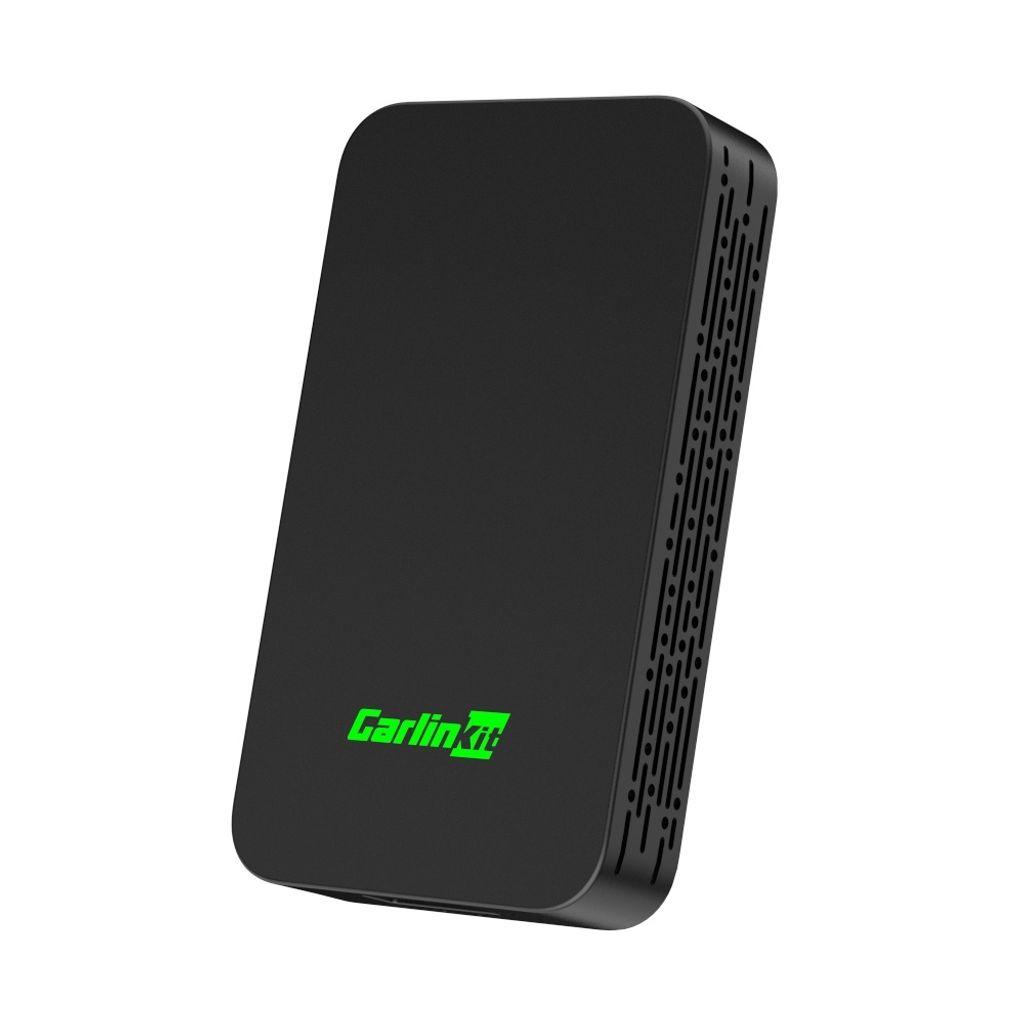
3. Carlinkit 5.0

Carlinkit 5.0 is a product that enhances and modernizes your car’s connectivity. If your vehicle supports Android Auto or Apple CarPlay but only via cable, this upgraded box ensures smooth wireless transmission for those platforms from your phone.

ChinaPlanet deal

Carlinkit 5.0

Black
Carlinkit 5.0
15-day delivery
43,07 €You save 4,12 €
38,95 €
No coupon

Price history

5,89 €more expensive than the average price
Cheapest 24,23 €Most expensive 41,39 €
Are you shopping on AliExpress for the first time? See the guide!
Updated 30. 10. 2026 at 10:12
TIP15-day delivery via Aliexpress Standard Shipping

For this product, Aliexpress Standard Shipping is available with guaranteed delivery in 15 days. This is the most reliable way to ship and, in most cases, it’s delivered by a courier company. 15-day delivery we’ve tested it for real.

When you order from a Chinese warehouse, AliExpress adds a customs duty charge of approximately 3,70 € per order to your cart. When you receive the shipment, you won’t have to pay anything extra.

Track this product’s price

As soon as we post a new coupon, we’ll send you an email. You can unsubscribe from tracking anytime.

Are you shopping on AliExpress for the first time?

The process is via the AliExpress mobile app, where most people shop. There are two key things: don’t use Buy now and enter the coupon only in the order summary, in the field Promo code. After you click Pay now, you won’t be able to add it.

  1. Copy the code and click Use discountIn our article, copy the coupon and click the button GET DISCOUNT. The link will take you directly to the product in the AliExpress app.
  2. Use Add to cart instead of Buy nowOn the product card, scroll down and tap Add to cart. Don’t use the Buy now button—you’ll skip the cart, and later you won’t have anywhere to enter the coupon. Before that, double-check the variant: the color, the version, and whether it ships from an EU warehouse.
  3. Through the cart, go to CheckoutA pop-up will appear: Added to cart! — tap Check it out in it. If it disappeared, open the cart with the icon at the bottom right. In the cart, check the product and quantity, then click the red Checkout. Only the items marked with the red ring will be applied.
  4. Enter your address and card, then look for Promo codeIn the order summary, first fill in the delivery address and payment card at the top. Below them there’s a line Promo code — expand it with the arrow on the right.
    Riadok Promo code v zhrnutí objednávky v aplikácii AliExpress
    Look for this line under the address and payment method.
  5. Paste the code and confirm ApplyIn the field Promo code paste the copied code and click the black Apply. The code is case-sensitive and must not contain spaces.
    Políčko Promo code s kódom a tlačidlom Apply v aplikácii AliExpress
    Paste the code into the field and confirm with the Apply button.
  6. Check the savings and payIn the Summary expand the line Saved — you’ll see the applied coupon there as AliExpress coupons/codes. Only when Total is really lower, click Pay now.
    Riadok Saved s uplatneným kupónom a znížený Total v aplikácii AliExpress
    The applied coupon will appear in the Saved line and will reduce the Total.
Apply the discount already at the order summary. After you click Pay now, you can no longer add a coupon. If Apply shows an error, the code has either expired, doesn’t apply to your items, or the order doesn’t meet the minimum amount.
The Store Coupon also goes in the same field. — a coupon from the seller itself, which isn’t always available and changes from day to day. AliExpress coupons can’t be combined, so try both and go with the one that gives you more. Coins are added automatically.

Ad

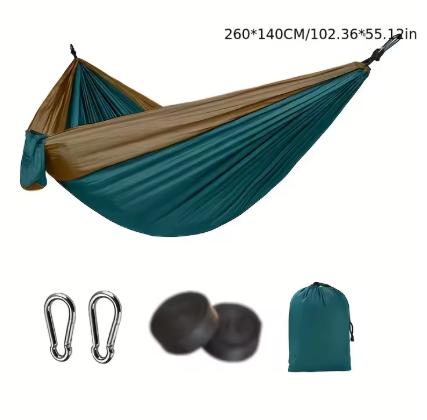
4. Nylon hanging hammock mesh

Rest outdoors, in the garden, or on the terrace—relaxation has never been easier or more comfortable. This nylon hanging hammock net is the perfect choice for anyone who wants to put their feet up for a moment, unwind with a book, or simply enjoy some quiet time in the shade of trees. This type of net is made from durable, lightweight nylon, which guarantees not only excellent load capacity but also easy portability. It’s available in two sizes—one for individuals and one for pairs—and in multiple color options, so everyone can find their own.

ChinaPlanet deal

Nylon hanging hammock net

Nylonová závesná hamak sieť
13,59 €You save 2,76 €
10,83 €

Price history

2,58 €cheaper than the average price
Cheapest 10,49 €Most expensive 16,93 €
Are you shopping on AliExpress for the first time? See the guide!
Updated 30. 10. 2026 at 10:12
TIP15-day delivery via Aliexpress Standard Shipping

For this product, Aliexpress Standard Shipping is available with guaranteed delivery within 15 days. It’s the most reliable delivery method and, in most cases, it’s handled by a courier company. The 15-day delivery is something we actually tested.

When you order from a Chinese warehouse, AliExpress adds a customs duty charge of approximately 3,70 € per order to your cart. When you receive the shipment, you won’t have to pay anything extra.

Track this product’s price

As soon as we post a new coupon, we’ll send you an email. You can unsubscribe from tracking anytime.

Are you shopping on AliExpress for the first time?

The process is via the AliExpress mobile app, where most people shop. There are two key things: don’t use Buy now and enter the coupon only in the order summary, in the field Promo code. After you click Pay now, you won’t be able to add it.

  1. Copy the code and click Use discountIn our article, copy the coupon and click the button GET DISCOUNT. The link will take you directly to the product in the AliExpress app.
  2. Use Add to cart instead of Buy nowOn the product card, scroll down and tap Add to cart. Don’t use the Buy now button—you’ll skip the cart, and later you won’t have anywhere to enter the coupon. Before that, double-check the variant: the color, the version, and whether it ships from an EU warehouse.
  3. Through the cart, go to CheckoutA pop-up will appear: Added to cart! — tap Check it out in it. If it disappeared, open the cart with the icon at the bottom right. In the cart, check the product and quantity, then click the red Checkout. Only the items marked with the red ring will be applied.
  4. Enter your address and card, then look for Promo codeIn the order summary, first fill in the delivery address and payment card at the top. Below them there’s a line Promo code — expand it with the arrow on the right.
    Riadok Promo code v zhrnutí objednávky v aplikácii AliExpress
    Look for this line under the address and payment method.
  5. Paste the code and confirm ApplyIn the field Promo code paste the copied code and click the black Apply. The code is case-sensitive and must not contain spaces.
    Políčko Promo code s kódom a tlačidlom Apply v aplikácii AliExpress
    Paste the code into the field and confirm with the Apply button.
  6. Check the savings and payIn the Summary expand the line Saved — you’ll see the applied coupon there as AliExpress coupons/codes. Only when Total is really lower, click Pay now.
    Riadok Saved s uplatneným kupónom a znížený Total v aplikácii AliExpress
    The applied coupon will appear in the Saved line and will reduce the Total.
Apply the discount already at the order summary. After you click Pay now, you can no longer add a coupon. If Apply shows an error, the code has either expired, doesn’t apply to your items, or the order doesn’t meet the minimum amount.
The Store Coupon also goes in the same field. — a coupon from the seller itself, which isn’t always available and changes from day to day. AliExpress coupons can’t be combined, so try both and go with the one that gives you more. Coins are added automatically.

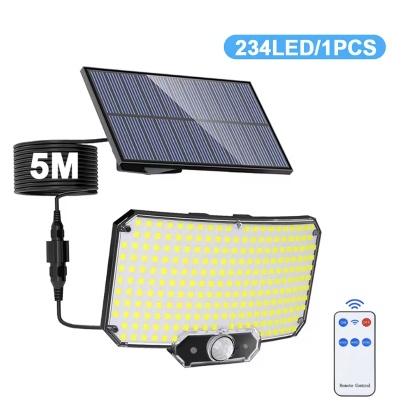
5. 366LED solar LED light

366LED solar LED light is a practical outdoor lighting solution for your garden, yard, garage, terrace, or the entrance to your home—works completely cable-free thanks to power from a solar panel. It offers a high number of LED diodes, a motion sensor, and water resistance according to IP65 standards, so it’s suitable for year-round outdoor use. When it gets dark, it can automatically light up the area when movement is detected, which is useful not only for a more comfortable arrival home, but also as a simple security feature against unwanted visitors.

ChinaPlanet deal

366LED solar LED light

15-day delivery
366LED solárne LED svetlo
20-day delivery
27,74 €You save 0,10 €
27,64 €
No coupon

Price history

1,46 €more expensive than the average price
Cheapest 18,69 €Most expensive 27,74 €
Are you shopping on AliExpress for the first time? See the guide!
Updated 30. 10. 2026 at 10:12
TIP20-day delivery via Aliexpress Standard Shipping

For this product, Aliexpress Standard Shipping is available with guaranteed delivery within 20 days. This is the most reliable shipping method and, in most cases, it’s handled by a courier company. The 20-day delivery we truly tested.

When you order from a Chinese warehouse, AliExpress adds a customs duty charge of approximately 3,70 € per order to your cart. When you receive the shipment, you won’t have to pay anything extra.

Track this product’s price

As soon as we post a new coupon, we’ll send you an email. You can unsubscribe from tracking anytime.

Are you shopping on AliExpress for the first time?

The process is via the AliExpress mobile app, where most people shop. There are two key things: don’t use Buy now and enter the coupon only in the order summary, in the field Promo code. After you click Pay now, you won’t be able to add it.

  1. Copy the code and click Use discountIn our article, copy the coupon and click the button GET DISCOUNT. The link will take you directly to the product in the AliExpress app.
  2. Use Add to cart instead of Buy nowOn the product card, scroll down and tap Add to cart. Don’t use the Buy now button—you’ll skip the cart, and later you won’t have anywhere to enter the coupon. Before that, double-check the variant: the color, the version, and whether it ships from an EU warehouse.
  3. Through the cart, go to CheckoutA pop-up will appear: Added to cart! — tap Check it out in it. If it disappeared, open the cart with the icon at the bottom right. In the cart, check the product and quantity, then click the red Checkout. Only the items marked with the red ring will be applied.
  4. Enter your address and card, then look for Promo codeIn the order summary, first fill in the delivery address and payment card at the top. Below them there’s a line Promo code — expand it with the arrow on the right.
    Riadok Promo code v zhrnutí objednávky v aplikácii AliExpress
    Look for this line under the address and payment method.
  5. Paste the code and confirm ApplyIn the field Promo code paste the copied code and click the black Apply. The code is case-sensitive and must not contain spaces.
    Políčko Promo code s kódom a tlačidlom Apply v aplikácii AliExpress
    Paste the code into the field and confirm with the Apply button.
  6. Check the savings and payIn the Summary expand the line Saved — you’ll see the applied coupon there as AliExpress coupons/codes. Only when Total is really lower, click Pay now.
    Riadok Saved s uplatneným kupónom a znížený Total v aplikácii AliExpress
    The applied coupon will appear in the Saved line and will reduce the Total.
Apply the discount already at the order summary. After you click Pay now, you can no longer add a coupon. If Apply shows an error, the code has either expired, doesn’t apply to your items, or the order doesn’t meet the minimum amount.
The Store Coupon also goes in the same field. — a coupon from the seller itself, which isn’t always available and changes from day to day. AliExpress coupons can’t be combined, so try both and go with the one that gives you more. Coins are added automatically.
Ad

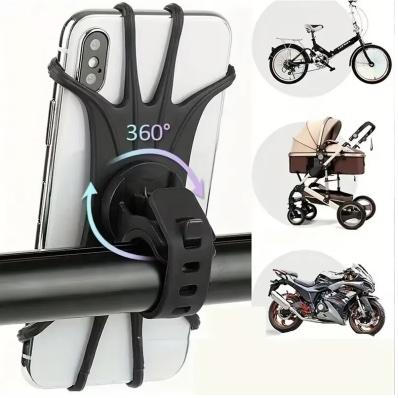
6. Universal phone holder for a bicycle

A universal phone holder for a bicycle is an affordable and practical accessory for anyone who wants their smartphone in view while riding. It fits a bicycle, an e-scooter, a motorcycle, a stroller, or a folding e-bike, while the phone is held in place with a flexible silicone grip. A big advantage is the 360° rotating mechanism, so you can set your phone to portrait or landscape orientation depending on your navigation, apps, or preferences. The silicone design is lightweight, easy to install, and—depending on the mounting type—should fit most common smartphones and handlebars. It’s a smart spring gadget for a few euros that you’ll especially appreciate on day trips, while cycling, or commuting around town.

ChinaPlanet deal

Universal phone holder for a bicycle

15-day delivery
Univerzálny držiak na telefón na bicykel
15-day delivery
2,99 €
No coupon
Are you shopping on AliExpress for the first time? See the guide!
Updated 30. 10. 2026 at 10:12
TIP15-day delivery via Aliexpress Standard Shipping

For this product, Aliexpress Standard Shipping is available with guaranteed delivery within 15 days. It’s the most reliable delivery method and, in most cases, it’s handled by a courier company. The 15-day delivery is something we actually tested.

When you order from a Chinese warehouse, AliExpress adds a customs duty charge of approximately 3,70 € per order to your cart. When you receive the shipment, you won’t have to pay anything extra.

Track this product’s price

As soon as we post a new coupon, we’ll send you an email. You can unsubscribe from tracking anytime.

Are you shopping on AliExpress for the first time?

The process is via the AliExpress mobile app, where most people shop. There are two key things: don’t use Buy now and enter the coupon only in the order summary, in the field Promo code. After you click Pay now, you won’t be able to add it.

  1. Copy the code and click Use discountIn our article, copy the coupon and click the button GET DISCOUNT. The link will take you directly to the product in the AliExpress app.
  2. Use Add to cart instead of Buy nowOn the product card, scroll down and tap Add to cart. Don’t use the Buy now button—you’ll skip the cart, and later you won’t have anywhere to enter the coupon. Before that, double-check the variant: the color, the version, and whether it ships from an EU warehouse.
  3. Through the cart, go to CheckoutA pop-up will appear: Added to cart! — tap Check it out in it. If it disappeared, open the cart with the icon at the bottom right. In the cart, check the product and quantity, then click the red Checkout. Only the items marked with the red ring will be applied.
  4. Enter your address and card, then look for Promo codeIn the order summary, first fill in the delivery address and payment card at the top. Below them there’s a line Promo code — expand it with the arrow on the right.
    Riadok Promo code v zhrnutí objednávky v aplikácii AliExpress
    Look for this line under the address and payment method.
  5. Paste the code and confirm ApplyIn the field Promo code paste the copied code and click the black Apply. The code is case-sensitive and must not contain spaces.
    Políčko Promo code s kódom a tlačidlom Apply v aplikácii AliExpress
    Paste the code into the field and confirm with the Apply button.
  6. Check the savings and payIn the Summary expand the line Saved — you’ll see the applied coupon there as AliExpress coupons/codes. Only when Total is really lower, click Pay now.
    Riadok Saved s uplatneným kupónom a znížený Total v aplikácii AliExpress
    The applied coupon will appear in the Saved line and will reduce the Total.
Apply the discount already at the order summary. After you click Pay now, you can no longer add a coupon. If Apply shows an error, the code has either expired, doesn’t apply to your items, or the order doesn’t meet the minimum amount.
The Store Coupon also goes in the same field. — a coupon from the seller itself, which isn’t always available and changes from day to day. AliExpress coupons can’t be combined, so try both and go with the one that gives you more. Coins are added automatically.

Got a tip for us? Send it to us via our form!

Follow the China Planet website, subscribe to our monthly newsletter, and be sure to check out our Facebook page, the China Planet group, and join our Telegram, where we add the best offers and coupons from China every single day.

Add us as your preferred source on Google

Don’t miss the best coupons 📩

Subscribe and we’ll email you new coupons before they expire. We only send it once a month — no spam.

Ad Engerio