


Verdict: Vivo X70 Pro+
Our editorial rating is based on product testing.
- Generous package
- Attractive design
- Top-notch cameras
- Beautiful display
- Fast (even wireless) charging
- High performance and 12 GB RAM
- Well-thought-out software
- Issues related to the Chinese version
- Notifications sometimes arrive late
- Failed to connect Samsung watch
- A lot of bloatware—everything can’t be removed
The Vivo X70 Pro+ hit the market only a few months after its predecessor, and the question is whether the manufacturer did a good job—and whether the improvements are interesting enough for customers to go for this newer, pricier model. Compared to the older Vivo X60 Pro+, it brings even better cameras, improved water resistance, slightly higher performance, a higher-resolution display with a variable refresh rate, and wireless charging.
In the detailed review, we’ll check how the smartphone takes photos, what the video quality is like, but we’ll also look at performance, charging, battery life, and share our experience after intensive use.
Where to buy
Vivo X70 Pro+ isn’t sold in Slovakia. The best option is to order it from the TradingShenzen online store, which we did as well. The phone arrived within a month; we didn’t pay any customs duty or VAT—just €16 for shipping. For more info on how we ordered the device, you can find it here. We have the Chinese version of the smartphone, where all Google services work—Google Play included—and there’s an English language option.
Vivo X70 Pro+

TIPExpress delivery from a European warehouse without customs duty and VAT.
This product will be delivered to you express from a local warehouse in Europe. Delivery from EU warehouses usually takes 2–10 days and is handled by a courier. When delivered, you don’t pay any extra fees—no customs duty or VAT.
TIPWith Global Priority shipping, you don’t pay any additional fees.
We recommend choosing Global Priority shipping, where you won’t have to pay anything extra. Customs fees and any VAT will be handled by the seller directly for you. Shipping can be selected in the cart after you enter your delivery address. Delivery with Global Priority usually takes about 15 days, but it may also take longer.
TIPWith Global Priority shipping, you don’t pay any additional fees.
We recommend choosing Global Priority shipping, where you won’t have to pay anything extra. Customs fees and any VAT will be handled by the seller directly for you. Shipping can be selected in the cart after you enter your delivery address. Delivery with Global Priority usually takes about 15 days, but it may also take longer.
TIPWith Global Priority shipping, you don’t pay any additional fees.
We recommend choosing Global Priority shipping, where you won’t have to pay anything extra. Customs fees and any VAT will be handled by the seller directly for you. Shipping can be selected in the cart after you enter your delivery address. Delivery with Global Priority usually takes about 15 days, but it may also take longer.
Technical specifications
| Vivo X70 Pro+ | |
|---|---|
| Dimensions | 164.5 x 75,2 x 8.9 mm |
| Weight | 209 g |
| Processor | Qualcomm Snapdragon 888+ / 5 nm / 3,42 GHz |
| Graphics chip | Adreno 660 |
| Display | 6.67″ AMOLED LTPO |
| Resolution 3200 x 1440 px | |
| Refresh rate 120 Hz | |
| Sampling rate 240 Hz | |
| Aspect ratio 20:9 | |
| HDR10+ | |
| RAM and storage | LPDDD5 RAM + UFS 3.1 storage |
| 8 + 256 GB / 12 + 256 GB / 12 + 512 GB | |
| Cameras | Main 50 MP wide-angle / f/1.6 aperture / OIS |
| 48 MP ultra-wide / f/2.2 aperture / 114° field of view / gimbal stabilization | |
| 12 MPx telephoto lens / aperture f/1.6 / OIS 2x optical zoom 8 MPx periscope / f/3.4 / OIS / 5x optical zoom |
|
| Front camera 32 MPx / f/2.5 aperture | |
| Battery and charging | 4500 mAh / 55 W wired charging / 50 W wireless charging |
| 5G support | yes |
| Connectivity | Bluetooth 5.2; NFC; WiFi 6; GPS: L1+L5; Galileo: E1+E5a | GLONASS: G1 |
Package contents
In times when smartphone manufacturers strip features from the box, the Vivo X70 Pro+ package is a welcome change. That’s exactly how it should look for flagship devices. After all, these are devices that don’t come cheap—so they deserve some extra accessories.
Unboxing this smartphone is literally a pleasure. Once you remove the top part of the box, you’re immediately drawn to the camera, which is visible right away. The rest of the body is hidden. An interesting solution that already hints at first glance that this is a smartphone primarily designed for photography.

Let’s move on to the accessories you get. We chose an orange color variant, and the manufacturer also includes an orange protective cover. It’s not just a typical rubber case like you often see in cheap smartphone bundles. Yes, you’ll also find a charger in the box.

Since this is the Chinese version, you’ll also need an adapter for a Slovak power outlet. You can buy one, for example, here. The charger has 55 W power, which is also the device’s maximum charging power. Of course, you can’t miss the cable either. USB-C on one end, and a standard large USB on the other. Also included is basic documentation (in Chinese) and as a nice extra, you get USB-C headphones.
Build quality and placement of the elements
Since the Vivo X70 Pro+ is an expensive flagship, we expect no corners were cut on build quality or materials. And that’s true. The design is what sets this model apart from the competition—especially the back, where the camera area dominates.

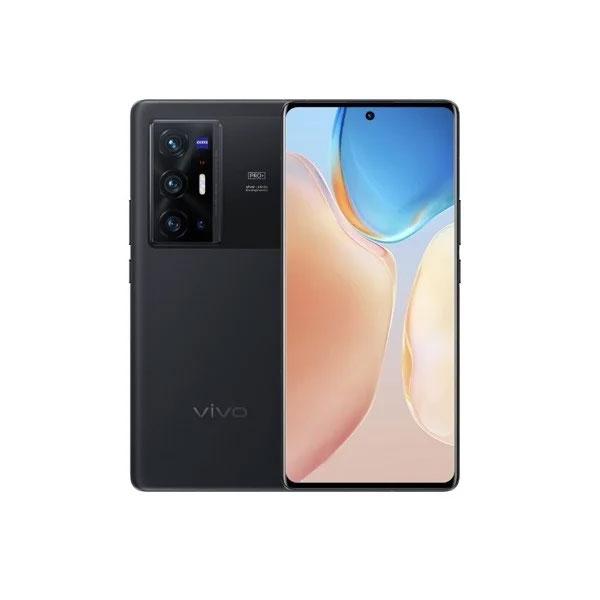
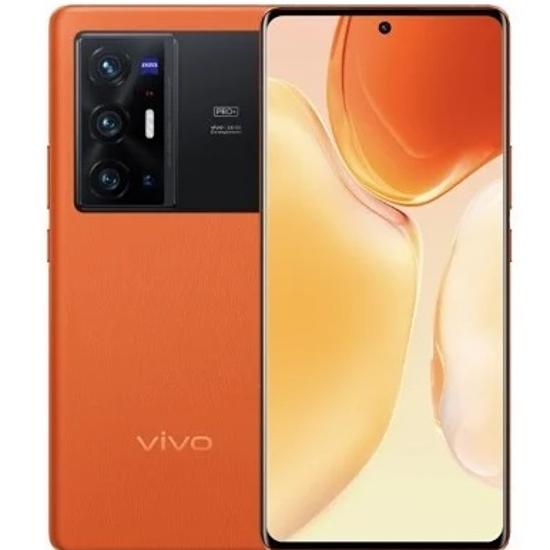
Let’s go step by step. The smartphone comes in three color variants— we picked the most eye-catching one, the orange. You can also get it in purple and black. The advantage is that all three versions are matte, so you can say goodbye to fingerprints.

Let’s stick with the back. It’s some kind of leather imitation that feels great to the touch and looks good as well. The black area to the right of the camera is properly glossy, and besides the (debatable) design, it doesn’t serve any other function. But you can use it, for example, as a mirror.

The layout of the elements is traditional. The hardware buttons are on the right side, and they work really well. Pressing them feels solid and we’re also glad they don’t click unnecessarily loud. The bottom side includes a slot for two NanoSIM cards, a USB-C connector, and a speaker. The second speaker from the pair is located above the display. The speakers get pretty loud and sound high-quality—they’re among the absolute best.

At the top, there’s an infrared port, and the left side is completely blank. Of course, the front belongs to the display, stretched all the way to the edges—only interrupted by a cutout for the selfie camera. When holding the Vivo X70 Pro+, you get the feeling of a premium, well-made device. It fits comfortably in the hand, and the curved back and front give you extra confidence.
The display is an absolute standout.
One of the areas with the most noticeable changes. The Vivo X70 Pro+ has a display that can go toe-to-toe with the very best, and its quality can confidently be compared, for example, with the Samsung Galaxy S21 Ultra. It’s a 6.78″ LTPO AMOLED panel with a 120 Hz refresh rate.
Because the refresh rate is variable, the device can adjust it to ensure the smoothest possible experience while keeping battery consumption as low as possible. The frequency can range from 120 Hz to 1 Hz. For example, when you scroll through menus, the refresh rate is at the maximum. If you watch a YouTube video with 30 frames per second, the display refresh rate adjusts to 30 Hz.

A basic protective film is applied to the display by default. It holds up quite decently. Since it’s not glass, scratches appear on it very quickly, but it definitely fulfills its role. The display will stay scratch-free. For the purposes of testing, we removed this film after two days.
Besides the beautiful colors, the outstanding maximum brightness is also great—it’s among the absolute top. 1500 nits in auto mode means that even in the harshest sunlight you won’t have any trouble reading it—we didn’t have issues with it either. We also have to praise the excellent viewing angles, which are standard for AMOLED displays.

You can fine-tune the display’s color output in the settings quite extensively, and you can also adjust the resolution. You don’t have to use the maximum—there’s also a resolution of 2400 x 1080 pixels, which helps save a bit of battery.


The display is nicely stretched across the entire front, and the bezels around it are truly minimal. On the sides it’s curved, which not everyone may like. The truth is that the curved design adds to its attractiveness and the quality feel, but from a practical point of view it’s not the best solution. Because of that, the image looks distorted on the side, and it may bother some users. Luckily, during testing we didn’t notice any issues with accidental touches, so everything is fine in that regard.
AMOLED tech fully leverages the Always On display. Here’s the first downside of having a smartphone meant for the Chinese market. You can download a large number of different styles to the device, but the “store” you use to do it is only in Chinese.


But that doesn’t change the fact that the Always On display is fully functional even without that, and there are more than enough styles. You can also choose which notifications will be shown. You can have the feature enabled all the time, during the time you set, or when the device detects motion.
Even gaming smartphones wouldn’t be shy about the performance.
Looking at the specs, it’s clear the new Vivo has plenty of performance. The Qualcomm Snapdragon 888+ processor is currently the most powerful option that the Android smartphone world offers. It’s a 5 nm processor, a mild upgrade over this year’s flagship Snapdragon 888, with even higher performance.
In practice, you get a genuinely powerful machine that can handle even the most demanding games without any problems. Add a smooth 120 Hz display to that, and the overall experience is even better—navigating menus, launching apps, multitasking. Everything runs effortlessly, fast, and with not the slightest stutter.


Fast LPDDR5 RAM also helps significantly, with capacity up to 12 GB. And if that still somehow isn’t enough (it definitely won’t be), the smartphone lets you use an additional 4 GB from the internal storage, increasing RAM capacity up to 16 GB. You can enable this option in the settings.
Storage capacity is also generous—256 GB by default. The top variant then offers 512 GB of storage. Before buying, think carefully about which version to choose, because memory cards are not supported. The performance is backed up by benchmarks too. What’s interesting is that Vivo beats most models with the same processor using these numbers.
The Chinese system put it through its paces.
The Indian version of the smartphone offers the Funtouch OS overlay; our Chinese version has OriginOS. Both run on Android 11. Using a Chinese smartphone in Slovakia brought a few unpleasant surprises—luckily, we managed to eliminate most of them.
The first problem may be the absence of the Slovak language. We already expected that before purchase. Besides Chinese, some European languages are also available. English and German are a given; you won’t miss Spanish, French, Portuguese, or Dutch either.
An unpleasant surprise came after we tried to sync contacts with a Google account. It simply didn’t work. There was also an issue with the calendar, but after a restart it recovered—the contacts remained unresolved. The problem was solved by installing the Google Contact Sync app.

But even that wasn’t to plan. We downloaded the app from an external source and the smartphone wouldn’t allow us to install it. It simply says it’s not possible. The solution is to sign in to a Vivo account, but you can’t enter a Slovak number there either. Luckily, in the app settings there’s an option to allow installation via specific apps (in this case Chrome)—you just need to enable it directly in that specific setting.
Another problem we ran into was notifications. Some apps didn’t send them. Vivo offers a guide on its website on how to fix this. First of all, you need to enable notifications, then in battery settings allow the specific app to use high-performance mode, also allow the app to start automatically, and the final step is to set the app so it doesn’t close automatically. Notifications are working now, but once in a while one still doesn’t arrive.

We couldn’t connect a Samsung Galaxy Watch 4 to the phone. The Galaxy Wearable app says they’re not compatible. We also tried Galaxy Watch 3, but that didn’t work either. Pairing would start, but it always got stuck and never finished successfully. Connecting Amazfit GTR 3 Pro watches was no problem at all.
The last problem was with the launcher. We couldn’t use anything other than the default one. Even after setting an alternative launcher as default, nothing changed. After pressing the home button, we were taken back to the original one again. Luckily, we managed to fix this problem too.


First, we created a Vivo account on a computer. Of course, using email, since it won’t accept a Slovak phone number. Then we logged into the phone with it. Next, you need to go into the security settings and allow changing the system launcher there. But beware, you need to untick the option “Tap the home button to lock the system home screen”.
So we’re successfully using Nova Launcher. There was one more minor issue here, though. When setting the automatic display refresh rate, Nova Launcher (and some other apps) only works in the 60 Hz mode. We fixed it by switching the display to the 120 Hz mode.
So as not to criticize only, let’s move on to the good things. The positive is that all apps work without any problems. We were worried about banking apps, but luckily they work. Google Pay also works.


The OriginOS skin is great. It contains an incredible number of different settings. It’s probably the skin with the widest range of visual tweaks and effects. You definitely won’t get bored, you can set absolutely everything exactly the way you want. You can have all apps on the home screens, and there’s also a classic alphabetical menu available.


What’s not so great, though, is the huge number of preinstalled apps you won’t use in Slovakia. Many of them have menus only in Chinese and similar. We managed to uninstall about half of them the usual way, while the rest stayed. Luckily, Nova Launcher lets you hide apps you don’t use, so at least we don’t have to look at them.
In-display fingerprint reader
Fingerprint readers built into the display are standard in the flagship category. That’s no different with Vivo’s flagships. It’s a classic optical sensor, and thankfully it’s fast and reliable. What’s surprising is the fact that in the IQOO 8 Pro model, Vivo used the latest generation of Qualcomm’s ultrasonic fingerprint reader, which works on a surface up to 17x larger—faster, safer, and more accurate. X70 Pro+ is a higher-end model, but somehow this reader seems to have been forgotten. That’s a shame.

Adding a new fingerprint is convenient and fast. The software skin from this manufacturer is refined down to the smallest detail and offers the user a wide range of customization options. For example, you can choose what visual effect accompanies unlocking and what the sensor area will look like. A nice detail that will please you.
Battery and charging
Vivo X70 Pro+ is equipped with a battery with a capacity of 4500 mAh. In today’s smartphone world, that number isn’t really exciting—it’s more average. The same goes for battery life on a single charge; this phone isn’t among the record breakers. On the other hand, you can count on it for a full day without charging.
Once the battery gets low, you’ll be happy with the charging options. Wired charging supports up to 55 W, and you even get wireless charging, which the previous model didn’t have. And even at up to 50 W maximum power. To charge wirelessly this fast, you’ll need a special wireless charger from Vivo directly.

Once again, we have to mention the wide range of customization options—also for charging you can choose one of the effects you’ll find in the settings. Battery life can be extended with a power-saving mode, and there’s also a special saving mode that limits the smartphone’s options to just a few basic functions. This way, you’ll save a significant amount of battery.
- 25 % – 10 minutes
- 60 % – 25 minutes
- 80 % – 35 minutes
- 100 % – 54 minutes
Camera
Vivo X70 Pro+ has only the highest ambitions. Just looking at the camera specs confirms it. On the back you’ll find 4 sensors. The main one has 50 MPx resolution, f/1.6 aperture, and optical image stabilization. There should also be an ultra-wide sensor up your sleeve again. It has 48 MPx resolution and, above all, advanced gimbal-style image stabilization. Plus, it can also shoot macro photos.

The third of the four sensors is a telephoto lens with 2x optical zoom, an f/1.6 aperture, and optical image stabilization. And the last one is a periscope lens with a resolution of 8 MPx, an f/3.4 aperture, and optical image stabilization. Promising specs, what do you think?
| Main camera | 50 MPx | aperture f/1.6 |
|---|---|---|
| Ultra-wide-angle camera | 48 MPx | aperture f/2.2 |
| Telephoto lens
Periscope lens |
12 MPx
8 MPx |
aperture f/1.6
aperture f/3.4 |
Great sensors aren’t everything. The rest of the hardware matters too, and especially the software. From the hardware side, it’s pretty clear. The most powerful processor around is a solid foundation. But Vivo has one more surprise—an advanced imaging chip called V1, designed to take photo and video quality even further. And of course, let’s not forget the important cooperation on both hardware and software with the world-famous German company Zeiss.
The photo app offers an incredible number of different functions. You won’t miss a professional mode, and there are plenty of different filters available, a live photo mode, a mode for shooting the Moon, or for photographing the night sky. You’ll definitely be taken care of when it comes to fun.

The app is refined down to the smallest detail and is excellently optimized. Everything is nicely fast, and switching between lenses is also smooth. An attractive feature is “Horizontal line”. It ensures that when you record video, the image stays aligned with the horizon no matter how you hold the phone. A very interesting thing you definitely need to try.
Let’s talk about photo quality. What else could it be, if not current top-tier performance? During the day, even much cheaper models can take great shots—so it’s no surprise that Vivo X70 Pro+ performs perfectly in this respect. Daytime photos have virtually zero noise, are detailed, full of color, and sharp across the entire frame. We also have to highlight the extremely good dynamic range, though in some situations it can feel a bit unnatural.
Thanks to the large sensor, you can also enjoy a very decent bokeh effect when shooting closer objects—you won’t need portrait mode in some cases at all.


Night shots are the new model’s very strong suit and belong among the best. Again, we have to praise the excellent dynamic range. Compared to the competition, it’s clearly obvious that Vivo handles highlights much better. Noise stays at very low levels, and thanks to the large sensor, photos are brighter than what competitors manage. And it gets even better with a dedicated night mode. So if you’re looking for a camera phone and night photography is your top priority, the Vivo X70 Pro+ is probably the best choice right now.


Ultra-wide photos are also high quality. The sensor with gimbal stabilization performs well—especially during the day, when shots are full of detail. As light levels drop, naturally it gets worse, and then it’s better to switch to the main sensor.


Zooming is a category of its own. The Vivo X70 Pro+ comes with a 8-megapixel periscope lens with five-times optical zoom, which is optically stabilized. Due to lower brightness, for night shots we recommend not zooming in too much—because the resulting photos won’t look nearly as zoomed as those produced by the main sensor. During the day, you’ll get pretty decent shots out of it.


You’ll mainly use the telephoto lens with 2x optical zoom for portrait shots; for regular photos with 2x zoom, the smartphone prefers the main sensor, which delivers a more high-quality image.
Video
Video is a chapter of its own. The highlight is up to 8K resolution at 30 frames per second that you can capture with the main lens. You also have 4K@60fps video, which you can record even with the ultra-wide-angle. And that’s exactly what you want. Thanks to the wider field of view, the image is stabilized better. On top of that, there’s also gimbal image stabilization, which works excellently.
The stabilization on this video is simply perfect, and there’s no smartphone on the market that can do it better. Daytime video created with the ultra-wide lens literally has no competition. If there’s less light, we recommend switching to the main sensor, which captures it better. Compared to, for example, the newest iPhones, the night image is weaker, and so is the stabilization.
Vivo X70 Pro+: Final thoughts
We waited almost a month for the Vivo X70 Pro+. And it was worth it. This is a true flagship without compromises. The specs are top-tier, and in the Android smartphone space it can confidently compete even with Samsung’s Galaxy S21 Ultra, which is still 300 euros more expensive. It offers great performance, plenty of RAM, and solid storage capacity.

The main attraction is of course the camera, which is among the absolute top— it won’t disappoint even with night shots. Another big draw is definitely its design, which is unique. The 120 Hz LTPO AMOLED display with brightness up to 1500 nits is great too, and you’ll also appreciate the rich bundle, fast charging, quality stereo speakers, and water resistance.
On the other hand, some downsides can’t be ignored. The curved display looks attractive design-wise, but it doesn’t have to suit everyone. Before buying, you should also think about whether you’re okay with the Chinese version—delivery pains didn’t bypass us either, but now everything works nicely. The system completely lacks the Slovak language, and you’ll also have to deal with a lot of bloatware, not all of which can be uninstalled.
Don’t miss the best coupons 📩
Subscribe and we’ll email you new coupons before they expire. We only send it once a month — no spam.


