A planet full of gadgets from China · a database of the best coupons
Car accessories

Great price from just €47! MUCAR CDE900 is a quality Android OBD2 diagnostic tool with a SK language, a 4″ display, and plug & play

24. November 2025 3 min read 6 comments

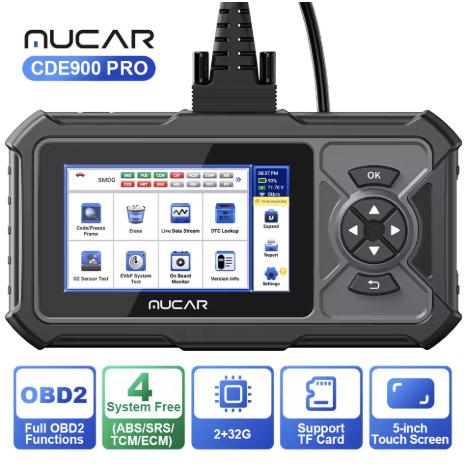
The Chinese company MUCAR offers this affordable diagnostic device for your car as well. The MUCAR CDE900 model features an Android operating system, as well as fast error diagnostics thanks to OBD2 technology.

Excellent Black Friday prices

You can buy the MUCAR CDE900 from a list of verified sellers on the well-known online marketplace AliExpress.com. The product is available in a Chinese warehouse, with completely free shipping and fast delivery within 10 – 15 business days from dispatch.

ChinaPlanet deal

MUCAR CDE900

Full system
MUCAR CDE900
15-day delivery
123,57 €You save 17,71 €
105,86 €
Are you shopping on AliExpress for the first time? See the guide!
Updated 27. 10. 2026 at 12:31
TIP15-day delivery via Aliexpress Standard Shipping

For this product, Aliexpress Standard Shipping is available with guaranteed delivery within 15 days. It’s the most reliable delivery method and, in most cases, it’s handled by a courier company. The 15-day delivery is something we actually tested.

When you order from a Chinese warehouse, AliExpress adds a customs duty charge of approximately 3,70 € per order to your cart. When you receive the shipment, you won’t have to pay anything extra.

Track this product’s price

As soon as we post a new coupon, we’ll send you an email. You can unsubscribe from tracking anytime.

Are you shopping on AliExpress for the first time?

The process is via the AliExpress mobile app, where most people shop. There are two key things: don’t use Buy now and enter the coupon only in the order summary, in the field Promo code. After you click Pay now, you won’t be able to add it.

  1. Copy the code and click Use discountIn our article, copy the coupon and click the button GET DISCOUNT. The link will take you directly to the product in the AliExpress app.
  2. Use Add to cart instead of Buy nowOn the product card, scroll down and tap Add to cart. Don’t use the Buy now button—you’ll skip the cart, and later you won’t have anywhere to enter the coupon. Before that, double-check the variant: the color, the version, and whether it ships from an EU warehouse.
  3. Through the cart, go to CheckoutA pop-up will appear: Added to cart! — tap Check it out in it. If it disappeared, open the cart with the icon at the bottom right. In the cart, check the product and quantity, then click the red Checkout. Only the items marked with the red ring will be applied.
  4. Enter your address and card, then look for Promo codeIn the order summary, first fill in the delivery address and payment card at the top. Below them there’s a line Promo code — expand it with the arrow on the right.
    Riadok Promo code v zhrnutí objednávky v aplikácii AliExpress
    Look for this line under the address and payment method.
  5. Paste the code and confirm ApplyIn the field Promo code paste the copied code and click the black Apply. The code is case-sensitive and must not contain spaces.
    Políčko Promo code s kódom a tlačidlom Apply v aplikácii AliExpress
    Paste the code into the field and confirm with the Apply button.
  6. Check the savings and payIn the Summary expand the line Saved — you’ll see the applied coupon there as AliExpress coupons/codes. Only when Total is really lower, click Pay now.
    Riadok Saved s uplatneným kupónom a znížený Total v aplikácii AliExpress
    The applied coupon will appear in the Saved line and will reduce the Total.
Apply the discount already at the order summary. After you click Pay now, you can no longer add a coupon. If Apply shows an error, the code has either expired, doesn’t apply to your items, or the order doesn’t meet the minimum amount.
The Store Coupon also goes in the same field. — a coupon from the seller itself, which isn’t always available and changes from day to day. AliExpress coupons can’t be combined, so try both and go with the one that gives you more. Coins are added automatically.

This is what the diagnostic tool looks like in the video:

MUCAR CDE900: Cheap OBD2 diagnostic with a touchscreen display

The basic car diagnostic model MUCAR CDE900 comes in a matte black color with an anti-slip surface finish. Its dimensions are 209 x 96 x 30 mm, and the individual functions are controlled using physical buttons.

On the front side, besides these buttons, you’ll also find 4″ color and touchscreen LCD display with 720p resolution, which shows error messages. Inside, it has 2 GB RAM and 16 GB internal storage. You can expand it with a microSD memory card. You can then transfer the data via the USB-C connector as well.

Ad

Android 6.0 and a wide database of codes

On the software side, there is an Android 6.0. operating system. It also offers fast features, e.g. to display the VIN number with just one click. The device supports 16 languages, including Slovak and English.

OBD2 diagnostics is used to display your vehicle’s errors, and its database includes 106 makes and over 10,000 codes. The manufacturer has also prepared 5 software packages to expand the functionality (software expansions are not included in the package—you need to purchase them or choose a different version of the diagnostic tool).

In the product’s retail package, you’ll find the diagnostic device itself called MUCAR CDE900, as well as original accessories. You’ll find the necessary wiring for connecting (diagnostic connector), a USB-C cable for connecting to a PC, and a brief user manual and initial device setup in English.

What do you think of this diagnostic device from the Chinese manufacturer MUCAR? If you have any other questions about this interesting product, the built-in components, or the selling price, feel free to write them below in the discussion under the article.

Also follow our website China Planet, our Telegram group full of up-to-date articles—subscribe to the newsletter and join us in our Facebook group.

Add us as your preferred source on Google

Don’t miss the best coupons 📩

Subscribe and we’ll email you new coupons before they expire. We only send it once a month — no spam.

Ad Engerio