With another weekend, we have another episode of TOP 6 cheap gadgets from China that you liked so much, and at the same time today it's already the round one hundred and eighty-eighth installment . We picked another set of six interesting items from international sellers at great prices.
To catch the latest installment of TOP 6 cheap gadgets from China, give us a like on Facebook , subscribe to our newsletter, or turn on notifications. Here we always keep you posted about our articles.
1. Automatic cigarette case
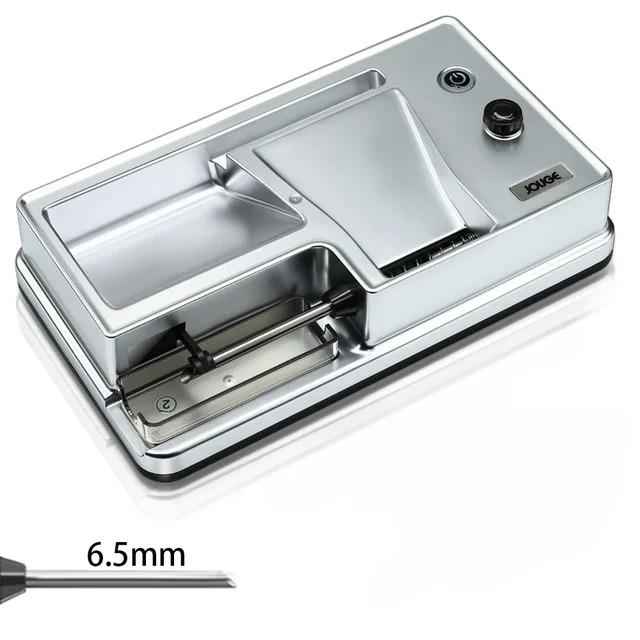
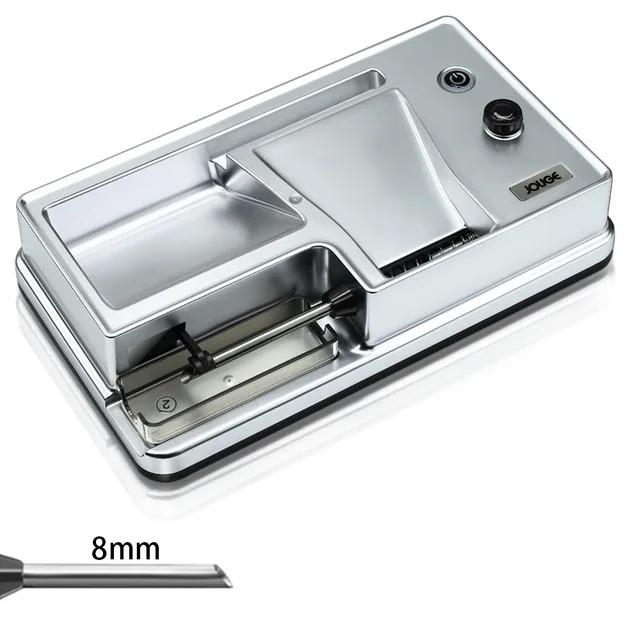
AliExpress is an online marketplace full of truly diverse products. So in today's gadget selection, we definitely can't skip the automatic cigarette case either. You can choose from size 6,5 mm or 8 mm. Delivery from China takes about 4 weeks.
6,5 mm 33,70 € 13-day delivery 8 mm 33,70 € 13-day delivery 34,65 € You save 0,95 €
33,70 €
Updated 28. 4. 2024 at 10:51 TIP 13-day delivery via Aliexpress Standard ShippingFor this product, AliExpress Standard Shipping is available with guaranteed delivery within 13 days. This is the most reliable shipping method and in most cases it’s delivered by a courier company.
When you order from a Chinese warehouse, AliExpress adds a customs duty charge of approximately 3,70 € per order to your cart. When you receive the shipment, you won’t have to pay anything extra.
Track this product’s price As soon as we post a new coupon, we’ll send you an email. You can unsubscribe from tracking anytime.
Are you shopping on AliExpress for the first time?
The process is via the AliExpress mobile app, where most people shop. There are two key things: don’t use Buy now and enter the coupon only in the order summary, in the field Promo code . After you click Pay now , you won’t be able to add it.
Copy the code and click Use discount In our article, copy the coupon and click the button GET DISCOUNT . The link will take you directly to the product in the AliExpress app. Use Add to cart instead of Buy now On the product card, scroll down and tap Add to cart . Don’t use the Buy now button—you’ll skip the cart, and later you won’t have anywhere to enter the coupon. Before that, double-check the variant: the color, the version, and whether it ships from an EU warehouse. Through the cart, go to Checkout A pop-up will appear: Added to cart! — tap Check it out in it. If it disappeared, open the cart with the icon at the bottom right. In the cart, check the product and quantity, then click the red Checkout . Only the items marked with the red ring will be applied. Enter your address and card, then look for Promo code In the order summary, first fill in the delivery address and payment card at the top. Below them there’s a line Promo code — expand it with the arrow on the right.
Look for this line under the address and payment method. Paste the code and confirm Apply In the field Promo code paste the copied code and click the black Apply . The code is case-sensitive and must not contain spaces.
Paste the code into the field and confirm with the Apply button. Check the savings and pay In the Summary expand the line Saved — you’ll see the applied coupon there as AliExpress coupons/codes . Only when Total is really lower, click Pay now .
The applied coupon will appear in the Saved line and will reduce the Total.
Apply the discount already at the order summary. After you click Pay now, you can no longer add a coupon. If Apply shows an error, the code has either expired, doesn’t apply to your items, or the order doesn’t meet the minimum amount.
The Store Coupon also goes in the same field. — a coupon from the seller itself, which isn’t always available and changes from day to day. AliExpress coupons can’t be combined, so try both and go with the one that gives you more. Coins are added automatically.
34,65 € You save 0,95 €
33,70 €
Updated 28. 4. 2024 at 10:51 TIP 13-day delivery via Aliexpress Standard ShippingFor this product, AliExpress Standard Shipping is available with guaranteed delivery within 13 days. This is the most reliable shipping method and in most cases it’s delivered by a courier company.
When you order from a Chinese warehouse, AliExpress adds a customs duty charge of approximately 3,70 € per order to your cart. When you receive the shipment, you won’t have to pay anything extra.
Track this product’s price As soon as we post a new coupon, we’ll send you an email. You can unsubscribe from tracking anytime.
Are you shopping on AliExpress for the first time?
The process is via the AliExpress mobile app, where most people shop. There are two key things: don’t use Buy now and enter the coupon only in the order summary, in the field Promo code . After you click Pay now , you won’t be able to add it.
Copy the code and click Use discount In our article, copy the coupon and click the button GET DISCOUNT . The link will take you directly to the product in the AliExpress app. Use Add to cart instead of Buy now On the product card, scroll down and tap Add to cart . Don’t use the Buy now button—you’ll skip the cart, and later you won’t have anywhere to enter the coupon. Before that, double-check the variant: the color, the version, and whether it ships from an EU warehouse. Through the cart, go to Checkout A pop-up will appear: Added to cart! — tap Check it out in it. If it disappeared, open the cart with the icon at the bottom right. In the cart, check the product and quantity, then click the red Checkout . Only the items marked with the red ring will be applied. Enter your address and card, then look for Promo code In the order summary, first fill in the delivery address and payment card at the top. Below them there’s a line Promo code — expand it with the arrow on the right.
Look for this line under the address and payment method. Paste the code and confirm Apply In the field Promo code paste the copied code and click the black Apply . The code is case-sensitive and must not contain spaces.
Paste the code into the field and confirm with the Apply button. Check the savings and pay In the Summary expand the line Saved — you’ll see the applied coupon there as AliExpress coupons/codes . Only when Total is really lower, click Pay now .
The applied coupon will appear in the Saved line and will reduce the Total.
Apply the discount already at the order summary. After you click Pay now, you can no longer add a coupon. If Apply shows an error, the code has either expired, doesn’t apply to your items, or the order doesn’t meet the minimum amount.
The Store Coupon also goes in the same field. — a coupon from the seller itself, which isn’t always available and changes from day to day. AliExpress coupons can’t be combined, so try both and go with the one that gives you more. Coins are added automatically.
2. Baseus protective glass with a simple app
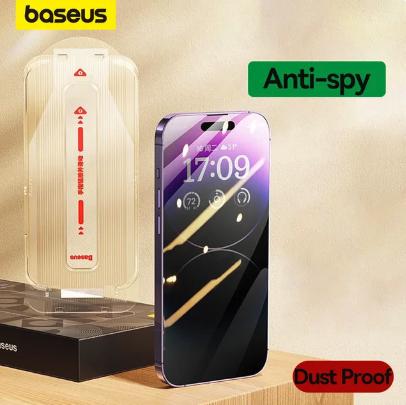
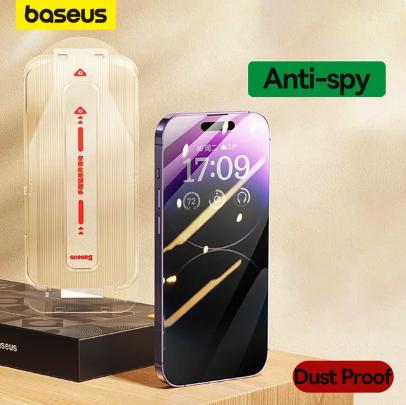
Baseus focuses on affordable accessories. Now it brings protective glass for smartphones with a very simple swipe-to-install app, in a case designed for sticking that is included in the package. You can choose from three variants: clear HD glass, glass with a green filter, and glass with an anti-spy filter; plus delivery in 13 days.
Baseus protective glass for iPhone Clear HD tempered glass 7,94 € 15-day delivery Tempered glass with Anti Spy filter 8,88 € 15-day delivery Clear HD Corning glass 9,39 € 15-day delivery Corning glass with Anti Spy filter 10,38 € 15-day delivery
Price history 0,50 € more expensive than the average price Cheapest 6,21 € Most expensive 7,94 €
3 mo. 6 mo. 1 year Max
Updated 7. 1. 2025 at 14:47 TIP 15-day delivery via Aliexpress Standard ShippingFor this product, Aliexpress Standard Shipping is available with guaranteed delivery within 15 days. It’s the most reliable delivery method and, in most cases, it’s handled by a courier company. The 15-day delivery is something we actually tested .
When you order from a Chinese warehouse, AliExpress adds a customs duty charge of approximately 3,70 € per order to your cart. When you receive the shipment, you won’t have to pay anything extra.
Track this product’s price As soon as we post a new coupon, we’ll send you an email. You can unsubscribe from tracking anytime.
Are you shopping on AliExpress for the first time?
The process is via the AliExpress mobile app, where most people shop. There are two key things: don’t use Buy now and enter the coupon only in the order summary, in the field Promo code . After you click Pay now , you won’t be able to add it.
Copy the code and click Use discount In our article, copy the coupon and click the button GET DISCOUNT . The link will take you directly to the product in the AliExpress app. Use Add to cart instead of Buy now On the product card, scroll down and tap Add to cart . Don’t use the Buy now button—you’ll skip the cart, and later you won’t have anywhere to enter the coupon. Before that, double-check the variant: the color, the version, and whether it ships from an EU warehouse. Through the cart, go to Checkout A pop-up will appear: Added to cart! — tap Check it out in it. If it disappeared, open the cart with the icon at the bottom right. In the cart, check the product and quantity, then click the red Checkout . Only the items marked with the red ring will be applied. Enter your address and card, then look for Promo code In the order summary, first fill in the delivery address and payment card at the top. Below them there’s a line Promo code — expand it with the arrow on the right.
Look for this line under the address and payment method. Paste the code and confirm Apply In the field Promo code paste the copied code and click the black Apply . The code is case-sensitive and must not contain spaces.
Paste the code into the field and confirm with the Apply button. Check the savings and pay In the Summary expand the line Saved — you’ll see the applied coupon there as AliExpress coupons/codes . Only when Total is really lower, click Pay now .
The applied coupon will appear in the Saved line and will reduce the Total.
Apply the discount already at the order summary. After you click Pay now, you can no longer add a coupon. If Apply shows an error, the code has either expired, doesn’t apply to your items, or the order doesn’t meet the minimum amount.
The Store Coupon also goes in the same field. — a coupon from the seller itself, which isn’t always available and changes from day to day. AliExpress coupons can’t be combined, so try both and go with the one that gives you more. Coins are added automatically.
Price history 0,54 € more expensive than the average price Cheapest 7,61 € Most expensive 8,88 €
3 mo. 6 mo. 1 year Max
Updated 7. 1. 2025 at 14:47 TIP 15-day delivery via Aliexpress Standard ShippingFor this product, Aliexpress Standard Shipping is available with guaranteed delivery within 15 days. It’s the most reliable delivery method and, in most cases, it’s handled by a courier company. The 15-day delivery is something we actually tested .
When you order from a Chinese warehouse, AliExpress adds a customs duty charge of approximately 3,70 € per order to your cart. When you receive the shipment, you won’t have to pay anything extra.
Track this product’s price As soon as we post a new coupon, we’ll send you an email. You can unsubscribe from tracking anytime.
Are you shopping on AliExpress for the first time?
The process is via the AliExpress mobile app, where most people shop. There are two key things: don’t use Buy now and enter the coupon only in the order summary, in the field Promo code . After you click Pay now , you won’t be able to add it.
Copy the code and click Use discount In our article, copy the coupon and click the button GET DISCOUNT . The link will take you directly to the product in the AliExpress app. Use Add to cart instead of Buy now On the product card, scroll down and tap Add to cart . Don’t use the Buy now button—you’ll skip the cart, and later you won’t have anywhere to enter the coupon. Before that, double-check the variant: the color, the version, and whether it ships from an EU warehouse. Through the cart, go to Checkout A pop-up will appear: Added to cart! — tap Check it out in it. If it disappeared, open the cart with the icon at the bottom right. In the cart, check the product and quantity, then click the red Checkout . Only the items marked with the red ring will be applied. Enter your address and card, then look for Promo code In the order summary, first fill in the delivery address and payment card at the top. Below them there’s a line Promo code — expand it with the arrow on the right.
Look for this line under the address and payment method. Paste the code and confirm Apply In the field Promo code paste the copied code and click the black Apply . The code is case-sensitive and must not contain spaces.
Paste the code into the field and confirm with the Apply button. Check the savings and pay In the Summary expand the line Saved — you’ll see the applied coupon there as AliExpress coupons/codes . Only when Total is really lower, click Pay now .
The applied coupon will appear in the Saved line and will reduce the Total.
Apply the discount already at the order summary. After you click Pay now, you can no longer add a coupon. If Apply shows an error, the code has either expired, doesn’t apply to your items, or the order doesn’t meet the minimum amount.
The Store Coupon also goes in the same field. — a coupon from the seller itself, which isn’t always available and changes from day to day. AliExpress coupons can’t be combined, so try both and go with the one that gives you more. Coins are added automatically.
Price history 0,66 € more expensive than the average price Cheapest 7,44 € Most expensive 9,39 €
3 mo. 6 mo. 1 year Max
Updated 7. 1. 2025 at 14:47 TIP 15-day delivery via Aliexpress Standard ShippingFor this product, Aliexpress Standard Shipping is available with guaranteed delivery within 15 days. It’s the most reliable delivery method and, in most cases, it’s handled by a courier company. The 15-day delivery is something we actually tested .
When you order from a Chinese warehouse, AliExpress adds a customs duty charge of approximately 3,70 € per order to your cart. When you receive the shipment, you won’t have to pay anything extra.
Track this product’s price As soon as we post a new coupon, we’ll send you an email. You can unsubscribe from tracking anytime.
Are you shopping on AliExpress for the first time?
The process is via the AliExpress mobile app, where most people shop. There are two key things: don’t use Buy now and enter the coupon only in the order summary, in the field Promo code . After you click Pay now , you won’t be able to add it.
Copy the code and click Use discount In our article, copy the coupon and click the button GET DISCOUNT . The link will take you directly to the product in the AliExpress app. Use Add to cart instead of Buy now On the product card, scroll down and tap Add to cart . Don’t use the Buy now button—you’ll skip the cart, and later you won’t have anywhere to enter the coupon. Before that, double-check the variant: the color, the version, and whether it ships from an EU warehouse. Through the cart, go to Checkout A pop-up will appear: Added to cart! — tap Check it out in it. If it disappeared, open the cart with the icon at the bottom right. In the cart, check the product and quantity, then click the red Checkout . Only the items marked with the red ring will be applied. Enter your address and card, then look for Promo code In the order summary, first fill in the delivery address and payment card at the top. Below them there’s a line Promo code — expand it with the arrow on the right.
Look for this line under the address and payment method. Paste the code and confirm Apply In the field Promo code paste the copied code and click the black Apply . The code is case-sensitive and must not contain spaces.
Paste the code into the field and confirm with the Apply button. Check the savings and pay In the Summary expand the line Saved — you’ll see the applied coupon there as AliExpress coupons/codes . Only when Total is really lower, click Pay now .
The applied coupon will appear in the Saved line and will reduce the Total.
Apply the discount already at the order summary. After you click Pay now, you can no longer add a coupon. If Apply shows an error, the code has either expired, doesn’t apply to your items, or the order doesn’t meet the minimum amount.
The Store Coupon also goes in the same field. — a coupon from the seller itself, which isn’t always available and changes from day to day. AliExpress coupons can’t be combined, so try both and go with the one that gives you more. Coins are added automatically.
Price history 0,71 € more expensive than the average price Cheapest 8,46 € Most expensive 10,38 €
3 mo. 6 mo. 1 year Max
Updated 7. 1. 2025 at 14:47 TIP 15-day delivery via Aliexpress Standard ShippingFor this product, Aliexpress Standard Shipping is available with guaranteed delivery within 15 days. It’s the most reliable delivery method and, in most cases, it’s handled by a courier company. The 15-day delivery is something we actually tested .
When you order from a Chinese warehouse, AliExpress adds a customs duty charge of approximately 3,70 € per order to your cart. When you receive the shipment, you won’t have to pay anything extra.
Track this product’s price As soon as we post a new coupon, we’ll send you an email. You can unsubscribe from tracking anytime.
Are you shopping on AliExpress for the first time?
The process is via the AliExpress mobile app, where most people shop. There are two key things: don’t use Buy now and enter the coupon only in the order summary, in the field Promo code . After you click Pay now , you won’t be able to add it.
Copy the code and click Use discount In our article, copy the coupon and click the button GET DISCOUNT . The link will take you directly to the product in the AliExpress app. Use Add to cart instead of Buy now On the product card, scroll down and tap Add to cart . Don’t use the Buy now button—you’ll skip the cart, and later you won’t have anywhere to enter the coupon. Before that, double-check the variant: the color, the version, and whether it ships from an EU warehouse. Through the cart, go to Checkout A pop-up will appear: Added to cart! — tap Check it out in it. If it disappeared, open the cart with the icon at the bottom right. In the cart, check the product and quantity, then click the red Checkout . Only the items marked with the red ring will be applied. Enter your address and card, then look for Promo code In the order summary, first fill in the delivery address and payment card at the top. Below them there’s a line Promo code — expand it with the arrow on the right.
Look for this line under the address and payment method. Paste the code and confirm Apply In the field Promo code paste the copied code and click the black Apply . The code is case-sensitive and must not contain spaces.
Paste the code into the field and confirm with the Apply button. Check the savings and pay In the Summary expand the line Saved — you’ll see the applied coupon there as AliExpress coupons/codes . Only when Total is really lower, click Pay now .
The applied coupon will appear in the Saved line and will reduce the Total.
Apply the discount already at the order summary. After you click Pay now, you can no longer add a coupon. If Apply shows an error, the code has either expired, doesn’t apply to your items, or the order doesn’t meet the minimum amount.
The Store Coupon also goes in the same field. — a coupon from the seller itself, which isn’t always available and changes from day to day. AliExpress coupons can’t be combined, so try both and go with the one that gives you more. Coins are added automatically.
3. Deli sliding knife
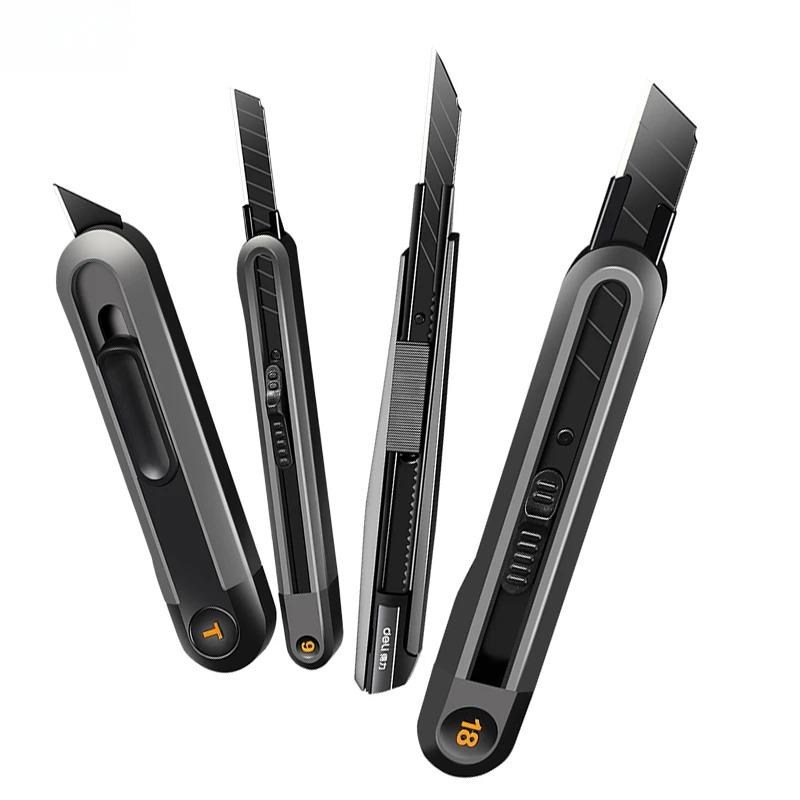
Another cheap gadget for today is this sliding knife from the Deli brand. You can choose from a 9 mm blade, an 18 mm blade, or a T-shaped blade. After you wear it down, you can simply snap it off and move to the next segment. The construction is made from quality ABS plastic materials, and the extend button is ridged, with a non-slip pattern. Delivery in 13 days is free when you order over 10,00 €.
Deli sliding knife Deli sliding knife
13-day delivery Updated 28. 4. 2024 at 10:54 TIP 13-day delivery via Aliexpress Standard ShippingFor this product, AliExpress Standard Shipping is available with guaranteed delivery within 13 days. This is the most reliable shipping method and in most cases it’s delivered by a courier company.
When you order from a Chinese warehouse, AliExpress adds a customs duty charge of approximately 3,70 € per order to your cart. When you receive the shipment, you won’t have to pay anything extra.
Track this product’s price As soon as we post a new coupon, we’ll send you an email. You can unsubscribe from tracking anytime.
Are you shopping on AliExpress for the first time?
The process is via the AliExpress mobile app, where most people shop. There are two key things: don’t use Buy now and enter the coupon only in the order summary, in the field Promo code . After you click Pay now , you won’t be able to add it.
Copy the code and click Use discount In our article, copy the coupon and click the button GET DISCOUNT . The link will take you directly to the product in the AliExpress app. Use Add to cart instead of Buy now On the product card, scroll down and tap Add to cart . Don’t use the Buy now button—you’ll skip the cart, and later you won’t have anywhere to enter the coupon. Before that, double-check the variant: the color, the version, and whether it ships from an EU warehouse. Through the cart, go to Checkout A pop-up will appear: Added to cart! — tap Check it out in it. If it disappeared, open the cart with the icon at the bottom right. In the cart, check the product and quantity, then click the red Checkout . Only the items marked with the red ring will be applied. Enter your address and card, then look for Promo code In the order summary, first fill in the delivery address and payment card at the top. Below them there’s a line Promo code — expand it with the arrow on the right.
Look for this line under the address and payment method. Paste the code and confirm Apply In the field Promo code paste the copied code and click the black Apply . The code is case-sensitive and must not contain spaces.
Paste the code into the field and confirm with the Apply button. Check the savings and pay In the Summary expand the line Saved — you’ll see the applied coupon there as AliExpress coupons/codes . Only when Total is really lower, click Pay now .
The applied coupon will appear in the Saved line and will reduce the Total.
Apply the discount already at the order summary. After you click Pay now, you can no longer add a coupon. If Apply shows an error, the code has either expired, doesn’t apply to your items, or the order doesn’t meet the minimum amount.
The Store Coupon also goes in the same field. — a coupon from the seller itself, which isn’t always available and changes from day to day. AliExpress coupons can’t be combined, so try both and go with the one that gives you more. Coins are added automatically.
Ad
4. Baseus bag / organizer for gadgets
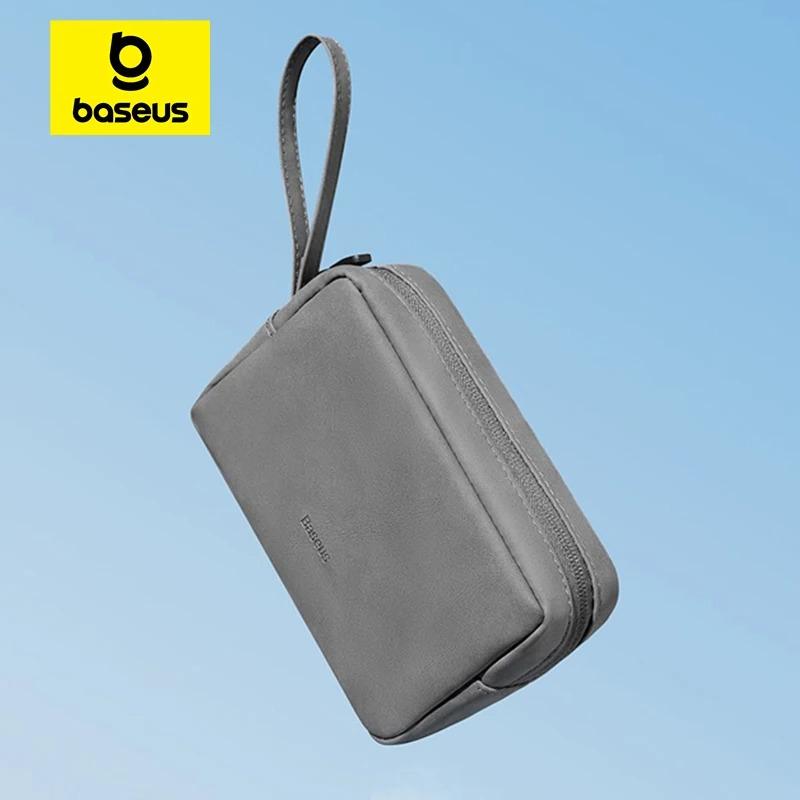
If you regularly buy tech gadgets from our articles, you'll definitely appreciate this organizer , or rather the carrying bag for products by Baseus . The bag is made of PU faux-leather material, has a carrying handle, and even a larger smartphone or power bank fits inside thanks to the dimensions 17,5 × 6,5 × 11,5 cm. Delivery in 13 days is free when you order over 10,00 €.
Baseus bag / organizer for gadgets Baseus bag / organizer for gadgets
13-day delivery Updated 28. 4. 2024 at 10:59 TIP 13-day delivery via Aliexpress Standard ShippingFor this product, AliExpress Standard Shipping is available with guaranteed delivery within 13 days. This is the most reliable shipping method and in most cases it’s delivered by a courier company.
When you order from a Chinese warehouse, AliExpress adds a customs duty charge of approximately 3,70 € per order to your cart. When you receive the shipment, you won’t have to pay anything extra.
Track this product’s price As soon as we post a new coupon, we’ll send you an email. You can unsubscribe from tracking anytime.
Are you shopping on AliExpress for the first time?
The process is via the AliExpress mobile app, where most people shop. There are two key things: don’t use Buy now and enter the coupon only in the order summary, in the field Promo code . After you click Pay now , you won’t be able to add it.
Copy the code and click Use discount In our article, copy the coupon and click the button GET DISCOUNT . The link will take you directly to the product in the AliExpress app. Use Add to cart instead of Buy now On the product card, scroll down and tap Add to cart . Don’t use the Buy now button—you’ll skip the cart, and later you won’t have anywhere to enter the coupon. Before that, double-check the variant: the color, the version, and whether it ships from an EU warehouse. Through the cart, go to Checkout A pop-up will appear: Added to cart! — tap Check it out in it. If it disappeared, open the cart with the icon at the bottom right. In the cart, check the product and quantity, then click the red Checkout . Only the items marked with the red ring will be applied. Enter your address and card, then look for Promo code In the order summary, first fill in the delivery address and payment card at the top. Below them there’s a line Promo code — expand it with the arrow on the right.
Look for this line under the address and payment method. Paste the code and confirm Apply In the field Promo code paste the copied code and click the black Apply . The code is case-sensitive and must not contain spaces.
Paste the code into the field and confirm with the Apply button. Check the savings and pay In the Summary expand the line Saved — you’ll see the applied coupon there as AliExpress coupons/codes . Only when Total is really lower, click Pay now .
The applied coupon will appear in the Saved line and will reduce the Total.
Apply the discount already at the order summary. After you click Pay now, you can no longer add a coupon. If Apply shows an error, the code has either expired, doesn’t apply to your items, or the order doesn’t meet the minimum amount.
The Store Coupon also goes in the same field. — a coupon from the seller itself, which isn’t always available and changes from day to day. AliExpress coupons can’t be combined, so try both and go with the one that gives you more. Coins are added automatically.
5. Baseus Bowie M2
True wireless earbuds with ANC don't have to be an expensive matter. Proof is also the Baseus Bowie M2 model, which offers Bluetooth 5.3 connectivity, a low-latency mode, support for a mobile app, as well as noise elimination up to 42 dB. They can play together with the case for up to 30 hours, and shipping to your home will take no more than 13 days.
Baseus Bowie M2 Baseus Bowie M2
13-day delivery Updated 28. 4. 2024 at 11:01 TIP 13-day delivery via Aliexpress Standard ShippingFor this product, AliExpress Standard Shipping is available with guaranteed delivery within 13 days. This is the most reliable shipping method and in most cases it’s delivered by a courier company.
When you order from a Chinese warehouse, AliExpress adds a customs duty charge of approximately 3,70 € per order to your cart. When you receive the shipment, you won’t have to pay anything extra.
Track this product’s price As soon as we post a new coupon, we’ll send you an email. You can unsubscribe from tracking anytime.
Are you shopping on AliExpress for the first time?
The process is via the AliExpress mobile app, where most people shop. There are two key things: don’t use Buy now and enter the coupon only in the order summary, in the field Promo code . After you click Pay now , you won’t be able to add it.
Copy the code and click Use discount In our article, copy the coupon and click the button GET DISCOUNT . The link will take you directly to the product in the AliExpress app. Use Add to cart instead of Buy now On the product card, scroll down and tap Add to cart . Don’t use the Buy now button—you’ll skip the cart, and later you won’t have anywhere to enter the coupon. Before that, double-check the variant: the color, the version, and whether it ships from an EU warehouse. Through the cart, go to Checkout A pop-up will appear: Added to cart! — tap Check it out in it. If it disappeared, open the cart with the icon at the bottom right. In the cart, check the product and quantity, then click the red Checkout . Only the items marked with the red ring will be applied. Enter your address and card, then look for Promo code In the order summary, first fill in the delivery address and payment card at the top. Below them there’s a line Promo code — expand it with the arrow on the right.
Look for this line under the address and payment method. Paste the code and confirm Apply In the field Promo code paste the copied code and click the black Apply . The code is case-sensitive and must not contain spaces.
Paste the code into the field and confirm with the Apply button. Check the savings and pay In the Summary expand the line Saved — you’ll see the applied coupon there as AliExpress coupons/codes . Only when Total is really lower, click Pay now .
The applied coupon will appear in the Saved line and will reduce the Total.
Apply the discount already at the order summary. After you click Pay now, you can no longer add a coupon. If Apply shows an error, the code has either expired, doesn’t apply to your items, or the order doesn’t meet the minimum amount.
The Store Coupon also goes in the same field. — a coupon from the seller itself, which isn’t always available and changes from day to day. AliExpress coupons can’t be combined, so try both and go with the one that gives you more. Coins are added automatically.
6. Baseus K01 keyboard
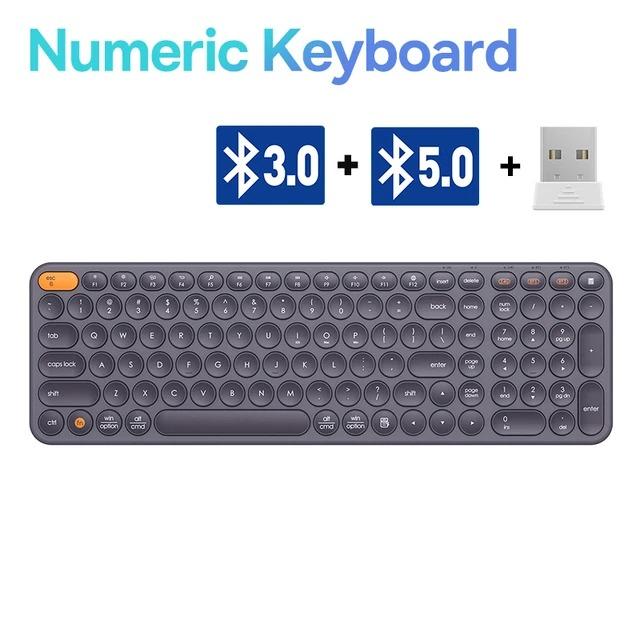
The last product in our article today is the Baseus K01 keyboard. It's a compact Bluetooth keyboard that you can connect to up to three devices at once. It runs on two AA batteries, and it also comes with a great fast delivery from China for just 13 days.
Without numeric keypad 25,94 € 13-day delivery With numeric keypad 27,77 € 13-day delivery Updated 28. 4. 2024 at 11:02 TIP 13-day delivery via Aliexpress Standard ShippingFor this product, AliExpress Standard Shipping is available with guaranteed delivery within 13 days. This is the most reliable shipping method and in most cases it’s delivered by a courier company.
When you order from a Chinese warehouse, AliExpress adds a customs duty charge of approximately 3,70 € per order to your cart. When you receive the shipment, you won’t have to pay anything extra.
Track this product’s price As soon as we post a new coupon, we’ll send you an email. You can unsubscribe from tracking anytime.
Are you shopping on AliExpress for the first time?
The process is via the AliExpress mobile app, where most people shop. There are two key things: don’t use Buy now and enter the coupon only in the order summary, in the field Promo code . After you click Pay now , you won’t be able to add it.
Copy the code and click Use discount In our article, copy the coupon and click the button GET DISCOUNT . The link will take you directly to the product in the AliExpress app. Use Add to cart instead of Buy now On the product card, scroll down and tap Add to cart . Don’t use the Buy now button—you’ll skip the cart, and later you won’t have anywhere to enter the coupon. Before that, double-check the variant: the color, the version, and whether it ships from an EU warehouse. Through the cart, go to Checkout A pop-up will appear: Added to cart! — tap Check it out in it. If it disappeared, open the cart with the icon at the bottom right. In the cart, check the product and quantity, then click the red Checkout . Only the items marked with the red ring will be applied. Enter your address and card, then look for Promo code In the order summary, first fill in the delivery address and payment card at the top. Below them there’s a line Promo code — expand it with the arrow on the right.
Look for this line under the address and payment method. Paste the code and confirm Apply In the field Promo code paste the copied code and click the black Apply . The code is case-sensitive and must not contain spaces.
Paste the code into the field and confirm with the Apply button. Check the savings and pay In the Summary expand the line Saved — you’ll see the applied coupon there as AliExpress coupons/codes . Only when Total is really lower, click Pay now .
The applied coupon will appear in the Saved line and will reduce the Total.
Apply the discount already at the order summary. After you click Pay now, you can no longer add a coupon. If Apply shows an error, the code has either expired, doesn’t apply to your items, or the order doesn’t meet the minimum amount.
The Store Coupon also goes in the same field. — a coupon from the seller itself, which isn’t always available and changes from day to day. AliExpress coupons can’t be combined, so try both and go with the one that gives you more. Coins are added automatically.
Updated 28. 4. 2024 at 11:02 TIP 13-day delivery via Aliexpress Standard ShippingFor this product, AliExpress Standard Shipping is available with guaranteed delivery within 13 days. This is the most reliable shipping method and in most cases it’s delivered by a courier company.
When you order from a Chinese warehouse, AliExpress adds a customs duty charge of approximately 3,70 € per order to your cart. When you receive the shipment, you won’t have to pay anything extra.
Track this product’s price As soon as we post a new coupon, we’ll send you an email. You can unsubscribe from tracking anytime.
Are you shopping on AliExpress for the first time?
The process is via the AliExpress mobile app, where most people shop. There are two key things: don’t use Buy now and enter the coupon only in the order summary, in the field Promo code . After you click Pay now , you won’t be able to add it.
Copy the code and click Use discount In our article, copy the coupon and click the button GET DISCOUNT . The link will take you directly to the product in the AliExpress app. Use Add to cart instead of Buy now On the product card, scroll down and tap Add to cart . Don’t use the Buy now button—you’ll skip the cart, and later you won’t have anywhere to enter the coupon. Before that, double-check the variant: the color, the version, and whether it ships from an EU warehouse. Through the cart, go to Checkout A pop-up will appear: Added to cart! — tap Check it out in it. If it disappeared, open the cart with the icon at the bottom right. In the cart, check the product and quantity, then click the red Checkout . Only the items marked with the red ring will be applied. Enter your address and card, then look for Promo code In the order summary, first fill in the delivery address and payment card at the top. Below them there’s a line Promo code — expand it with the arrow on the right.
Look for this line under the address and payment method. Paste the code and confirm Apply In the field Promo code paste the copied code and click the black Apply . The code is case-sensitive and must not contain spaces.
Paste the code into the field and confirm with the Apply button. Check the savings and pay In the Summary expand the line Saved — you’ll see the applied coupon there as AliExpress coupons/codes . Only when Total is really lower, click Pay now .
The applied coupon will appear in the Saved line and will reduce the Total.
Apply the discount already at the order summary. After you click Pay now, you can no longer add a coupon. If Apply shows an error, the code has either expired, doesn’t apply to your items, or the order doesn’t meet the minimum amount.
The Store Coupon also goes in the same field. — a coupon from the seller itself, which isn’t always available and changes from day to day. AliExpress coupons can’t be combined, so try both and go with the one that gives you more. Coins are added automatically.





 13-day delivery