


Review: TicWatch Pro 5 Enduro
Our editorial rating is based on product testing.
- High durability
- Power-saving display
- Relatively long battery life (considering the open system)
- Wear OS with support for lots of apps
- Your wrist sweats in the silicone strap
- Payment works inconsistently
- Can’t reply to messages from the Messenger app
- Quieter speaker
For our tests, we got the smart watch TicWatch Pro 5 Enduro from Mobvoi. It’s a rugged version of the premium watch TicWatch Pro 5, which we’ve already reviewed. Did it perform just as well in our tests as its sibling from the same series? This is the review of TicWatch Pro 5 Enduro.
Great price right in the EU warehouse!
You can already find the smartwatch TicWatch Pro 5 Enduro in the official Mobvoi store we cooperate with. It’s available directly in the European warehouse, which means very fast delivery—starting from 2–4 business days.
We’ve already tested shipping from the official Mobvoi store, and you can read about our experience in this review of the Mobvoi running treadmill. This is reliable, fast shipping from EU warehouses—and the seller also guarantees a money-back guarantee within 30 days.
In this coupon article, you’ll learn how to get the lowest possible price.
TicWatch Pro 5 Enduro
 15-day delivery
TIP15-day delivery via Aliexpress Standard Shipping
For this product, Aliexpress Standard Shipping is available with guaranteed delivery in 15 days. This is the most reliable way to ship and, in most cases, it’s delivered by a courier company. 15-day delivery we’ve tested it for real.
When you order from a Chinese warehouse, AliExpress adds a customs duty charge of approximately 3,70 € per order to your cart. When you receive the shipment, you won’t have to pay anything extra.
Technical specifications
| Model | TicWatch Pro 5 Enduro |
|---|---|
Dimensions | 50.15 x 48 x 11.95 mm |
Weight | 44.7 g |
Material | Stainless steel + aluminum from series 7000 + nylon |
Protective glass | Sapphire crystal |
Strap | 24 mm silicone |
Operating system | Wear OS 3.5 |
Processor | Snapdragon W5+ Gen 1 |
Memory | 2 GB RAM + 32 GB storage |
Display | 1.43 inch with a resolution of 466 x 466 px |
326 ppi pixel density | |
AMOLED + Ultra-power-saving FSTN display | |
Connectivity | Bluetooth 5.2 + Wi-Fi (2.4 GHz) |
GNSS | GPS + Beidou + Glonass + Galileo + QZSS |
NFC | Yes |
Speaker | Yes |
Microphone | Yes |
Barometer | Yes |
Sensors | accelerometer; gyroscope; HD PPG heart rate sensor; SpO2 sensor; temperature sensor; barometer; compass |
Battery | 628 mAh |
Water resistance | 5 ATM |
App | Mobvoi Health |
Package contents
The long white box includes the watch, a magnetic charging cable with a pair of pins, and a user manual. On the box you’ll also find an illustrated picture of the watch itself.
Design and build quality
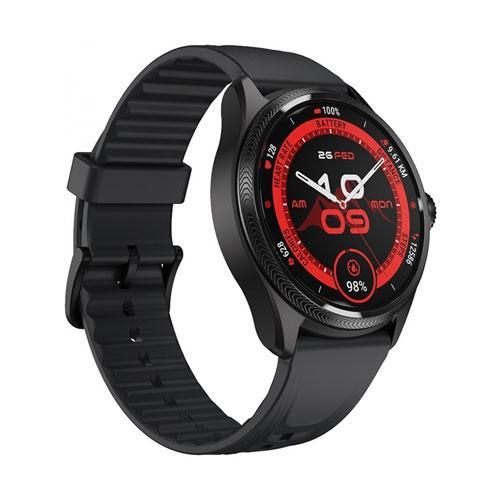
Even the watch’s design alone suggests it’s meant for the outdoors. It’s dark gray and looks very high-quality and robust. The watch face—or rather the display—is round. To the watch body, a 24 mm silicone strap is attached. We’d say it’s a unisex design that definitely won’t offend anyone. The watch is built from 7000-series aluminum.

First impressions were great—TicWatch 5 Pro Enduro looks premium. There’s a knurled bezel around the display. The right side has controls in the form of a button and a rotating crown with a red accent that can be pressed and also rotated for navigation in the system. Under it, there’s a microphone.

The left side looks empty at first glance, but at the bottom there’s a subtle speaker grille. From below, you can see the sensors located in the middle and two charging pins plus another two whose purpose we don’t know (probably data pins that the included charging cable doesn’t have). The strap itself has fine grooves with a sportier pattern. Tightening it is very easy, and while wearing the watch we didn’t feel like it would come undone on its own.

First power-on and pairing with your smartphone
The initial setup is very easy. Your Android device automatically detects the new watch nearby. After clicking the relevant notification in the status bar, pairing is done via Bluetooth. You just need to confirm that the code on the phone screen and on the watch matches. If that doesn’t happen, register and connect the device manually in the app Mobvoi Health.

You’ll be guided through the process by English text in the app. For the most part, the watches are set up via your phone, where you sign in to the watch using your Google account in order to link it to Google services, such as Google Play or Google Wallet.

Your phone will also offer you the option to install apps on the watch that you already have installed on it, and there’s also a version for Wear OS. TicWatch Pro 5 Enduro will introduce you to the basic navigation in the system after you finish the initial setup. We tested the watches with the Xiaomi 14 Ultra smartphone, for which we’re preparing a review as well. You can look forward to it soon—it will be published on our site Xiaomi Planet.

Operating system and NFC payments
These are smart watches with a full-fledged open operating system, Wear OS in version 3.5. It also includes an app store with Google Play and the ability to make contactless payments via NFC. Google Wallet is used for this. From our experience, payments work quite inconsistently. In two grocery stores, the watch refused the terminal, but for example electronics shops or pickup lockers always worked reliably.

It probably depends on the specific terminals or outlets whether watch payments via Google Wallet are supported. (Update 31.1.2025: TicWatch Atlas had the same problem in one store, but it worked in the second case. So it may be a terminal-side issue.) Apple Pay via Apple Watch, by the way, worked flawlessly—always—in the same outlets. You have a lot of watch faces to choose from; according to the manufacturer, there are 7000 available.

You can choose them through the smartphone app or directly in Google Play on the watch. The ones you transfer to the watch can also be changed right from the watch face. Many watch faces, including the default one, display data like the time, date, number of steps taken, battery level, heart rate, or air pressure. You can find the entire Google Play store content for watches using this link.
Controls and apps
As for navigation in the system, pressing the rotating crown takes you back to the home screen, or to the selected watch face. If you press this control while you’re already on the home screen, an apps menu opens. In the default setup, you’ll find quite a few of them here. This is the full list:
Alarm clock | Calculator | Timer | Hand-washing timer | Essential mode settings |
Flashlight | Contacts | Maps | Mobvoi Privacy | Mobvoi Treadmill |
Find my phone | Settings | Play Store | One-tap measurement | Media controls |
Google Wallet | Weather | Schedule | Spotify | Messages |
Stopwatch | Phone | TicBarometer | TicBreathe | TicCare |
TicCompass | TicExercise | TicHealth | TimeShow | YouTube Music |
Going back is done by swiping across the display from its left side to the right. The top button is used to show recently opened apps. Quick switching between the last-used app is possible by double-pressing this button. You turn off the watch by pressing and holding the top button for longer. The menu also gives you the option to restart the watch.

When it comes to translation completeness, some apps, including their names, are in English. The Settings menu is entirely in Slovak, but the watch faces, some manufacturer-built-in modes, and apps, including Essential Mode, are in English. The Mobvoi Treadmill app is used to connect the watch to the Mobvoi treadmill.

One-tap measurement lets you measure, all at once, your heart rate, blood oxygenation, breathing rate, stress level, and heart health (heart arrhythmia detection and other abnormalities, such as tachycardia, bradycardia, or atrial fibrillation). Sports activities are recorded via TicExercise. Your choice is through 110 indoor and outdoor activities that can be tracked.

The TicHealth app provides your training statistics and a comprehensive view of your health. On its home screen, you’ll immediately see burned calories, number of steps taken, active minutes, hours standing, floors climbed, distance covered, heart rate, and blood oxygenation (from the latest measurement; the measurement frequency is adjustable). In addition, it also includes stress level data, your sleep hours and minutes, and you can see how you’re progressing toward your weekly movement activity goals.
Notifications, replies from the watch, and calls
In the default setup, all notifications received on the paired smartphone will also be displayed on the watch. Luckily, you can change this in the device settings in the mobile app Mobvoi Health. The reliability of receiving notifications is excellent. During our testing period, it never happened that the watch failed to alert us in time about something.

If you receive emojis in a message, the watch will display them nicely. There’s no problem with that, and of course no issue with diacritics either. You’ll even see any received photos, which we have to highlight. The only problem we had again was with the Messenger app. Received images weren’t displayed, but that isn’t the biggest issue.
Typing replies to messages in the Messenger app simply doesn’t work. You type the message on the watch keyboard, send it, and an animation of successful delivery shows up, but in reality it doesn’t. We hope the manufacturer will finally fix this with a software update, because Facebook Messenger is probably the most-used chat app in our region.

In other apps we tested, such as WhatsApp or regular SMS, sending messages works. As for Bluetooth calls, those are, of course, handled via the smartphone, and only the audio is transmitted to the watch—then the microphone switches on. The watch itself does not support eSIM.

For incoming calls, you can see the caller’s name (and also a photo, if one was set) or, for unknown callers, their phone number. You can reject or accept the call using the watch. The speaker is quite quiet, and while calling outdoors, surrounding sounds can easily make the call inaudible. Indoors it’s fine, but the speaker quality is rather poor. However, the other party didn’t complain about the quality of our voice.
Display
The screen has a 1.43-inch diagonal and a resolution of 466 x 466 px, which results in a pixel density of 326 pixels per inch. The watch’s durability is also backed up by the sapphire crystal glass. The watch display is truly special.
To put it better, there are two displays available at once – a full-featured AMOLED panel and an ultra-low-power FSTN display for showing basic information in Always On mode. That’s exactly what contributes massively to the great battery life.


If you want to use the Always On feature, we definitely recommend using this display type. You can set the backlight color according to your preferences.
The backlight is turned off by default and only turns on when you start interacting with the watch or when you swing your hand. We like how the colors change depending on your current heart rate.
There are six detected heart-rate stages – “Resting”, “Warm Up”, “Fat Burn”, “Cardio”, “Anaerobic”, and “Dangerous”; each one is distinguished by a different color.


By turning the crown, you can switch what this ultra-low-power Always On display shows. By default it shows the time, but it can also show the number of calories burned, blood oxygen level, heart rate, or a compass scale.
When showing other information, the time shifts to the top. In the bottom section, there is always an icon indicating its battery level. If the time is shown in the middle, the date appears at the top. When a notification is received, the corresponding icon will appear.
Performance and connectivity
Mobvoi TicWatch Pro 5 Enduro is premium not only on the outside, but also inside. The heart of the device is the great chipset Snapdragon W5+ Gen 1. You get 2 GB of RAM and 32 GB of internal storage. The watch system is very fast and smooth.

You only have to wait a bit when switching to / from Essential mode. Connection to your smartphone is handled by Bluetooth 5.2. The watches support pairing with 2.4 GHz Wi-Fi. For location, you get GPS, Beidou, Glonass, Galileo, and QZSS location services. Getting a location before starting a sports activity typically takes about 15 seconds.

Battery life, charging, and Essential mode
With one charge, TicWatch Pro 5 Enduro lasted about 3 – 4 days. That’s a great result considering the watches run an open, i.e. advanced, operating system. 3 days was what we got when we had continuous monitoring of vital functions turned on.
When we turned off some features and did less sports during the day, we were able to get up to about four days. Essential mode plays a major role together with the ultra-low-power display. We tried setting its automatic activation after 22:00, and it deactivated at 7:00 the next day.

In this mode, the watch uses only the power-saving display to show basic information. To disable Essential mode, you need to press and hold the top button above the rotating crown for a few seconds. According to the manufacturer, in this mode the watch can last up to 45 days on a charge.

The Essential mode also automatically activates when the battery level drops below 5% (the exact percentage can be set according to your preferences). A full charge can only be done within one hour.
Charging | Time |
|---|---|
6 – 37 % | 15 minutes |
37 % – 68 % | 30 minutes |
68 % – 89 % | 45 minutes |
89 % – 100 % | 55 minutes |
Sports activity recording
During our testing, we managed to record dozens of workouts on the watch. These included walking (outdoors and on a treadmill, with outdoor walking detected and recorded automatically), cycling, volleyball, and traditional strength training in the gym.

If it’s an outdoor activity, GPS location services are used, and in the app you can see the route you covered with kilometer markers and color-coded sections of the route for different speeds. In the included screenshots, you can see what statistics are recorded from your workouts.
General overview of the sports activities performed and personal statistics:


Cycling


Walking, volleyball, and gym


Sleep monitoring
Automatic sleep tracking is awful. It always recorded only about half of the sleep. If we fell asleep, for example, before midnight, the watch often recorded sleep up to two and a half hours later. Other times, sleep detection worked fine. It’s very inconsistent.


For more accurate sleep monitoring, we recommend recording through the Mobvoi Health app. Place your phone somewhere close to you so it can also pick up snoring. You can then listen to it and check the time and how long you snored.


However, the app sometimes confuses it with other sounds, for example unclear talking. Still, it’s interesting to listen to it again afterward. Based on the results we received, a smartphone takes care of the sound recording.


TicWatch Pro 5: Final review
We have no doubt that TicWatch Pro 5 Enduro are an excellent choice (not only) for people who are physically active. They stand out with a simple design that blends sports with elegance.

They come with an open operating system, Wear OS, and a very solid battery life reaching 3 – 4 days. Compared to models with a closed system, it may sound like not much, but Wear OS watches usually last with a charge even less. You can thank the special ultra-efficient Always On display for that.

Of course, there’s great tracking of sports activities, NFC for contactless payments (which unfortunately did not work 100%), and message replies are also supported via a keyboard directly from the watch screen. With the TicWatch Pro 5 Enduro, you can even lift incoming calls, and you don’t have to worry about taking them out into the field thanks to their high durability.
TicWatch Pro 5 Enduro
15-day deliveryTIP15-day delivery via Aliexpress Standard Shipping
For this product, Aliexpress Standard Shipping is available with guaranteed delivery within 15 days. It’s the most reliable delivery method and, in most cases, it’s handled by a courier company. The 15-day delivery is something we actually tested.
When you order from a Chinese warehouse, AliExpress adds a customs duty charge of approximately 3,70 € per order to your cart. When you receive the shipment, you won’t have to pay anything extra.
Don’t miss the best coupons 📩
Subscribe and we’ll email you new coupons before they expire. We only send it once a month — no spam.


